
matthew_lind
VIP ⭐️⭐️⭐️⭐️⭐️
Jun 27, 2023 7:23 PM UTC
New Idea

Horizon Rules & Data Designer: Include Lookup "Path" in the Display Name

Related products:CS Data Management & Integrations

In Data Designer, and the Rules Engine when building Horizon Rules, I wish the Display Name displayed the entire Lookup path of the selected field rather than only the Field Name itself.


By keeping the entire Lookup path of any selected field, the Admin is able to work more quickly and with less ambiguity than having the Display Name take on only the Field Name.

These two screenshots compare Bionic Rules with the Horizon Rules / Data Designer experience.

  • In the Bionic experience, it’s easy to differentiate the GSID and Name fields, especially because the Output Field Label carries the entire path into any subsequent Tasks within the rule.
  • In the Horizon experience, the GSID and Name are harder to differentiate, requiring a manual edit of the Display Name field.
  • Side note: Given the UI, you cannot even use the details on-screen to differentiate. One must hover over the Aggregation column and view the tooltip to disambiguate the fields.

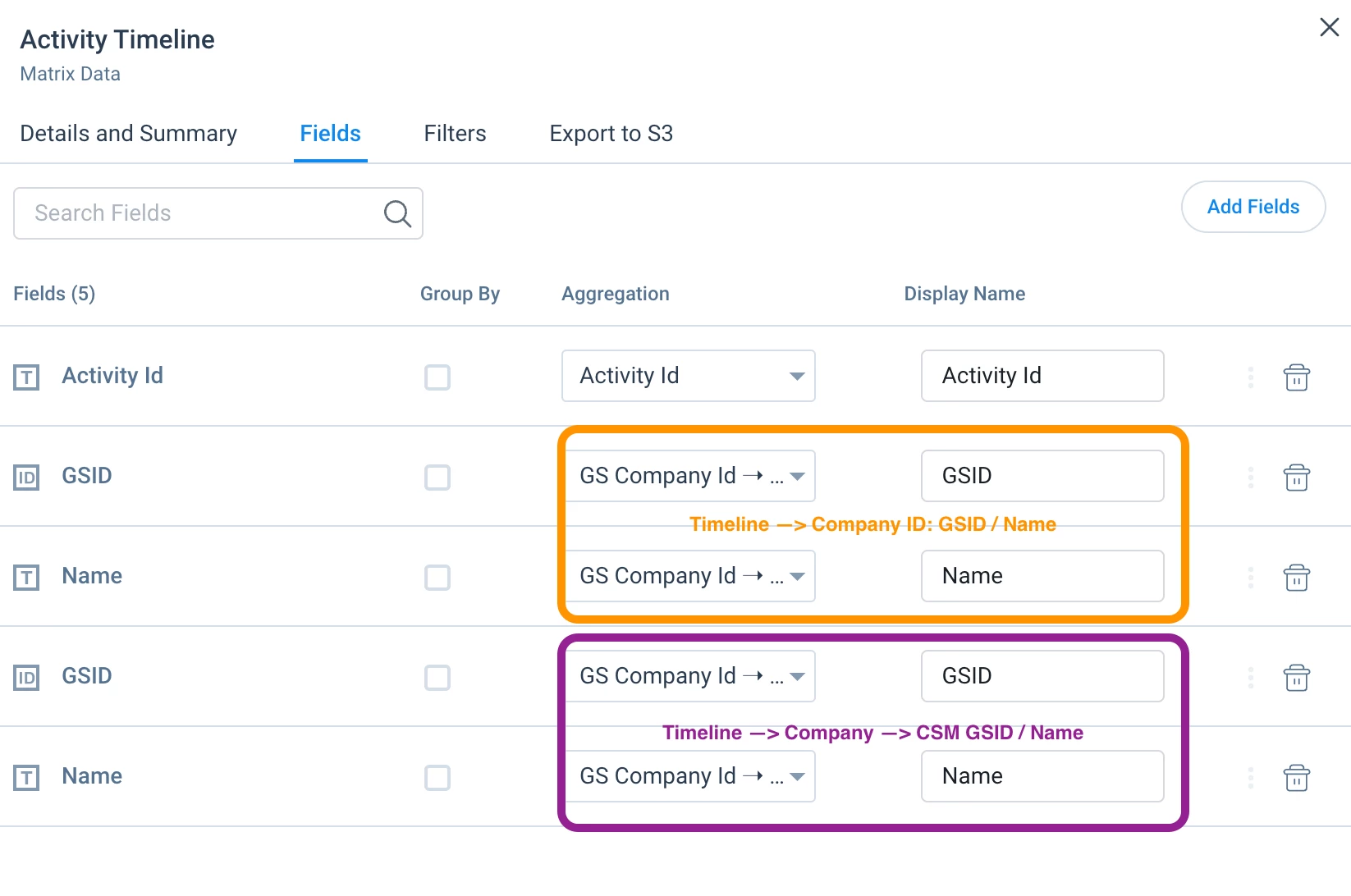
I have a very long-time best practice to always rename a GSID or a Name field (to Company GSID or Company CSM Name, as examples) whenever its path is ambiguous. This reduces the opportunity for confusion or ambiguity when rule building. That step of manually editing a field Display Name is much less necessary in the Bionic UI than in the Horizon / DD UI.


Given you cannot save a Horizon Rule / DD fetch when there are duplicate Display Names, the Admin has to stop and make an edit that wasn’t required in the Bionic Rules environment.


6 replies

alizee
VIP ⭐️⭐️⭐️⭐️⭐️
Jun 28, 2023 7:39 AM UTC

That would be great indeed!

Translate
The most expensive part of building is the mistakes. That's true in construction. Not so much in CSOps. So ask questions, make mistakes and learn. All views expressed here are my own.
heather_hansen
VIP ⭐️⭐️⭐️⭐️⭐️
Jun 30, 2023 11:06 AM UTC

YES!

Translate
shambhawi
Helper ⭐️
Jul 13, 2023 5:11 PM UTC

Thanks for sharing this feedback @matthew_lind, @alizee and @heather_hansen, I will share this feedback with my team and keep you updated on any further development on this.

Translate
benwanlessmenlo
Contributor ⭐️⭐️⭐️⭐️⭐️
Aug 14, 2023 3:36 AM UTC

I had to make a random guess which GSID to use in the Load to People action because I had selected multiple in an update. I believe in Bionic Rules you had the ability to rename the fields. 

Furthermore, a Test Run with the Incorrect GSID mapping resulted in “Success”, when I had actually incorrectly mapped it.


Translate
matthew_lind
VIP ⭐️⭐️⭐️⭐️⭐️
Aug 14, 2023 3:52 PM UTC

Thanks for adding that update @benwanlessmenlo.

For @shambhawi and team, that’s a tough admin experience, having to guess which field is correct and further having to execute test runs of your rule to reverse engineer if you chose correctly. It’s not just inconvenience, but a regression in functionality that that decreases the efficiency of a Gainsight expert and introduces non-valuable, non-impactful work.

Translate
Making people their best....currently disguised as a CS Ops Architect. How can I contribute to your success?
andy_roy
Helper ⭐️
Aug 25, 2023 6:09 PM UTC

This would be a big improvement and I wouldn’t want to interfere with its trajectory into production...but it does feel a bit like a Band-Aid on one of the many symptoms caused by having field labels like “Name” on every single object.  Navigation in reports, token mapping, rule building, filters, etc. are all hampered by this.  You can’t search for the object, you have to search for the generic field which is ubiquitous, then fumble through every related object in whatever task you’re performing. 

If the system fields themselves were named with a bit more care, we wouldn’t need requests like this to work around them.  Just sayin. 🤓

Translate