

andreammelde
Helper ⭐️⭐️
April 23, 2020
New Idea

How can you show 0 in a report on dates?

  • April 23, 2020
  • 13 replies
  • 250 views

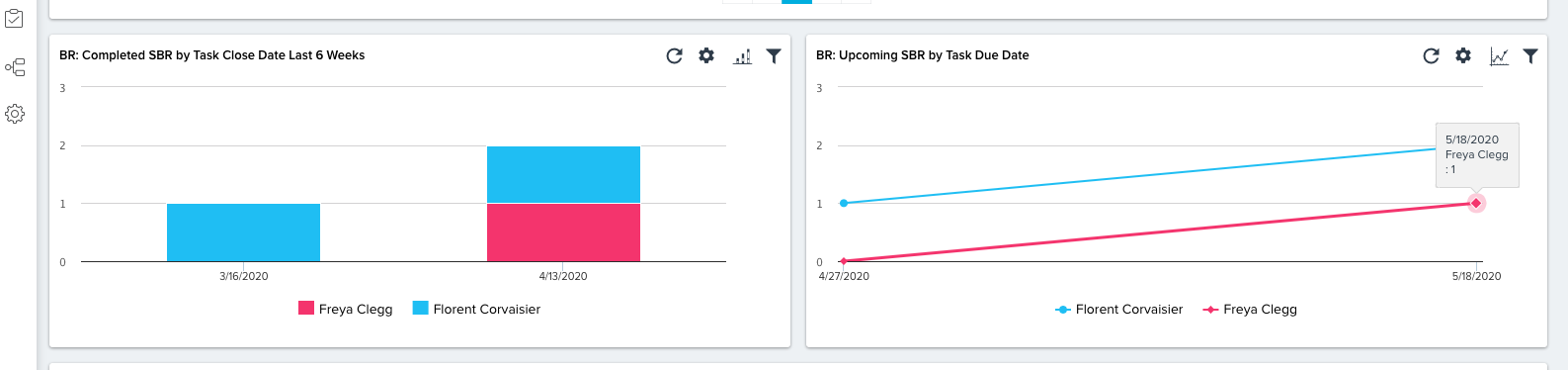
We have reports created to  show the due date of specific CTA tasks grouped by week. However if there are no due dates for that particular week, the graphs skips the date. We want to be able to show 0 for these dates rather than have it skipped. Is it possible to require this on graph setup?


I tried with both line and bar graphs, and both skip the 0 week
 

13 replies

Helper ⭐️
December 19, 2022

Any update on this, looks like its been open of couple of years, Is this in pipeline by any chance?

rachelhibbardtmo
Contributor ⭐️⭐️⭐️⭐️
December 20, 2022

Not a fun solution, but a possible option, would be to do a full join with a dates object to get the empty weeks and force a zero to be stored.

matthew_lind
VIP ⭐️⭐️⭐️⭐️⭐️
December 20, 2022

My idea, admittedly a workaround, is similar to @rachelhibbardtmo‘s proposal. If you build a Data Designer or a new custom object to store these tallies, you can likely display the 0’s.


Incidentally, I very much enjoy how Adoption Explorer reporting handles 0’s and bills, with a checkbox inside the report that displays or suppresses the null values. AR may be a great inspiration as the Gainsight team approaches potential solutions to this 0’s issue in the Report builder.

Making people their best....currently disguised as a CS Ops Architect. How can I contribute to your success?