

Icons instead of Profile Avatars for some notifications in the Notification Center
Maybe it’s just me, but I’d love some visual differentiation to different types of in-app notifications in the NC.
Why?
- Different notifications have different use cases / value props, and what might visually cue me to click into the notification may be different.
- Using the profile Avatar may create a generic looking notification feed when profile photo/avatar adoption is low:
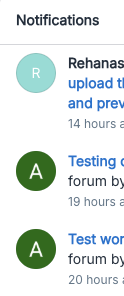
Which Notifications?
- New topic in a subscribed Category/Group
- I’m subscribed to the category or group because I want to hear about new posts, not necessarily from a specific person.
- Possible alternatives:
- CC platform icon for Topic Type (question, conversation, article, product update, idea)
- Category thumbnail image (already something we have to style for categories and groups, but not often visible in the platform)
- Question Answered
- The useful information is that question I subscribe to has an answer marked, not necessarily who provided it.
- FWIW, the default phrasing for this notification ( notification.center.messages.topicAnswered) makes no mention of the Answer Author, which could lead to confusion (“is that the avatar for the author of the Q or the A?”)
- Note: If you want to do this add the
{username}variable to the phrase.
- Note: If you want to do this add the
- Group Invite and approvals
- I don’t use groups, so it’s not important to me, but the same logic as the “New topic” suggestion applies:
- What’s most relevant is the group, not who invited you.
Potential Impact
- More visual variance in the NC, but in a way that should entice additional clicks into the notifications
- Visual “noise” (avatars) replaced with relevant context (topic type / category thumbnail)
Use Cases
Answer notifications looking more like this:

-
As a super user, I want to know when an answer is marked on a question I’ve replied to, in order to…
-
Know if it’s my answer or someone else’s (gamification motivation)
-
Answer author context is semi-relevant to me
-
-
Learn what the best answer is (learning motivation)
-
Turn off email notifications for answers, but still be able to easily see when answers are marked via the NC.
-
-
As a user with the same question, I want to know when an answer is marked on a question I have followed, in order to
-
Learn and apply that information.
-
Answer author context is not very relevant to me, plus available when I click into the thread.
-
-
Turn off email notifications for answers, but still be able to easily see when answers are marked via the NC.
-
-
As a community manager / digital self-service lead, I want to cultivate community behaviors of learning from newly marked answers in the community, in order to…
-
Increase the knowledge of community members.
-
Build a Q&A culture that’s less about transactional answers and more about collective learning
-
Topic Notifications looking more like either of these options
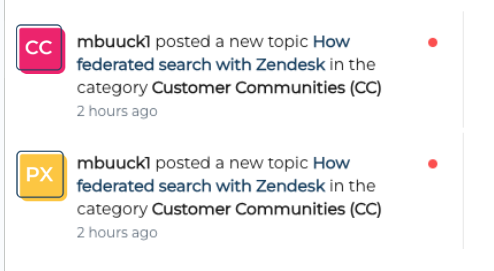
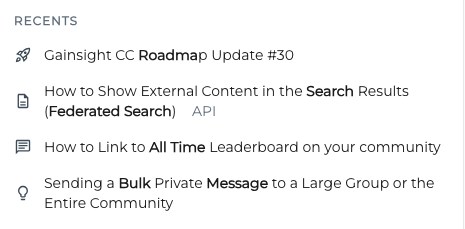
- As a super user, I want to know when questions are asked (or asked in specific forums), in order to help solve them and {fulfill a gamification motivation}
- Earn points
- Earn category-specific or answer-specific badges
- Move up in the ranks
- Move up the leaderboard
- As a multi-product customer / multi-category subscriber, I want to know when topics are posted to the various categories I subscribe to, in order to…
- Decide if I want to click into that topic
- Catch up on conversations I haven’t read
- Prioritize which topics I want to view
TL;DR
My hypothesis is that having these notifications look the same as others (with user avatars) makes users less likely to click into these types of topics. Whereas replacing the avatar with a more relevant category thumbnail or content type icon would make them more likely to click into those types of topics.