

alizee
VIP ⭐️⭐️⭐️⭐️⭐️
August 26, 2022
New Idea

Improve outer merge output data sets

Related products:CS Reports
  • August 26, 2022
  • 4 replies
  • 119 views

Hey All,

I have found the outer join/merge data tasks in Data Designer falls a little short.

Currently, when you perform an outer merge on two data sets, for example with a merge on GSID, the final data set looks like this
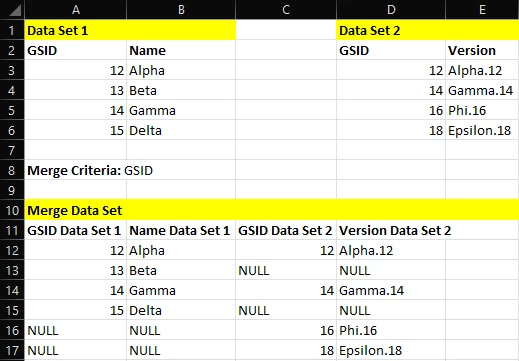
This is not as useful as could be as despite merging on GSID, GSID values have not been parsed to both GSID columns. Instead, we have no values. That means effectively merging the data sets in a useful manner will involve the use of case expressions (which are limited in capability, both criteria and case statements). 

When performing an outer merge, we consider the join on field as the identifier. There is no reason why we shouldn’t consequently be appending records that exist only in one of the datasets to the bottom of each of the other data sets as part of the merge.
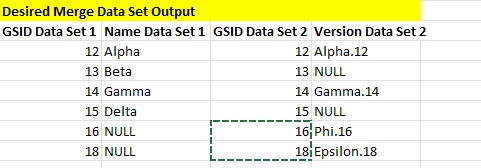
  

We could then just take the following data points:

  • GSID Data Set 1
  • Name Data Set 1
  • Version Data Set 2

And have a data set with all the information I need, against an identifier that would be available from each of the GSID columns.

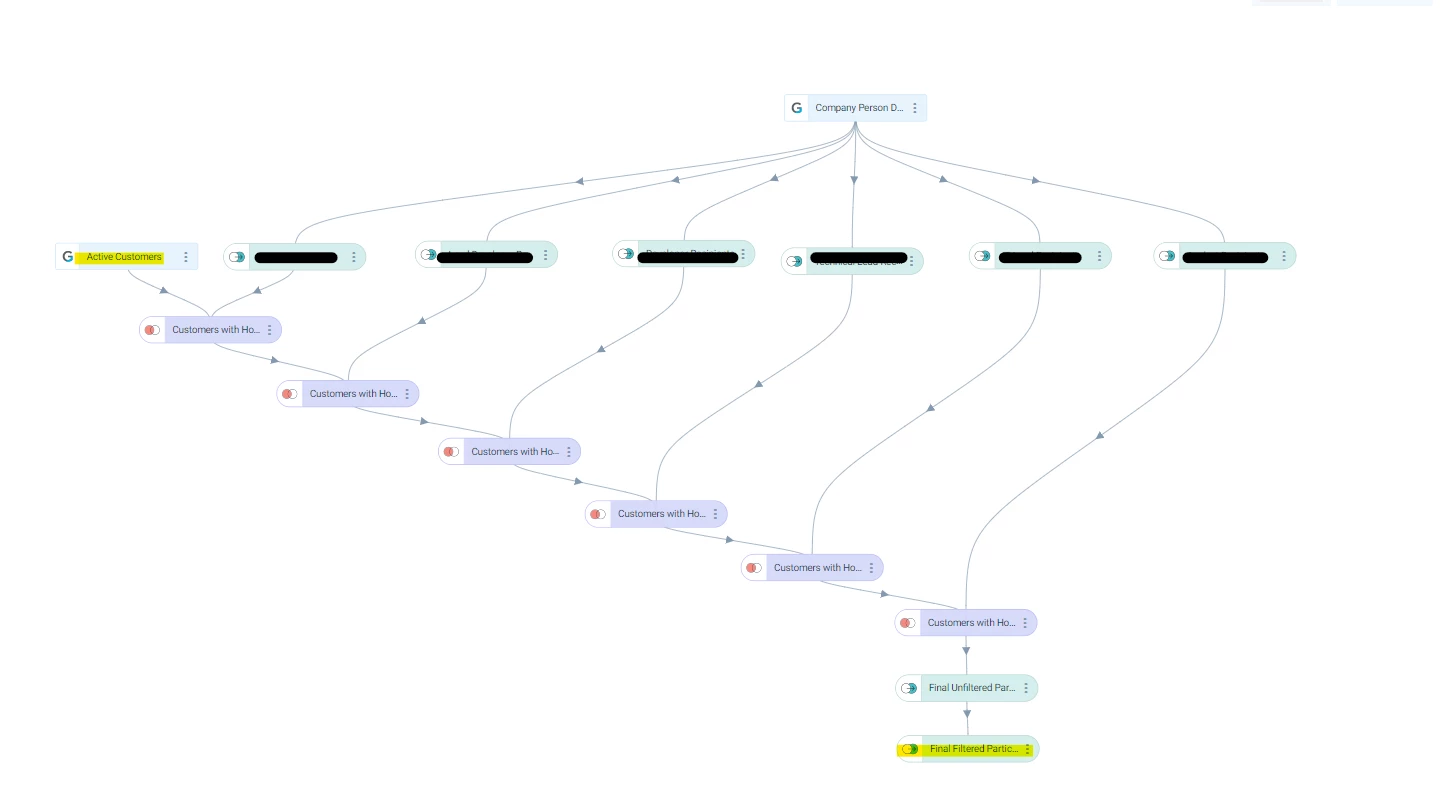
The below result would instead allow us to drop one of the two GSID columns (like we do in other merge types), and to effectively use the data for reporting purposes or in Journey Orchestrator. It would also help rationalize queries and data designs by not having to add other data set with a merge left and a final transformation to eliminate empty values (and further transformation to require duplicates). See below two additional tasks to achieve the desired outcome (further transformation required to eliminate duplicates too). 
Thanks!

4 replies

Tomas Trijonis
Contributor ⭐️⭐️⭐️⭐️⭐️
May 17, 2023

Found myself to be facing the same issue! I wonder is there an efficient workaround or a solution yet? I can only tell my own case, but the principle seems exactly the same.
I have two datasets, both of them contain the date (month); one contains revenue generated by a client that month, while the second one contains the time spent on the client that month.

  • Some months could have both records.
  • Some months could have revenue but no records for any time spent.
  • Some months could have time spent but no records of revenue.

It leads to this same issue during the merge for me


I’m considering a workaround that uses a third dummy dataset that contains every possible Account ID and every possible Month for each account. Starting with this dummy dataset, then merging these two datasets one by one on top of that while keeping the original Account ID and Date as identifiers.

But I’m not sure if there’s any better solution?


rakesh
Gainsight Employee ⭐️
Lets put your data to work!
June 13, 2023

Thanks for posting this - This is an interesting problem. 

The way joins work is pretty standard across industry and tools (https://www.w3schools.com/sql/sql_join_full.asp). Keeping Gainsight tools behavior consistent with industry standard means customers can leverage their cross tool learnings. 

That being said, a potential solution that people use is IFNULL and CONCAT. We can replicate that by filtering null values and concatenating - while acknowledging that its more steps than ideal 

Tomas Trijonis
Contributor ⭐️⭐️⭐️⭐️⭐️
June 13, 2023

@Rakesh

Can you clarify what do you mean by concatenating if the leftover fields in the merge are not necessarily String? It can be Date or Currency or anything else.

I can imagine a potential solution when working with the Rules Engine (IF time spent = null, write Date1 to Date. IF Revenue = null, write Date2 to Date). Basically like you say leveraging filtering null values.

But since this is about Data Designer, I don’t fully understand how to solve that and what role concat plays in your explanation.

Tomas Trijonis
Contributor ⭐️⭐️⭐️⭐️⭐️
July 5, 2023

@rakesh bumping this up