In-App Hub - New Editor Shortcomings (Padding & other CSS Control, Onboarding Progress Bar/Icons/Notifications)
I submitted this as Product Feedback, and they suggested I post it here. Our Onboarding Guides look great in the old In-App Hub, and we’d like to upgrade to the new Editor, but the new Editor is lacking some features we need:
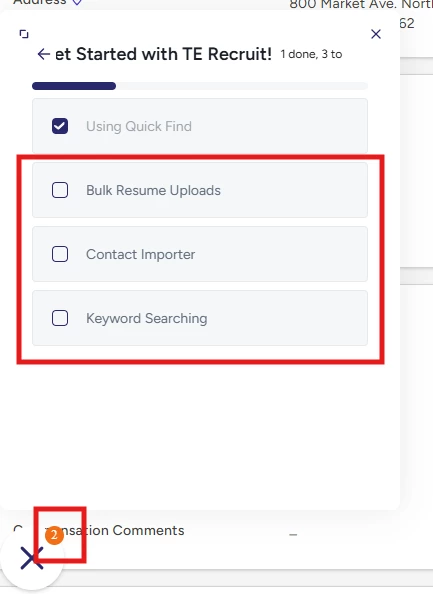
- Compared with the old editor, the List Items in the new editor are WAY over-padded, such that where I can fit 8ish list items per “page” in the old editor, I can only fit 4 in the new editor, where the excess items are hidden behind another click I don’t want our users to have to do. It would be nice to have more granular control over padding and other appearance settings in the new editor. Here are some screenshots of our Onboarding list in old vs new editor:
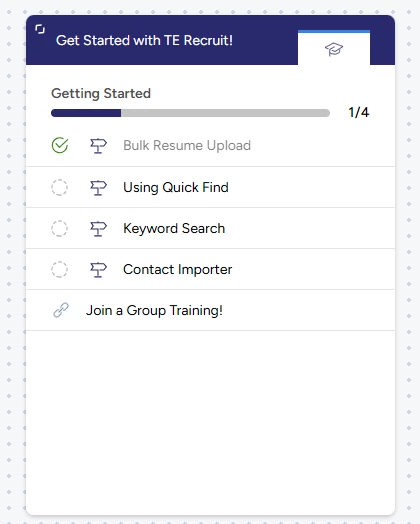
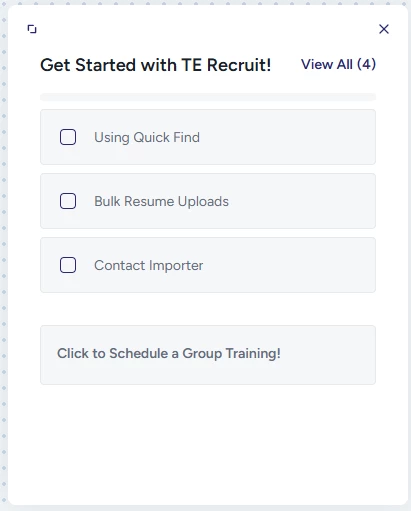
Please note that the 4th Guide is “below the fold”, even though there is plenty of room at the bottom of the hub.
-
The settings option for the “Progress Bar” feature from the old editor is missing from the New Editor, the ”Badges” setting is called “Notifications” (and there’s no way in the editor to see what that means), and the “Progress Icon” feature is missing entirely.
I didn’t even know the Progress Bar and Badges would be there until I launched the new In-App Hub for internal testing, where the Progress Bar is in the Settings in the old editor and you have choices for whether/how it appears. In the old editor “Notifications” are Badges, and the new editor does not give any visual representation of what Notifications are, so I didn’t know that Notifications=Badges until after I launched the hub.
Because of how Notifications/Badges work (count goes down when you click a Guide, regardless of whether you complete the Guide), the new editor really needs the “Progress Icon” feature. If I click a Guide, but don’t finish it, there is no visual representation that I started, but did not finish it. I do see that the “checked” state exists for completed guides, but the intermediate “started but did not finish” state is missing, and how else do you explain the 2 Notifications with 3 items to finish?