
July 22, 2021
Released

'Last updated' timestamp

Related products:CC Knowledge Base
  • July 22, 2021
  • 30 replies
  • 400 views

When posting topics in a KB and surfacing them in the Featured Topics widget (as part of the new KB landing page), the presentation seems odd to me.

Here’s an example:
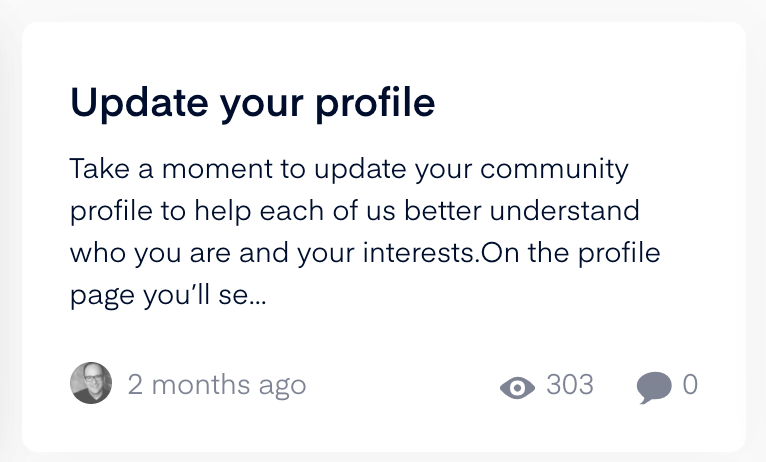
As you can see in this example, the content displays the title of the article (or of the question/conversation), some of the initial text, the user icon, the date the content was published, the number of views, and the number of comments.

In my view, KB content works best when it communicates when it was last updated, not when it was published. And it makes little sense to display the number of comments when the article is not open to comments. So here’s some specific changes I’d like to suggest unique to content published in the knowledgebase

  • Where the content says 2 months ago this is the publish date, replace this with the date last updated. So if I made a change to this article today (which I did) it should display the date last updated. For example, it could read as “Updated today” (if today) or “Updated X days ago” if past that date

I’ve also suggested that we remove the comments bubble and count if the article is closed to comments I have added this as a separate idea here so vote on that too!

30 replies

KellyBebenek
Helper ⭐️
March 24, 2026

Are there release notes you can share on this?

Larry
Helper ⭐️⭐️
March 24, 2026

​@KellyBebenek Soon! I have my team queuing this up for wide availability. If you need it now, I can enable the config for your instance, just send me a DM!

Larry Imgrund || Senior Product Manager & Community Nerd
JayS
Helper ⭐️
March 25, 2026

Hi ​@Larry 

I’m not sure I follow. Do you mean that the last updated date needs to be enabled for our Community, or it’s already available but the release notes aren’t out yet? We were trying to find it today, but weren’t sure where to look and didn’t see anything obvious.

cc: ​@woodlande ​@cunninghams 

Jay Sherwood
revote
VIP ⭐️⭐️⭐️⭐️⭐️
March 26, 2026

Is this improvement also for the articles? Not just TKB?

Larry
Helper ⭐️⭐️
March 26, 2026

​@JayS ​@revote My apologies for the confusion here, I marked it as released given it was close but we are queuing it up for release early next week. 

To answer your question, it is an improvement for the Articles, not just TKB.

Larry Imgrund || Senior Product Manager & Community Nerd
revote
VIP ⭐️⭐️⭐️⭐️⭐️
March 26, 2026

​To answer your question, it is an improvement for the Articles, not just TKB.

Excellent. 👌

Larry
Helper ⭐️⭐️
March 26, 2026

​To answer your question, it is an improvement for the Articles, not just TKB.

Excellent. 👌

Just to show an example on one of our internal test communities:


Larry Imgrund || Senior Product Manager & Community Nerd
JayS
Helper ⭐️
March 27, 2026

Thank you for the screenshot, ​@Larry ! That helps a lot.

Do you happen to know if this will be released into our sandbox environment as well?


cc: ​@woodlande 

Jay Sherwood
Larry
Helper ⭐️⭐️
March 27, 2026

​@JayS ​@woodlande  Yes! I’ve enabled it for your sandbox environment, as well as for your communities (on sandbox): ​@Erik_ ​@JeppePeppe ​@atwhite ​@revote 

Larry Imgrund || Senior Product Manager & Community Nerd
revote
VIP ⭐️⭐️⭐️⭐️⭐️
March 27, 2026

Thanks ​@Larry, looks great. Please publish it to out production site. 😊