

romihache
VIP ⭐️⭐️⭐️⭐️⭐️
May 15, 2023
Discovery

Make it possible to see full field name in Fields in Data Designer (whitespace)

Related products:CS Other Features
  • May 15, 2023
  • 6 replies
  • 131 views

I see that whitespace is a recurring topic among admins but I was unable to find a specific post for this.

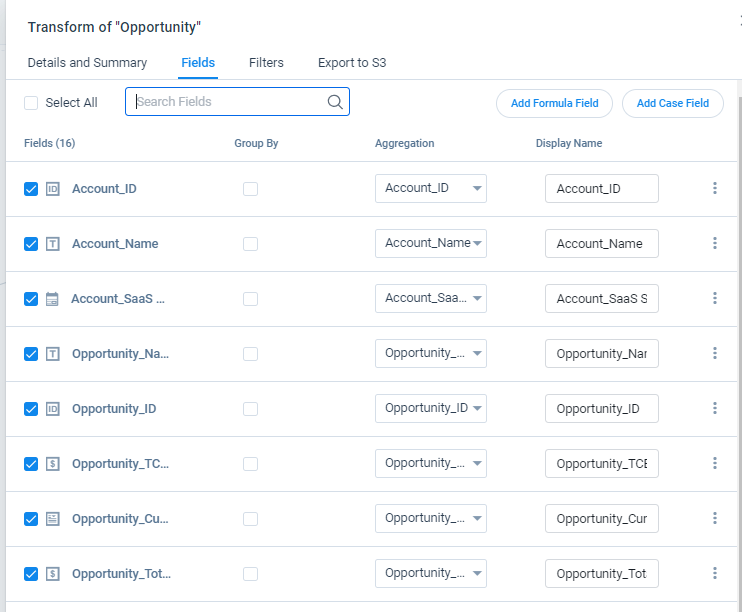
To see a full name in a DD dataset, 9/10 times you have to hover over the field name, the names are truncated with ellipses despite the available space.
Definitely the use of space could be improved, even moving the group by to the right and decreasing the spacing among columns would make a big difference.


6 replies

TMaier
Helper ⭐️
May 15, 2023

Yes please this is very annoying and I often select the wrong field once or twice before getting it right when the names are too long to read.

sarahmiracle
VIP ⭐️⭐️⭐️⭐️⭐️
May 15, 2023

I have the same request here! Such a pain!


Customer Success Systems Admin @ Amplitude, 3x Gainsight CS Ops Product Council Member
bradley
Expert ⭐️
May 15, 2023

I have the same request here! Such a pain!


Should be addressed for Horizon Rules now as well!

anirbandutta
Expert ⭐️
September 11, 2023
Idea merged into:

All the votes from this idea have been transferred.
It's an opportunity for engagement
rakesh
Gainsight Employee ⭐️
Lets put your data to work!
September 11, 2023

Hi All,

Wanted to update this thread that we plan to improve the usability here. Will post more concrete updates as it progresses.

rakesh
Gainsight Employee ⭐️
Lets put your data to work!
September 11, 2023
No Status→Under Consideration