Open
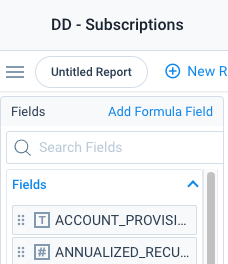
Make it possible to see full field name in Fields section in Data Designer Explore
The “Fields” section when in Explore mode of Data Designer is not expandable, nor are you able to hover over your fields to see the full name. If I have fields with long names, this means I’m adding them to the “Show Me” just so I know which one I ultimately want (then I remove the ones I don’t). For example, maybe I have PURCHASING_ACCOUNT_ID and PURCHASING_ACCOUNT_NAME fields. I don’t know which one is the ID field and which one is the NAME field unless I add them to Show Me and then see the column header in the report.