

New Idea
Make KPI widget show "No data" instead of "0%" when Formula is used
Normally, when you make a KPI widget and there is no data to base the value on, you would see such an icon, signalizing no data available:

However, if the KPI is based on a Formula field (created in that report), in the exact same scenario you will see a 0% instead:
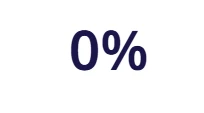
This is largely inaccurate since imagine I am tracking how many Risk CTAs are closed:
- We might have 10 open Risk CTAs, and closed none - in this case 0% is expected as we are not performing as expected.
- But we might have no Risk CTAs at all, in this case N/A is expected, as 0% indicates a false warning that we are not acting on risk.
Support already acknowledged this issue, so please fix this behavior to ensure that KPI widgets support formula fields properly.