darkknight
Expert ⭐️
March 3, 2021
New Idea

New Scorecard Visualization Mass Edit feedback

  • March 3, 2021
  • 30 replies
  • 758 views

At a quick glance of the new Scorecard Visualizations I see a couple of issues right off the bat.


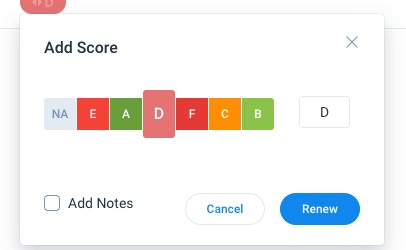
  1. For a manually configured Letter-based score, the letters are not in alphabetical order:
     

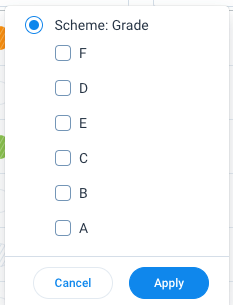
    Also it’s weird that in the filter box they are in reverse (almost) alphabetical order (it was that way in the “old” Mass Edit view as well, which I always thought was odd)

  2. We don’t even have an “E” score - why is that displaying above?
  3. According to the Update Scores and Add Notes docs, if you check the “Add Notes” box it’s supposed to bring up a new Timeline Activity window. It’s not doing that in my environment.
  4. The “Stale” visual indicator is too subtle. I had to look VERY close to tell that if it’s stale there are diagononal lines going through the score.  The ! in a circle was so much easier to recognize.
    Stale
    Not Stale


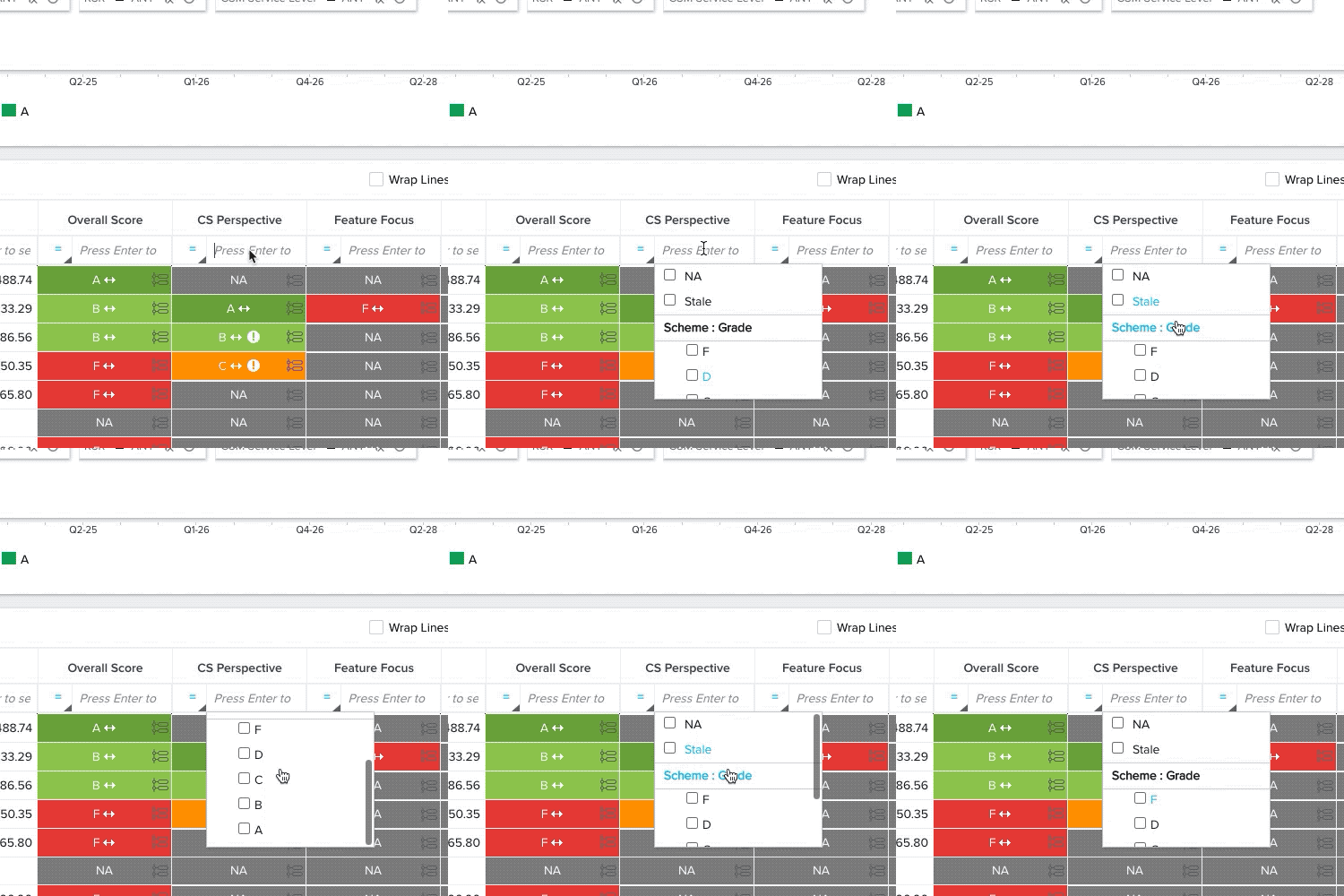
  5. The filters are misleading for end users, making it seem like you can search by Grade (Letter), Color OR Numeric scheme, when in fact it only works for the scoring scheme you’re on.  We are on Letter Grade scheme, and In the “old” Scorecard Mass Edit, the filter only allows me to select a letter grade as a filterable option.  Color and Numeric aren’t even options:
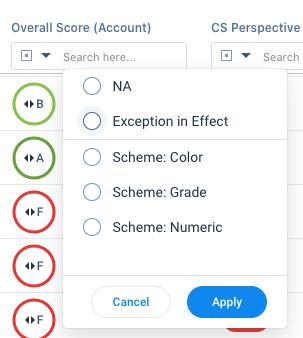
    But the “new” mass edit lists ALL schemes as options - but Color and Numeric do not work when you attempt to use them, which will mislead users and lead to more support tickets.


  1. The way Timeline was accessible via the old Mass Edit report was better - you could hover over the timeline icon and see the comments history.  That appears to now be gone and you can only see the “Last Comment.”  This is not a great functionality change because now end users will have to navigate to the C360 in order to see the TL history:
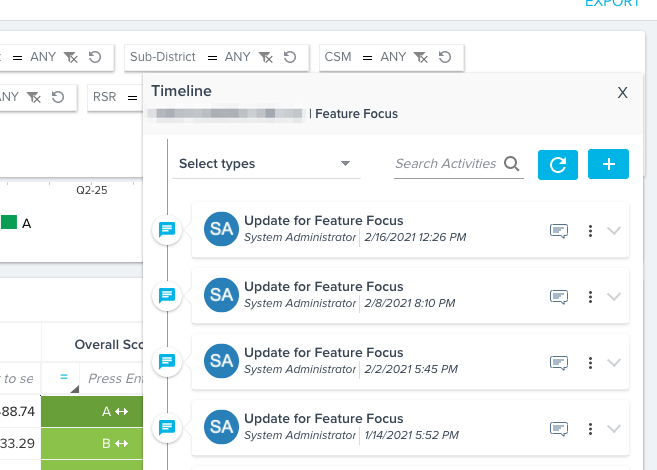
    Old View
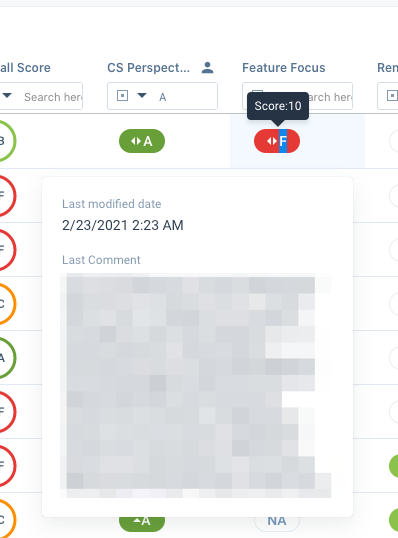
    New View (Last Comment only)


These are just a few issues I’ve identified spending about half an hour with this.  Our end users will mostly see this “enhancement” as a downgrade compared to the current functionality.  I don’t feel we can roll this out to our end users until most of this is addressed.

(The “Add Comment” while making a score change will be a nice adjustment, once it’s working).

    30 replies

    shantan_reddy
    Gainsight Employee ⭐️
    Gainsight Employee ⭐️
    March 5, 2021

    @darkknight A quick update on the feedback you provided: We have fixed all but one of the issues you raised. Details on the fixes are below.

    Thanks again for the detailed feedback, and  we are sorry you had a bad initial experience with the feature. 

    1. We have fixed the ordering of the grades. They will now show ordered grades from lowest score to highest score.
    2. We have also fixed this. You should not see the extra grade anymore.
    3. & 6. Both these issues were because of an issue that was happening for a handful of tenants, and we have fixed it. You should be able to see the scorecard timeline on clicking any measure. Also, the timeline composer will automatically open when you check the “add comment” checkbox. Just want to re-emphasise that we did not remove the timeline functionality, it was a bug. We have, in fact, enhanced the pane to also show scorecard history and other details.
    4. We will go back to the design board, and make this indicator more visible.
    5. This is the one item that we have not yet fixed. The fix for this is targeted for Wednesday, next week.

    I hope you will have a better experience after these fixes. We are actively monitoring all feedback on the feature, and fixing them as soon as we can. 

    bradley
    Expert ⭐️
    March 5, 2021

    @shantan_reddy Great to see the feedback loop here is alive and well!

    darkknight
    Expert ⭐️
    March 5, 2021

    @shantan_reddy 

     thanks for the quick response/effort!

    1. Confirmed working.
    2. Confirmed working.
    3. Confirmed that I get the Activity pop-up when I check the “Add Notes” box BUT 
      • I don’t see the Comments until I refresh the dashboard (even a report filter reset doesn’t work)  Is it possible to have that automatically visible?


      • Would be incredibly useful to allow Admins to set the default Timeline Activity Type to display in the pop-up.  We have a specific Activity Type to which we want users to log Scorecard TL activities.  When I click “Add Notes” it pops up and defaults to the first one in the list. When I select the Activity Type I want, I get a notification that it will clear any data in the current note. Not the best user experience.
    1. I’m still not seeing TL history when I hover over / click on scores….???


    Jeff Kirkpatrick
    darkknight
    Expert ⭐️
    March 5, 2021

    @shantan_reddy additional feedback item.


    Today, if you try to delete a report from Report Builder that is in use on a Dashboard, it won’t let you.

    Trying to delete a reports in the Scorecard Visualizer prompts you with “This report might be used across Gainsight. Others applications which are using the report might be impacted. Are you sure you want to delete it?”  (This message appears regardless of whether or not the report is actually in use).

    But it still lets you delete it if it’s in use on a Dashboard.

    That feels like a step backwards.


    Jeff Kirkpatrick
    shantan_reddy
    Gainsight Employee ⭐️
    Gainsight Employee ⭐️
    March 8, 2021

    @darkknight Thanks for the reply!

    • We will look into the comment refresh issue. It’s definitely a bug.
    • The ability to set a default activity type for timeline posts is something we have in mind already. We have de-scoped it from the initial version, but will be made available soon.
    • You can view the timeline by clicking anywhere in the cell other than the measure score area. It seems this is not completely intuitive, so we will improve the UX here.
    • The report deletion issue is a known limitation, and we are currently looking at ways to address this in the new framework.


    Regards,

    Shantan


    darkknight
    Expert ⭐️
    March 8, 2021

    @shantan_reddy thanks for the continued dialogue and support on this issue. All that makes sense.  A couple of follow ups:


    • I see now if you click outside the score bubble it attempts to pull up Timeline History (yes, you’re correct not very intuitive) however when I do it in mine, the actual activities never load: (NOTE: I cleared browser cache right before this test)
      NEW VIEW: https://share.getcloudapp.com/eDu8pAyL
      OLD VIEW: https://share.getcloudapp.com/KouZ5G7l
    • This may be more general Horizon Dashboard feedback, but I notice that when I go to modify report filters, I have to manually expand “Filters on Fields” to see the filters, when in the Old (current) UI, the filters are automatically visible.  That seems like an unnecessary step/click in the new UI:
      NEW FILTER: https://share.getcloudapp.com/12uomqg6
      OLD FILTER: https://share.getcloudapp.com/geu4QJP0
    Jeff Kirkpatrick
    darkknight
    Expert ⭐️
    March 16, 2021

    Moving this to a new post as it is unrelated to the Mass Edit report.


    Jeff Kirkpatrick
    darkknight
    Expert ⭐️
    March 16, 2021


    Moving this to a new post as it is unrelated to the Mass Edit report.

    Jeff Kirkpatrick
    darkknight
    Expert ⭐️
    March 18, 2021

    @shantan_reddy I observed that the Scorecard Mass Edit filter functions a little differently in Horizon than it did in the current version:


    In the current environment, if I check a value from one of the measure columns and filter on that value, I then uncheck that value to return to normal:

    OLD FILTER

    In Horizon, I cannot unselect the value - I have to delete the value from the box (and the filter list still appears when I click in the box) and hit enter for the change to apply.  This is clunky, not intuitive and not an improvement on the current functionality.


    Jeff Kirkpatrick
    shantan_reddy
    Gainsight Employee ⭐️
    Gainsight Employee ⭐️
    March 22, 2021

    @darkknight We’ll look into this. Thanks for the feedback.


    FYI...@silpa1234 


    Regards,

    Shantan