


Brayden
Gainsight Employee ⭐️
February 20, 2024
New Idea

Please add ability to restrict Company Persons in Customer Cheat Sheet email share

  • February 20, 2024
  • 27 replies
  • 499 views

Hi Team, 

When sharing Customer Cheat Sheet from C360 by email, the search bar includes Company Persons, which could possibly be a risk since there may not be information you would like to share with your customer in the Cheat Sheet. 
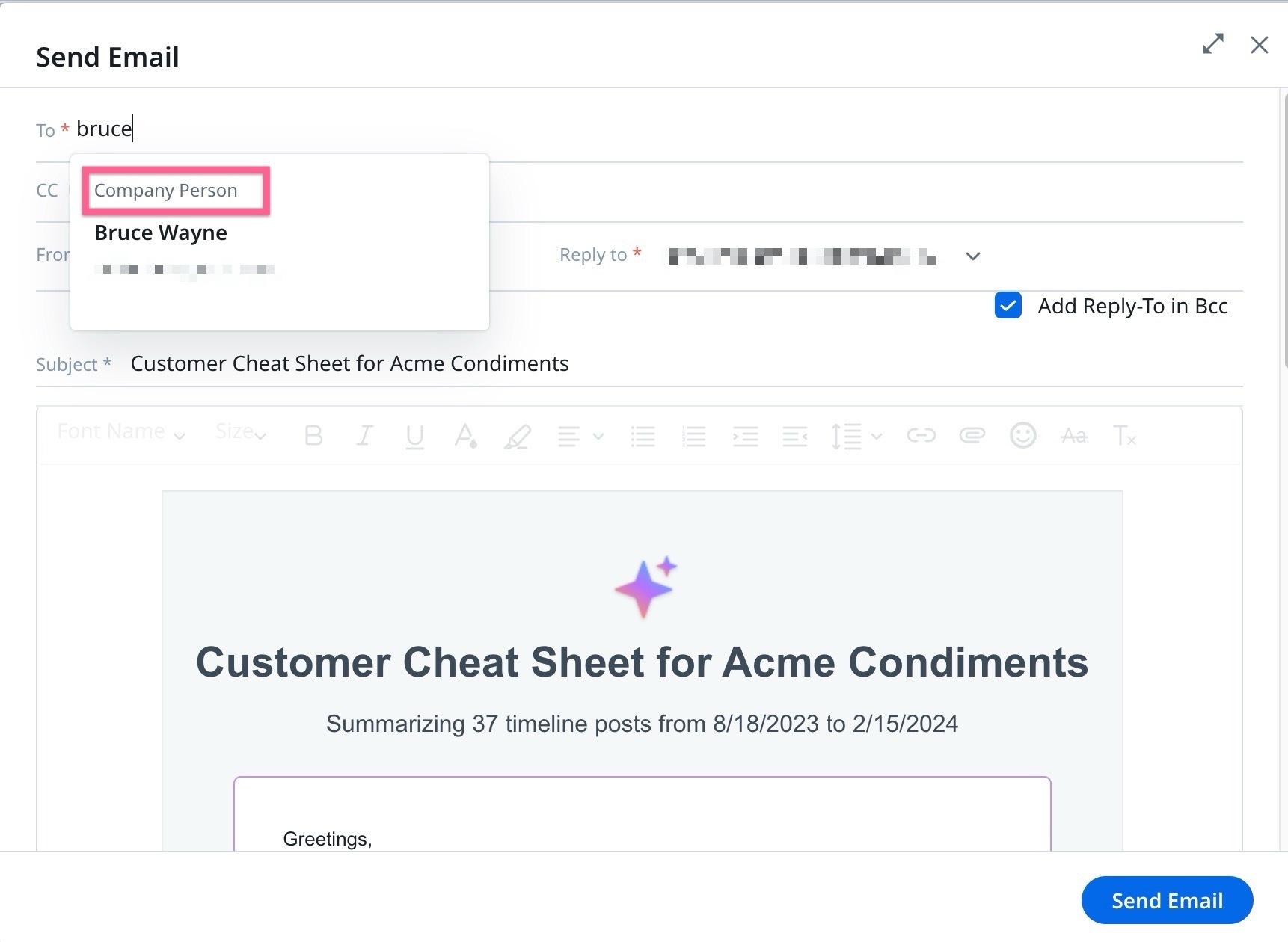
It would be very useful to have the ability to restrict this search list to just Internal Users to ensure this information is not shared erroneously with a customer contact. 

Thank you. 

27 replies

romihache
VIP ⭐️⭐️⭐️⭐️⭐️
April 24, 2024

100% Agree:


For end users, often the reasoning is if something is “possible” then it must be ok to do. You have to give admins the ability to keep them from shooting themselves in the foot.


I added my two cents some months back while we were discussing internally the concerns surrounding the feature. Leadership decided to backtrack the rollout because of these issues 

Continuous improvement is better than delayed perfection
dayn.johnson
VIP ⭐️⭐️⭐️⭐️⭐️
April 24, 2024

@AshutoshSingh  

For end users, often the reasoning is if something is “possible” then it must be ok to do. You have to give admins the ability to keep them from shooting themselves in the foot.
 

From the way Cheat Sheet has been marketed and documented, it was designed to be an internal tool, not an external one.  Rather than implement granular access controls, which I understand will take a lot of time to work out, can you not just disable the ability to share externally? I have to believe the use cases to share internally far exceed the use cases to share externally - (I can’t imagine why any company would want to share this info externally.)


On sharing cheat sheet data externally -- if any of the info wanted to be shared externally, my thinking would be that we would be copying that select bit of info into another vehicle for sharing (slide deck, email) or just paraphrasing it in a call (ex: “last time we spoke, we talked about x, y, z -- this is what’s happened since then”).

There’s no reason I can think of for externally sharing the full breadth of info in the cheat sheets.

Staff CS Content & Comms Manager, 2x Gainsight CS Ops Product Council Member
darkknight
Expert ⭐️
April 26, 2024

I just caught wind that Gainsight is working on addressing the sharing directly - going to stop showing external contacts in search altogether. No toggle.  Coming very soon (possibly before Pulse) 

Jeff Kirkpatrick
jordan_cook
Contributor ⭐️⭐️⭐️⭐️⭐️
May 20, 2024

@jake_ellis this is what I was talking to you about last Wednesday.

darkknight
Expert ⭐️
May 20, 2024

So this appears to have been kinda fixed. Company persons are no longer selectable in the search, but you still can enter an external email address directly and it prompts you with ‘you’ve added an external recipient - verify before sending.’ Even so, the send email button was grayed out.  Odd and misleading way to address it but at least it appears I cannot send to external recipients.

Jeff Kirkpatrick
manu_mittal
Gainsight Employee ⭐️
May 20, 2024
jordan_cook
Contributor ⭐️⭐️⭐️⭐️⭐️
May 23, 2024

Thanks for the confirmation @manu_mittal!