

Current Behaviour

Product Mapper UI Element Rule Wildcards

Related products:PX Product Mapper
  • August 10, 2023
  • 3 replies
  • 98 views

Ashton
Forum|alt.badge.img+1
  • Contributor ⭐️⭐️⭐️⭐️

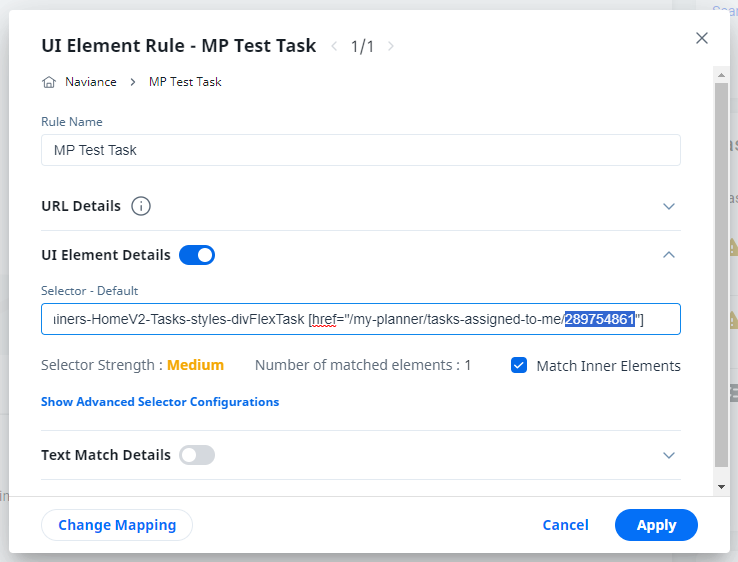
Similar to how Product Mapper URL rules have wildcards it would be nice to have wildcards for UI Element rules. When evaluating the selector it might be such that a UI object has a dynamically created ID and we would want to capture any of the objects of this type. 

Example image showing where we would use the wildcard.


3 replies

broghanzwack
Forum|alt.badge.img+3
  • Gainsight Employee ⭐️⭐️
  • August 10, 2023

Hi @Ashton! You can actually do this now with a slight syntax adjustment.  
 

Let’s say you’ve got an href that looks like this: [href=”https://www.nytimes.com/crosswords/game/daily/2023/08/10”]. If you want to build a rule for any link that contains text from that URL, you can simply add a * to the attribute name. In this case, we end up with [href*=”/crosswords/game/daily/”], which means ‘URL contains /crossword/game/daily’. 


This W3 article shares a couple other ways to manipulate attributes in CSS selectors.  


broghanzwack
Forum|alt.badge.img+3
  • Gainsight Employee ⭐️⭐️
  • August 10, 2023
No StatusWorkaround Available

  • Contributor ⭐️
  • March 7, 2024

I’ve attempted this with a feature that looks like this:

The UI Element was changed to : 
[href*="/Folder/FolderProperties.aspx?FolderID"] > .buttonContent  This does not seem to have worked. Any ideas?