

PX on my CS
PX on CS (also known as the Enablement Engine)
I would like improved user analytics and product engagement to help drive user growth in my Nxt CS instance. We currently have 700 users in Gainsight CS and we are evolving our processes quickly. Enabling our teams on new process/system changes is critical to the success of our teams.
As the PX website states, it enables you to deeply understand what users are doing in your product, collect feedback, and create in-app engagements like walkthroughs and guides to drive onboarding and adoption. That’s exactly what I want for my Gainsight CS and my users. Let me explain further.
Gainsight CS Analytics Today
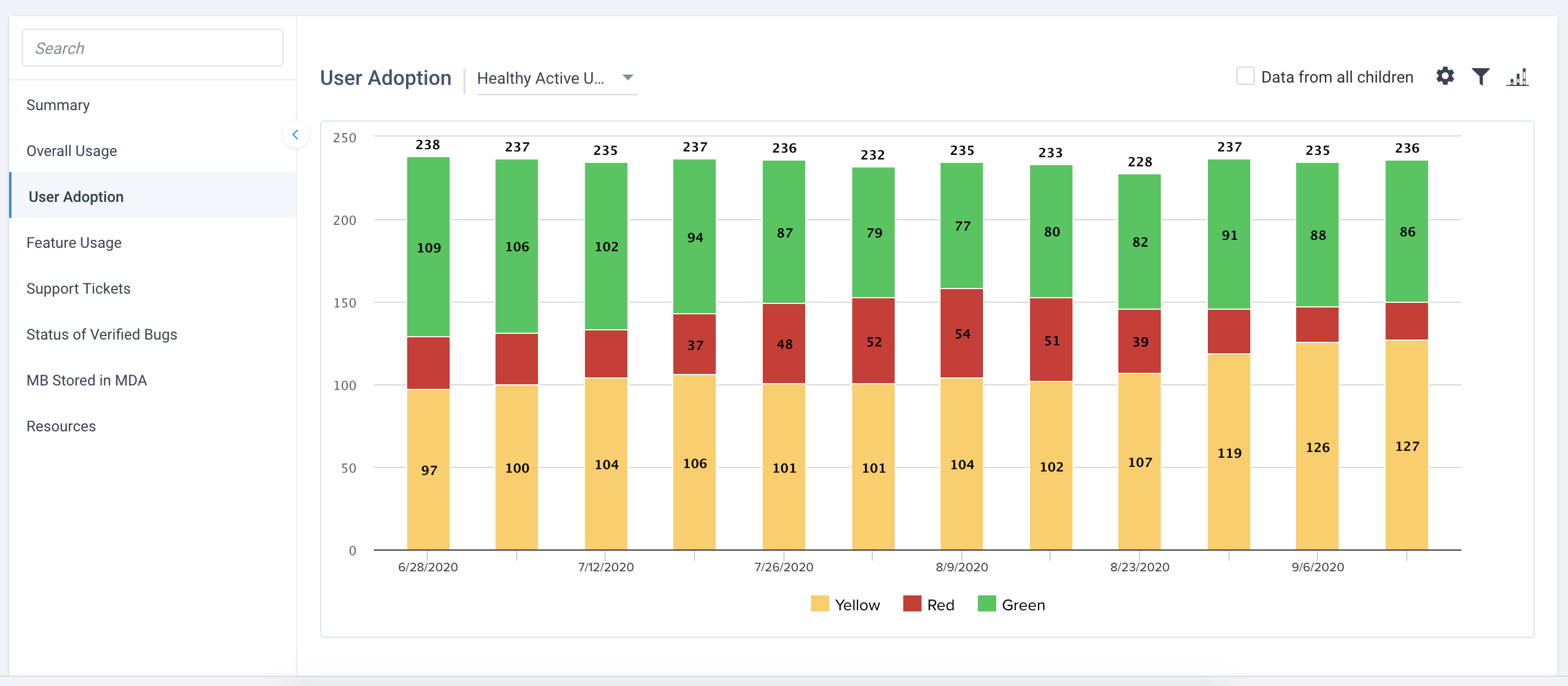
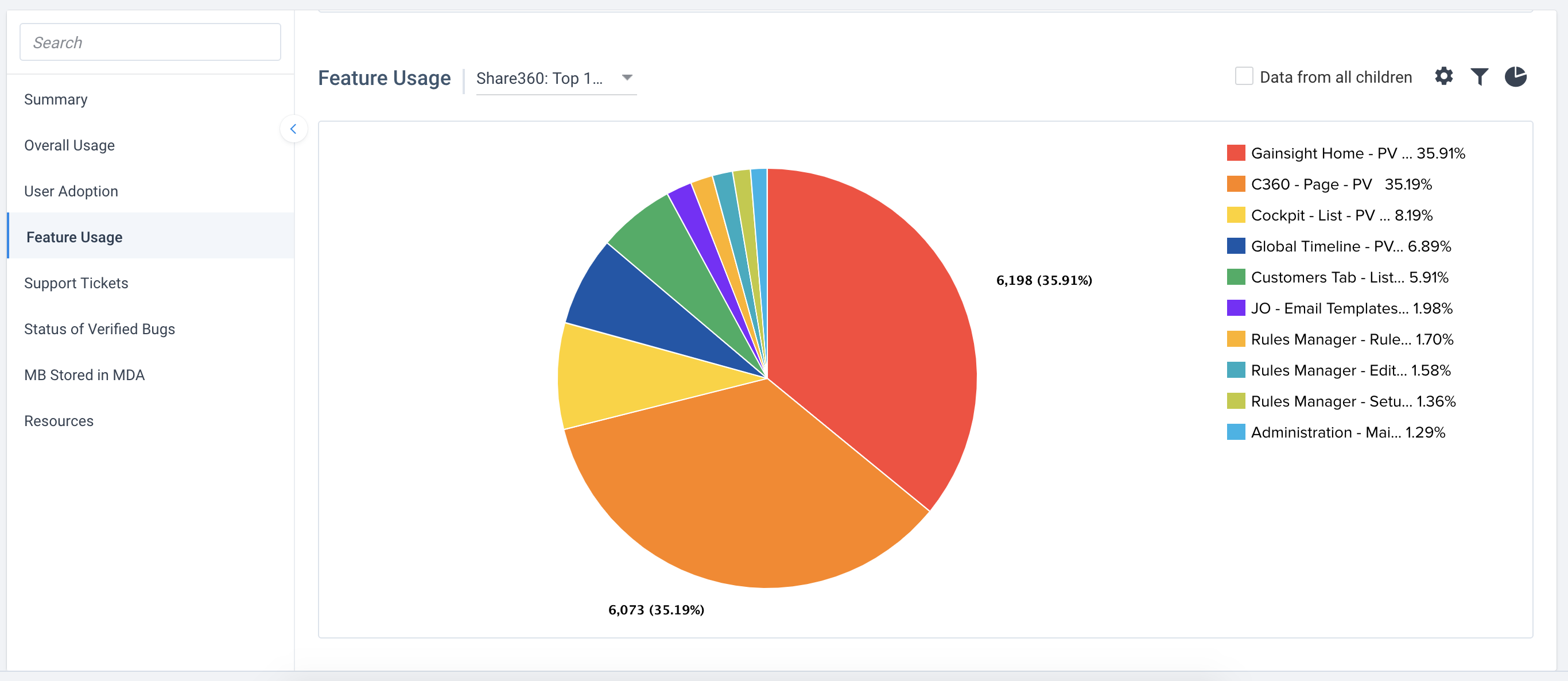
Today, Gainsight provide the G360 feature to show admins some simple usage data. If you don’t have this in your instance, I recommend talking to your CSM to get access to it.
The data in this feature is not very deep. You can see things like page views and how often users are logging into Gainsight. You can also top level feature usage like how often someone goes to the Cockpit, a 360, or the Rule Engine. This is somewhat helpful, but it isn’t deep enough information to be incredibly powerful.
Analytics Ask
What would be incredibly powerful is to see deeper insights on on our Gainsight users so that we can continue to identify areas to improve and build our end-users depth of their usage.
For example, I would like the ability to be able to understand:
- Which users are not only going to the Home page but which dashboards do they use the most? Which dashboards do they not use?
- Which sections on the 360 are they leveraging the most? Do they spend all their time on the Summary and Cockpit or is it one of the related lists?
- When they go to the Cockpit, are they using Global Cockpit or the 360 Cockpit the most? And more importantly, which views are they using the most and which ones do they not use?
- How do user cohorts (brand new users vs seasoned users) compare? Do older users spend more time somewhere different than new users and is there something there that new users are not learning?
- We measure our user’s satisfaction through surveys and it would be great to be able to correlate usage details to better understand if certain functionality is attributing to better satisfaction.
Those are a few of my asks but I think if we are able to marry usage data with end-user surveys and other key details about the users (ex: departments, manager, geo, etc), this information could be incredibly powerful for administrators to drive further adoption and stickiness of our configurations.
End User Enablement Today
Today, we enable our end-users through many of the common ways that other companies are using. Our change management and end-user enablement includes:
- Training sessions: global virtual meetings and sometimes in-person
- Knowledge Base: we use a knowledge base (salesforce and sharepoint pages) to store help articles which include GS how tos and CSM processes. This includes both articles, videos, and lots of pictures.
- Monthly Email Newsletters: we send out regular emails with updates to Gainsight, processes, and other changes that impact our end-users.
- Online Chat Message: We further send out regular messages on multiple chat streams to follow-up on new changes and reinforce specific new configurations.
- One-on-Ones: and when all the above doesn’t work, we further meet with people to ensure they fully understand the changes and how to apply them in their day.
Our current change management efforts require a lot of energy and commitment to continue pushing the changes we are trying to accomplish in our teams. And we are always trying to better understand usage to see where our change management activities didn’t hit the mark. But it’s never enough and has zero automation.
Enablement Ask
What would be incredibly power is to use the PX engine to drive user enablement at the point of action. Change management activities over meetings, email, and chat are somewhat effective but often get forgotten and it is very difficult to reinforce behavioural changes.
It would be incredibly helpful if we could:
- Build in-app guides to walk new users through our 360s and other core features with combinations of dialogs, sliders, tooltips, and hotspots. Fully personalize the onboarding experience based on account and user level attributes. We also want welcome videos from our leadership to popup when a user first signs. This creates an amazing new employee onboarding experience within Gainsight.
- Leverage guides, tooltips, and hotspots to activate usage of new or lesser-known features, new features the moment they are released, and any workflow or business changes.
- Create highly personalized engagement experiences based on user characteristics such as role, geography, historical product behavior, and more
- Create Knowledge Center bots with customizable content like how-to articles, CSM checklists, and key business processes. We don’t want this to just be about Gainsight, we want it for all our how to content for our end-users (CSMs, TAMs, Renewals, etc).
- Identify and segment out users who aren’t fully utilizing a core feature and target them with personalized tips and guides. Especially for our leaders to help guide them through their critical dashboards.
- Survey our customers within the app to get feedback on new features we’ve enabled or key changes.
Integration with other Systems
We use Nxt in Salesforce (Classic and Lightning) so it would need to work there properly. It is critical that if a user is in Classic and/or switches to Lightning, it has to work there. And possibly, if need be, we’d like to be able to know which user is using which SFDC version. We’re migrating from Classic to Lightning and it would be an amazing bonus if we know who’s logging in where to help enable and push this change as well.
Conclusion
The ability to use PX on our instance of CS is going to be incredibly powerful for us to drive the stickiness of our Gainsight. There is a tremendous amount of shared value here for us to drive our user growth. If we can do this easier and more successfully, our use cases and value will write itself. And most importantly, we need this functionality in the hands of our admins so that we can learn quickly and make adjustments to campaigns quickly. This feature will not scale if we always need a TAM to implement changes.