

Search Window for Timeline "Attendees" Fields Should Clear Entries After Selection
This one is right on the line between bug and enhancement request.
When using the Internal / External Attendees search function in Timeline Activity entry, the search bar is not cleared of previously-entered text after a selection is made.
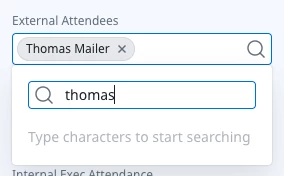
This is annoying for users because the typical workflow for entering multiple attendees goes something like this…
- Click in the Attendee field and start a search
- Select the desired result from the list
- Enter another Attendee in the search field
- Repeat 1-3 until everyone is included
The issue is that when the search results are NOT cleared, the user has to remove them manually which in itself is a little bit inconvenient, here’s the real problem with that: if users hit backspace one time too many, they delete every entry already selected in the field. That’s a much bigger snag, and causes frustration for many end users I’d imagine.
Includes / IN operators on Dashboard global filters work the same way, except the search box DOES get cleared down after each selection is made, preventing the issues we see on Timeline entries. If we could extend that same behavior (clearing down the search box after a selection is made) to Timeline Attendee fields, it would fix a big gotcha in a super common workflow and I’m sure our users would appreciate it the refinement.