

Update Object Display Names: Reports and Report Builder
Calling out reports and report builder but there might be other areas this comes up.
Problem: I’m looking at a report built by someone else and I’m trying to figure out what object it’s created from. I can do this from reports in a couple of ways:
- The report itself on the left shows the name of the object
- Report builder adding the Source Object column
The problem is that when it comes to Data Designer MDAs, and maybe other objects as well, these do not always match object names in Data Management or Data Designer.
Example:
What I see in the report:
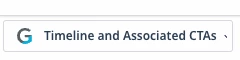
What I see in Report Builder:
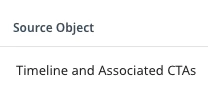
What I see in Data Management:
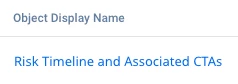
What I see in Data Designer
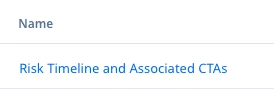
And no, neither of these are the API name of the object either.
I have to manually validate that what I think I’m looking at is what I’m actually looking at on published, actively refreshing DDs.
Request: Please update object and field name metadata throughout Gainsight. I assume the name of this DD has updated several times after initial instantiation. This is a really basic ask that I can’t believe I have to make. Either pick the API or Display name for something and when it changes, update the reference wherever it is used in the system.