

darkknight
Expert ⭐️
October 11, 2021
New Idea

User Connector job should allow SFDC User ID to be key field

  • October 11, 2021
  • 18 replies
  • 350 views

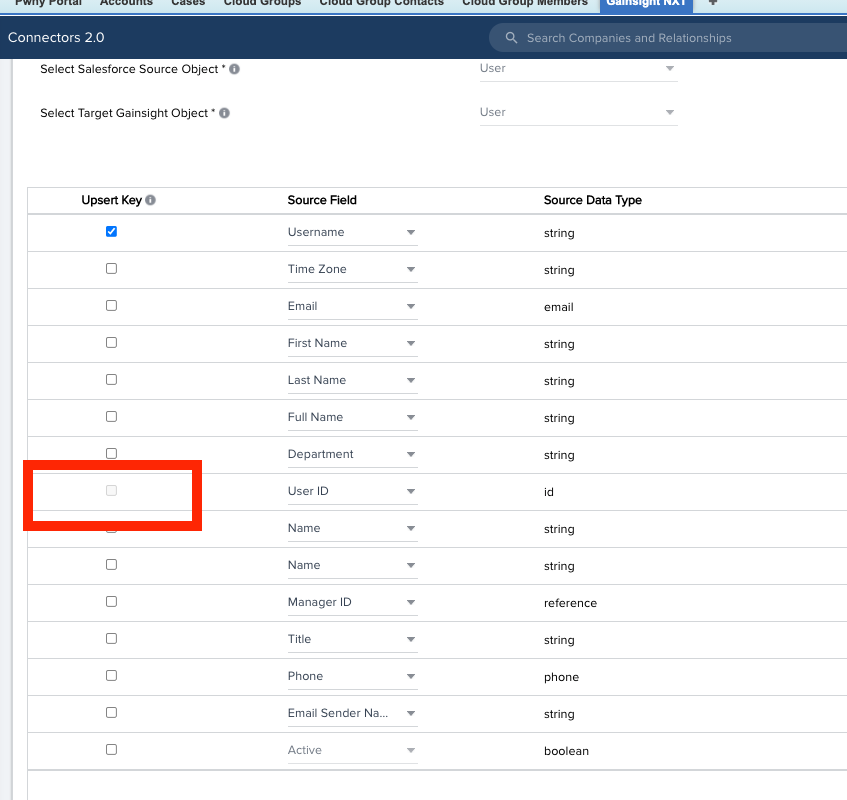
When a user’s username is changed in Salesforce, it produces a duplicate record in Gainsight’s User table because the User Connector job doesn’t let you select the SFDC User ID as a Key field - the only immutable field on the SFDC User record.

As a result, this is causing duplicate records to be displayed, exported when using SFDC User ID as a lookup value on dashboards, queries, etc.

Even though, yes, a SFDC Username must be unique - it can be changed on the same SFDC record.  The SFDC User ID cannot.  It should be the Key value.
 

18 replies

darkknight
Expert ⭐️
December 16, 2021

@Neha Gupta any update?

Jeff Kirkpatrick
Neha Gupta
Contributor ⭐️⭐️⭐️⭐️⭐️
January 6, 2022

@shannon_olsen @spencer_engel @darkknight we are in the middle of testing all the use cases when SFDC User ID matches both through Connectors and Rules Engine. The use cases include updation of any user attributes that got changed. Will keep you informed about the ETA.

bradley
Expert ⭐️
March 2, 2022

Oh, and we can’t do this in the Rules Engine either. “Username has to be set as identifiers”...why??


FWIW this still appears to be the case in our sandbox instance, which is on Horizon Connectors 2.0. You can select SFDC User ID as an identifier/upsert key, but not by itself. You must also include username which seems to be back to square one.

spencer_engel
Expert ⭐️
April 5, 2022

I was hopeful that I had found a workaround to this issue thanks to @sdrostgainsightcom, who suggested populating “External ID” with the SFDC User ID value and using it as my lone external identifier. This seems to work well at first. However, today I learned from support that usernames are excepted from being updated with this workaround, which means you cannot update usernames automatically in the system at all, whether via the connector or via the rules engine. This is causing us a lot of headaches. 


Also, there is a duplicate idea post for this that should be merged. 


sdrostgainsightcom
Gainsight Employee ⭐️⭐️⭐️
April 5, 2022

Oof - yes, @spencer_engel -- this is something that I came to understand, and understand why, it’s done this way -- even if the Gainsight user’s username is first generated from the connector to be the same as the SFDC username, it then becomes an independent, Gainsight username . . . since users can be enabled to log directly into Gainsight vs. logging in via SFDC NXT tab, we don’t want username, and username/password combos changing.  It made sense to me once I pictured trying to convince a Salesforce admin that if I change a username in Gainsight, the SFDC Username should be automatically changed to match -- same request in the opposite direction -- and knowing what the SFDC Admin would think.

THAT SAID, with so many Gainsight instance linked to an SFDC instance that is the only way the end users can log in, a utility, or checkbox, for a 1-time update when needed would help.  I just know that architecturally, changing a username isn’t without downstream effects or lag time, etc.

Scott Drost, Gainsight -- Principal Customer Success Architect
anirbandutta
Expert ⭐️
April 6, 2022

I was hopeful that I had found a workaround to this issue thanks to @sdrostgainsightcom, who suggested populating “External ID” with the SFDC User ID value and using it as my lone external identifier. This seems to work well at first. However, today I learned from support that usernames are excepted from being updated with this workaround, which means you cannot update usernames automatically in the system at all, whether via the connector or via the rules engine. This is causing us a lot of headaches. 


Also, there is a duplicate idea post for this that should be merged. 


Thanks for the pointer @spencer_engel.

Merging is not possible on the current technology, so I’ve given a shoutout to voters to come and vote this idea up. cc @Ritesh Sharma , @Neha Gupta  

It's an opportunity for engagement
zach_davis
Helper ⭐️
April 6, 2022

Oof - yes, @spencer_engel -- this is something that I came to understand, and understand why, it’s done this way -- even if the Gainsight user’s username is first generated from the connector to be the same as the SFDC username, it then becomes an independent, Gainsight username . . . since users can be enabled to log directly into Gainsight vs. logging in via SFDC NXT tab, we don’t want username, and username/password combos changing.  It made sense to me once I pictured trying to convince a Salesforce admin that if I change a username in Gainsight, the SFDC Username should be automatically changed to match -- same request in the opposite direction -- and knowing what the SFDC Admin would think.

THAT SAID, with so many Gainsight instance linked to an SFDC instance that is the only way the end users can log in, a utility, or checkbox, for a 1-time update when needed would help.  I just know that architecturally, changing a username isn’t without downstream effects or lag time, etc.

Fancy running into you in the wild @sdrostgainsightcom!

We recently made this change and were unaware that the Username would not be updated. I understand why now based on your post. Shouldn’t the product support users that only login via SFDC? This is a problem affecting all SFDC instances just to support login via NXT. It seems like it could be solved by functioning differently for instances that have System DB(NXT) auth disabled?

Neha Gupta
Contributor ⭐️⭐️⭐️⭐️⭐️
April 29, 2022

Hi All,

Now we can select SFDC User ID as an identifier in User object in the direct mappings for SFDC Connector. It will update all the user fields except username if there is any change in Salesforce. Please reach out to support if there is any bulk update required for the usernames. Please let us know if there are any open questions.

Thanks and regards,
Neha