

Customer Communities and Champion Integration
This article helps admins connect Champion to Gainsight CC and view community engagement data in Champion profiles.
Overview
Champion is a customer advocacy platform that helps customer success, marketing, and sales teams identify and activate their strongest advocates. It tracks advocacy activity such as referrals, references, and case study participation, and scores each contact based on their likelihood to drive influence and revenue. Organizations use Champion to build repeatable advocacy programs and measure their impact on pipeline and retention.
The Champion and Gainsight Customer Communities integration brings community engagement data directly into Champion, giving customer success teams a complete view of each member's community activity alongside their advocacy profile.
Once connected, the Community tab on a Champion profile surfaces key membership details and activity data pulled from Gainsight CC. Community activity also feeds directly into Champion Health Score, contributing to both the Community and Advocacy categories.
After the integration is set up, the Community tab on each Champion profile displays the following information:
- Name and community rank
- Roles and moderator status
- Member Since date
- Last Activity Date:
- Green: Active within 30 days
- Yellow: Active 30 to 90 days ago
- Red: No activity in over 90 days
- Topic, reply, badge, and community point counts
- Badges earned
Gainsight CC activity contributes to two categories of the Champion Health Score. The Community category reflects how actively a member participates in the community and the Advocacy category tracks content a member creates in the community as a form of public advocacy.
The following signals from Gainsight CC feed into the Community category:
- Reply activity
- Likes received
- Badge count
- Moderator status
- Last activity date
- Banned status
When a member posts an Article, Conversation, Idea, or Question in Gainsight CC, Champion automatically creates a User Generated Content (UGC) interaction with the corresponding subtype. This counts as an advocacy action and positively impacts the Advocacy category of Champion Health Score.
IMPORTANT: Corresponding subtypes are automatically created under the User Generated Content type in Champion as a system subtype. If you use Points, ensure your User Generated Content type or subtype in Champion is configured with the same point values assigned to topics in Gainsight CC.
Integrate Champion with Customer Communities
You can integrate Customer Communities with Champion from Control. The integration involves two stages:
Create OAuth2 Client in Gainsight CC
You need to create an OAuth2 client first before integrating with Champion. To create the OAuth2 Client:
- Log in to Control.
- Navigate to Integrations > API. The API page appears.
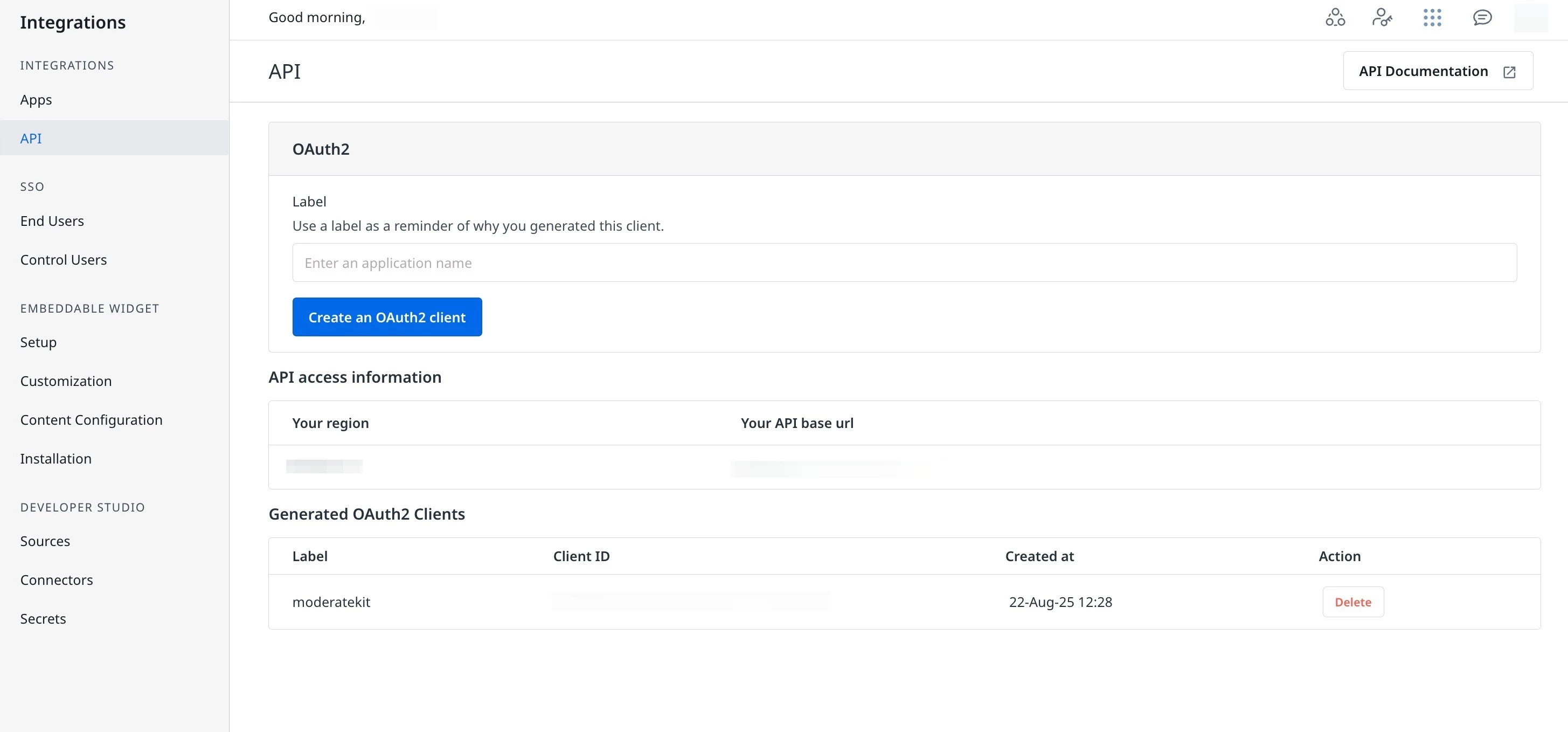
- In the Label text field, enter the application name.
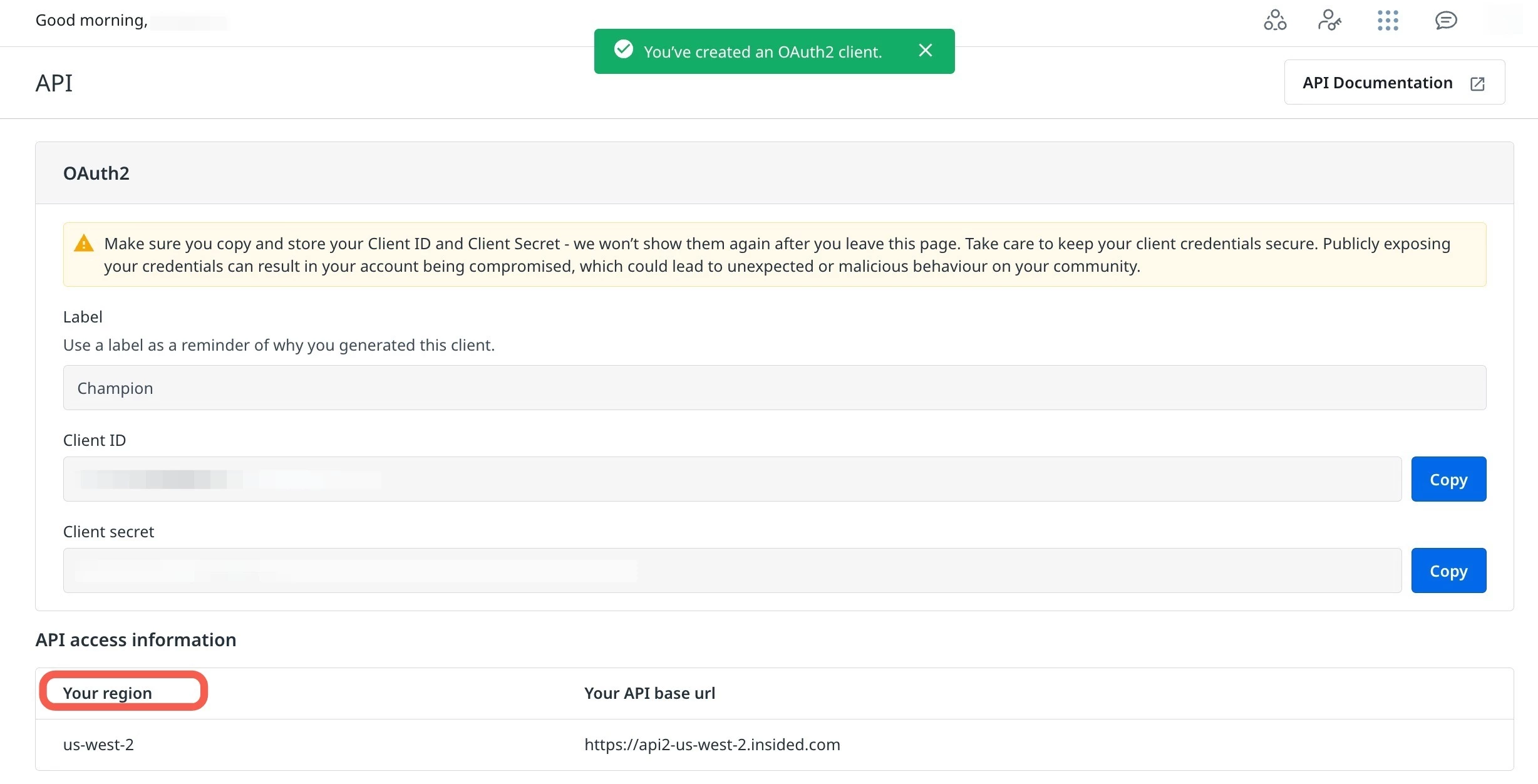
- Click Create an OAuth2 Client. The Client ID and Client Secret are generated. Copy and save these credentials along with the region details.
IMPORTANT: The Client Secret is displayed only once.
Connect Gainsight CC in Champion
With your OAuth2 credentials ready, you can now authorize the connection in Champion. To connect Gainsight CC:
- Log in to Champion.
- Navigate to Settings > Integrations. The Integrations page appears.
- Locate the Gainsight CC tile and click Connect. The Integrations dialog appears.
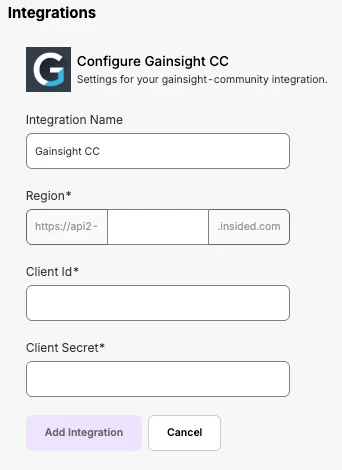
- In Integration Name, enter the name of the integration.
- In Region, enter your Gainsight CC region, captured ffrom OAuth2 Client configuration.
- In Client Id, enter the ID copied from OAuth2 Client configuration.
- In Client Secret, enter the secret copied from the previous section.
- Click Add integration. Customer Communities is now connected to Champion.
Note: The initial sync can take 24 to 48 hours. Once the connection is successful, the status indicator on the Gainsight CC tile updates to confirm the connection is active.