
Sudhanshu
Gainsight Product Manager
June 15, 2021

Configure the Knowledge base overview page

  • June 15, 2021
  • 24 replies
  • 1048 views

With the Knowledge Base overview page, your end-users can see at one glance all the content that is hosted on you Knowledge Base and easily find the content they are looking for.

Customize the KB overview page

  1. Access the page by either:
  • Going in Control Platform> Knowledge Base. You can click the link "Customize"
  1. Make sure to add a visual and a title to your hero banner 
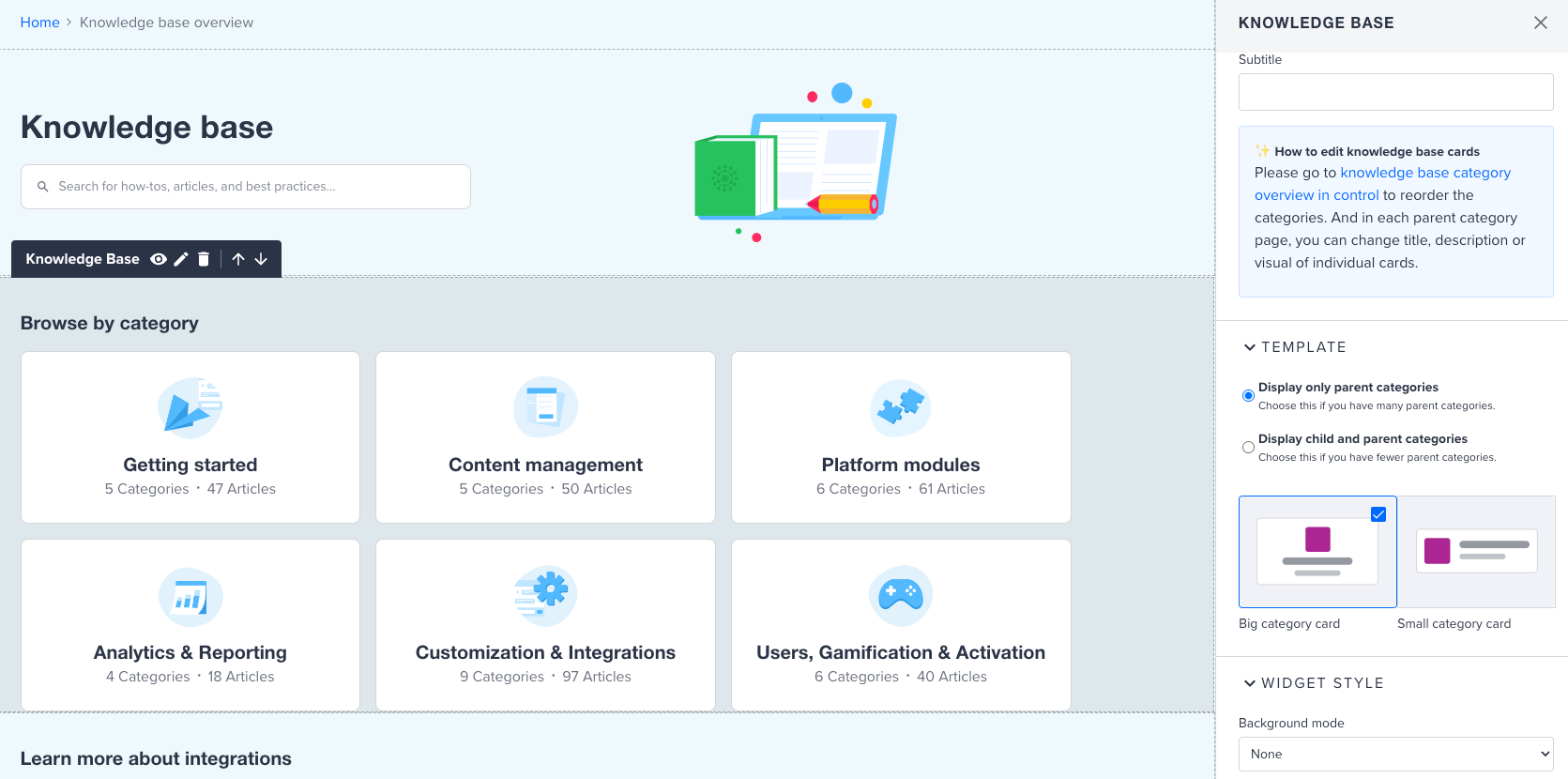
  2. You can configure your KB widget to show only parents categories OR parent and child categories. That second option is particularly interesting if you have a limited number of parent categories.
Widget displaying all the child categories grouped per parent category

You can access this setting in the configuration side panel of the KB widget.

KB widget configuration side panel


  1. Feel free to use any other widgets on this page.

The following widgets are available on the page: Quick links, Featured topics, Recommendations, HTML widget.
Update the Phrases:


You can update the name of the page in the breadcrumb using phrases

The phrase set in the breadcrumb will be applied in the Mega Menu. 

Once you enable the page for end users, the page will be accessible from the Mega Menu.  You can also update the phrase from the Mega Menu as well.

Editing the phrase from the breadcrumd
Editing the phrase from the Mega Menu


If you are using the old navigation menu. We are not investing in building new features in the old navigation menu. We strongly recommend using the new Mega Menu to make the best use of the KB overview page. ​​


Make the page visible to you end users


Once your page is configured, go to  Control in Platform> Knowledge Base. Click the button “Make overview page visible to end users now”.

By clicking this button, the KB overview page will be accessible to all users who have access to at least one KB category. They will also see the link to the KB overview page appear in the Mega Menu.

Of course the permissions settings at the level of the KB categories still apply. On the KB overview page, end users will only see link to the categories they have access to. This is the same behavior that we currently have on the homepage.


    24 replies

    Stuart.cruttenden
    Contributor ⭐️⭐️⭐️
    August 5, 2021

    Fantastic - Thank you for adding this feature and for giving a detailed description on implementing it. I do have a quick question however. How would I have the banner search bar and title to be in the centre much like on the community home screen / landing page? Thanks.

    Stuart
    Helper ⭐️⭐️⭐️
    August 9, 2021
    '

    Hello @Stuart.cruttenden thank you!

    To answer your question, right now we don''t offer this configuration. You can not decide where the search bar gets positioned in the hero.

    The logic is to have a central search bar on the homepage, and have a search bar to the left on the sub pages (like the KB overview and the category pages)

    I can recommend creating an idea if you would like to have this customisation option :)

    You can use Custom CSS in the meantime, if you really want to have the search bar centered. This article might be of help 


    '
    Kgastaldo
    Helper ⭐️⭐️⭐️
    August 10, 2021

    How did you guys do “Latest Articles” on your overview page?

    Helper ⭐️⭐️⭐️
    August 10, 2021

    Hello @Kgastaldo we used the recommendations widgets and manually inserted links to the topics :)

    Kgastaldo
    Helper ⭐️⭐️⭐️
    August 10, 2021

    Hello @Kgastaldo we used the recommendations widgets and manually inserted links to the topics :)

    Ah, okay. A widget would be cool so you wouldn’t have to keep manually updating these.

    Helper ⭐️⭐️⭐️
    August 10, 2021

    I totally agree @Kgastaldo . Could you create an idea for it so it can gather some votes? I know some others customers could be interested :)

    Irina Chernega
    Helper ⭐️
    August 16, 2021

    How could I insert cloud of tags to the overview page now?

    Helper ⭐️⭐️⭐️
    August 16, 2021

    Hello @Irina Chernega the cloud of tag widget is not available in the KB overview page. Indeed currently it's only available for the sidebar on the homepage. 

    victorlacombe
    Contributor ⭐️⭐️⭐️⭐️
    September 8, 2021

    Hi @Marion Frecaut,

    It seems we can’t change the Phrase related to “View all” in the knowledge base page.

    It there a specific phrase to add?

    Thanks


    Helper ⭐️⭐️⭐️
    September 9, 2021

    Hello @victorlacombe this seems to be hardcoded and we missed adding it to phrases. I created a ticket for us to add it to phrase I will keep you informed :)