

Subscription Status Dashboard
This article helps community managers understand the KPI widgets under the Subscription Status dashboard.
Overview
The Subscription Status Dashboard provides a clear view of how subscriptions are distributed across the community.
It helps community managers, product teams, and engagement analysts understand how users are subscribed across categories, groups, topics, event page and product updates.
Key performance indicators (KPIs) such as total subscribers, ranked subscription reports, and top 100 subscriber lists offer a clear view of where engagement is concentrated. Hierarchical and drill-down views enable teams to analyze subscriber distribution at multiple levels, from high-level category trends to individual user subscription details.
By centralizing subscriber counts into an interactive and filterable interface, the Subscription Status dashboard enables teams to evaluate subscription coverage, identify high-interest areas, and understand user participation patterns. These insights support data-driven decisions to optimize content structure, improve targeting strategies, and strengthen overall community engagement.
Global Filters
To support targeted analysis, the Subscription Status dashboard provides the following global filters:
- User Primary Role: Applies to subscriptions based on the user’s Primary Role and applies to the most recent role update. If the user’s Primary Role has changed over time, only the last or current role is taken into account.
- User Custom Role: Applies to subscriptions based on the user’s Custom Role and applies to the most recent role update. If the user’s Custom Role has changed over time, only the last or current role is taken into account.
- User Rank: Applies to subscriptions based on the user’s Rank and applies to the most recent rank update. If the user’s Rank has changed over time, only the last or current rank is taken into account.
Access and Manage Subscription Status Dashboard
The Subscription Status dashboard is an out-of-the-box (OOB) dashboard that can be viewed from the Analytics page.
To view the dashboard:
- Log in to Control.
- Navigate to Analytics > New Dashboards.
- From the dropdown list, select Subscription Status. The Subscription Status dashboard appears.
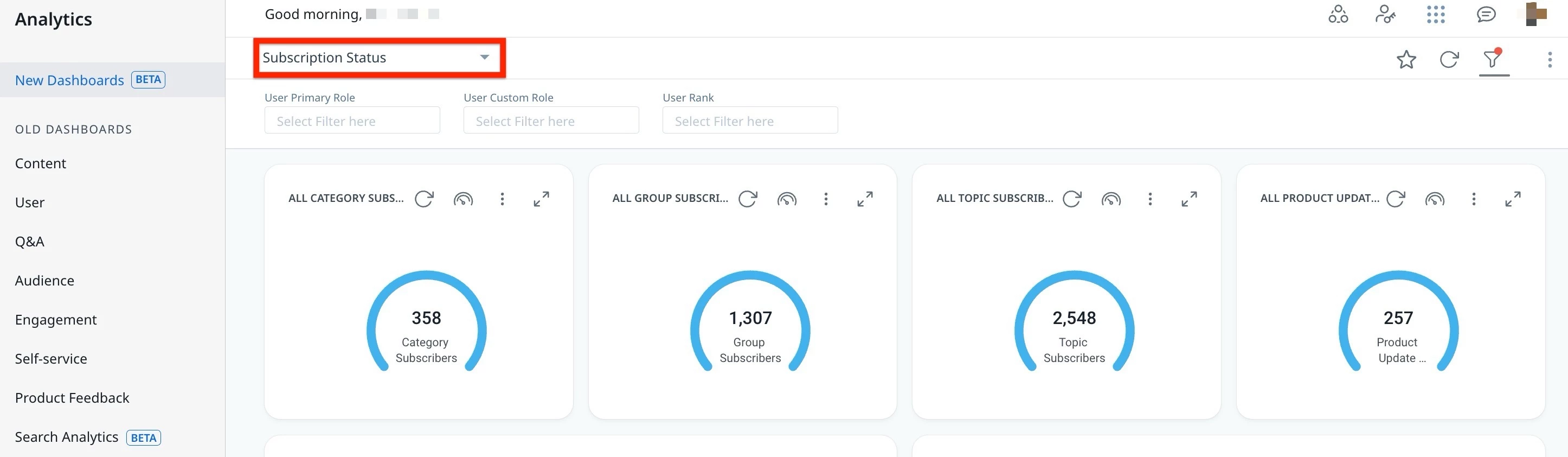
You can interact and customize the dashboard using features such as global and individual filters, report visualization options, and more.
Note: The dashboard data is displayed in UTC.
For more information on how to customize Dashboards, Widgets, and Reports, refer to the Customize New Dashboards article.
Understand the Key Performance Indicators
To effectively use the Subscription Status dashboard and accurately interpret performance insights, it is important to first understand the key performance indicators it tracks. The KPIs in the Subscription Status dashboard help track metrics for categories, groups, topics, and product updates.
The following table describes each KPI available in the Subscription Status dashboard:
| KPIs | Definition | Drill-Down Action |
| ALL CATEGORY SUBSCRIBERS | Total unique users subscribed to each category, to date. | Click a category to view detailed category insights and subscriber information. |
| ALL GROUP SUBSCRIBERS | Total unique users subscribed to each group, to date. | Click a group to view detailed group insights and subscriber information. |
| ALL TOPIC SUBSCRIBERS | Total unique users subscribed to each topic, to date. | Click a topic to view detailed topic insights and subscriber information. |
| ALL PRODUCT UPDATE SUBSCRIBERS | Total unique users subscribed to Product Updates, to date. | Click the chart to view detailed Product Update insights and subscriber information. |
| ALL EVENT PAGE SUBSCRIBERS | Total unique users subscribed to Event Page, to date. | Click the chart to see drill-down details. Use '+' to add or remove columns in the drill-down view. |
| TOP CATEGORIES BY SUBSCRIBERS | Categories ranked by total unique subscribers, to date. | Click a category to view detailed category insights and subscriber information. |
| TOP GROUPS BY SUBSCRIBERS | Groups ranked by total unique subscribers, to date. | Click a group to view detailed group insights and subscriber information. |
| POPULAR CATEGORIES HIERARCHY – SUBSCRIBERS | Unique subscribers distributed across category levels, to date. | Click a category to view detailed sub-level insights and subscriber information. |
| TOP 100 TOPICS BY SUBSCRIBERS | Top 100 topics ranked by total unique subscribers, to date. | Click a topic to view detailed topic insights and subscriber information. |
| TOP 100 USERS BY SUBSCRIPTIONS | Top 100 users ranked by total subscriptions, to date, segmented by category, group, and topic. | Click a user to view detailed user subscription insights and subscriber information. |