Question

Where has the Bookmarks button gone

  • May 20, 2026
  • 3 replies
  • 33 views

Alistair FIeld
Forum|alt.badge.img+4

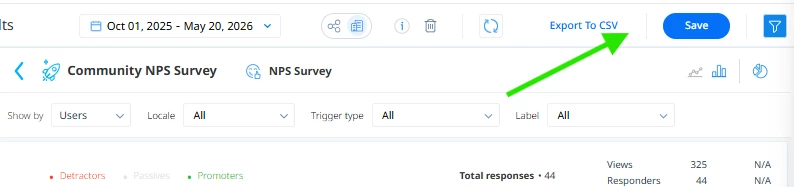
In PX where has the bookmark button gone?

I do not see it on the report next to Export like it used to be as per the documentation.


I am looking to export weekly the reports. I currently have some in the Email Reports section, but not the ones I want.


On a general note, the Documentation seems to be lacking in updates and I often find it is old product imagery or out of date workflows.

3 replies

link_black
Forum|alt.badge.img+2
  • Gainsight Employee ⭐️⭐️
  • May 20, 2026

Thanks for posting to PX Community ​@Alistair FIeld !


The “Bookmarks” button is only available within Audience Explorer and as a dropdown option on the newer Accounts Explorer page.  All other reports have a “Save As” or “Save” (already saved) button, which makes those available for easy access in the My Reports section inside PX. 

Please provide a screenshot from our documentation where you identified, “I do not see it on the report next to Export like it used to be as per the documentation.”, so we can ask our docs team to update this quickly.


To your last point, I agree that some of the PX product screenshots are out of date with the many UX  and PX Feature updates/improvements that our PX Product team has delivered.  Feedback such as this will help those teams to update those assets as needed. It is a big job with so much documentation covering many different Gainsight solutions.😅


Happy PX-ing!


Alistair FIeld
Forum|alt.badge.img+4

https://support.gainsight.com/PX/Analytics/About/02_Reports_in_Gainsight_PX#Bookmark_Customized_Filter


I am trying to weekly email a couple of different reports. But in order to do so i need to bookmark it first, as i understand


link_black
Forum|alt.badge.img+2
  • Gainsight Employee ⭐️⭐️
  • May 20, 2026

Thanks.  That document is referencing the Audience Explorer Bookmark feature, with a slightly older UX for sure.  


Available Email Reports (under your PX User Profile page) are limited to the “Built-in reports” and custom Email Performance, Feature Adoption, Dialog/Guide/Slider Engagement performance reports and Audience/Accounts Explorer bookmarks.  Emailing other Reports, such as Survey Performance (what you seem to be trying to do), Feedback,  Query Builder, Path Analyzer, and Retention reports are not currently supported by this Email feature. 


I agree that those additional Email report options would be nice and are good candidates to post as enhancement requests in the Ideas section of the Community.  I will cc: our PX Product Managers below so they can review your post and use case directly and even perhaps provide some of their feedback too.


@Chandu ​@aharkut ​@skalle