

daniel.boon
Helper ⭐️⭐️⭐️
August 24, 2020
Announcement

Coming soon: new moderation overview will become the default view in Control

Related products:CC Moderation
  • August 24, 2020
  • 21 replies
  • 572 views

Update 31 Aug 13:05 CEST

The new moderation overview is now the default moderation overview for all Control users. Please let us know any feedback you have in the replies!

Next week on Monday 31st August at ~11AM CEST we will bring the new moderation overview out of beta and make it the default moderation overview for all Control users.

Read on to find out:

  • What improvements we’ve made since launching the beta.
  • Whether you can still use the old overview for now (spoiler: yes).
  • What’s next for the moderation overview.

What improvements have been made to the new moderation overview since the launch of the beta?

Here’s a recap of the improvements we’ve delivered since launching the moderation overview in beta at the beginning of June:

:white_check_mark: Improved reliability of the data on the overview (for example: when topics are trashed, or moved).

:white_check_mark: A responsive table design and UX, and the ability to customise the columns to display.

:white_check_mark: Even more filters and columns, including old favourites: unread by team (‘status’) column, moderation label column, filter by ‘unassigned moderator’, filter by best answer marked, sort by publish date, and more.

:white_check_mark: Bulk actions: close, trash, and change the category of several topics at once.

:white_check_mark: Ability to delete custom views.


Our most important investment since launching the beta has been to improve the data reliability of the new moderation overview. Thanks to your feedback during the beta, we identified where we weren’t keeping topics up to date. We’ve now resolved all of these issues. Topics are up to date instantly, meaning you can focus your moderation efforts on the right content.

Can I still use the old overview?

Yes, for now you can still use the old overview. Simply press ‘switch to old version’. We’ll remember your preference for the duration of your browser session.
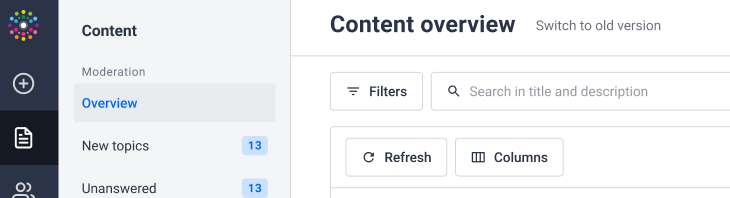
Hit ‘Switch to old version’ to use the old moderation overview.

Your old saved filters are also still accessible. These are now displayed in a combined list alongside your custom views saved via the new overview; old saved filters are identifiable via a grey warning sign.
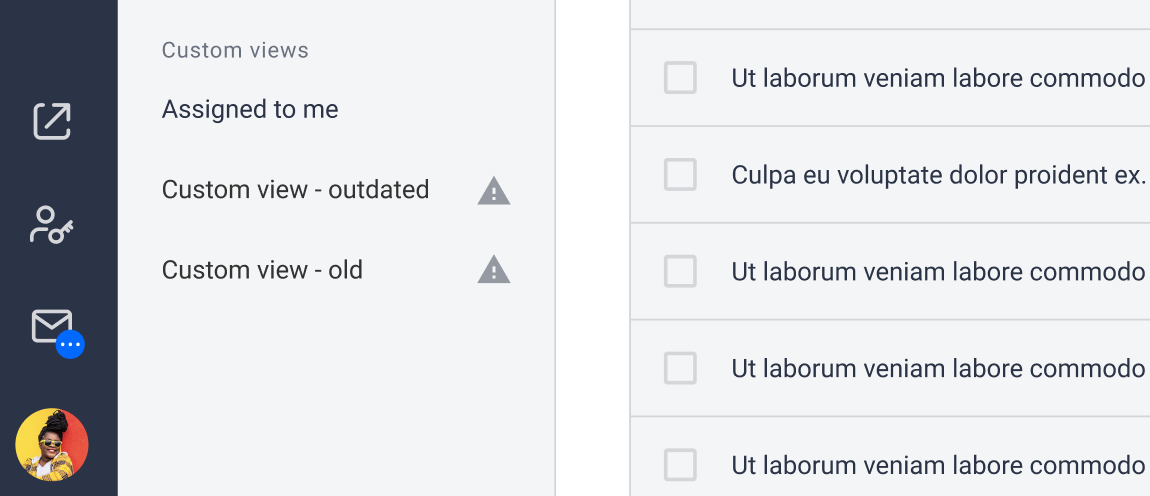
Old saved filters are still accessible, and marked distinctly from new saved custom views.

What’s next for the new moderation overview?

We don’t yet have a locked-in date on which we’ll completely phase out the old moderation overview. Our ambition is still to provide a better set of capabilities and an improved design first, and then to phase out the old moderation overview once it’s convenient to you.

We hope you enjoy using the new moderation overview, and we’re looking forward to continuing to improve it even further with your feedback.

Please let us know any questions or feedback you’ve got in the replies!

21 replies

Folkert Ziggo
Contributor ⭐️⭐️
August 24, 2020

Hi @daniel.boon,

This is exciting news! Hope it is okay to share my feedback here.

In order to make sure topics in certain categories are assigned to one of 3 dedicated moderators i currently use a filter to exclude other moderators. I am missing this in the new moderation overview. Is there a way to apply this?


₀₁₁₁₁₀₁₀ ₀₁₁₀₁₀₀₁ ₀₁₁₀₀₁₁₁ ₀₁₁₀₀₁₁₁ ₀₁₁₀₁₁₁₁
timcavey
Helper ⭐️⭐️
August 26, 2020

Thanks for the heads up Insided - it’s looking good!


*Update: just found out this change will take place from Monday 31st August.* 


I can’t find the ‘mark as spam’ option. Is it best practice to trash a spam topic, and if so, do we need to take actions against the poster manually?

learning, sharing and repeat
daniel.boon
Helper ⭐️⭐️⭐️
August 26, 2020

Hi @daniel.boon,

This is exciting news! Hope it is okay to share my feedback here.

In order to make sure topics in certain categories are assigned to one of 3 dedicated moderators i currently use a filter to exclude other moderators. I am missing this in the new moderation overview. Is there a way to apply this?


Glad to hear you’re looking forward to the rollout @Folkert Ziggo! This is definitely a good place to share your feedback ;)

Currently there’s no proper way to apply the filter you’re requesting. Just to make sure I understand: you want to see any topic that’s not assigned to any of the 3 dedicated moderators, including any topics that are unassigned, right?

I’ll look into this with the team and we’ll check if it’s a quick win to add an ‘Is not’ condition to the assigned moderator filter.

inSided product alumnus
daniel.boon
Helper ⭐️⭐️⭐️
August 26, 2020

I can’t find the ‘mark as spam’ option. Is it best practice to trash a spam topic, and if so, do we need to take actions against the poster manually?

Hi @timcavey - we haven’t yet added in the ‘mark as spam’ bulk action on the new overview.

The best practice is still to use the ‘mark as spam’ option rather than only trashing the topic, (e.g. marking a topic as spam automatically bans the community user, and also helps the spam algorithm learn).

We hope to make a ‘mark as spam’ bulk action available on the new overview in the future, but I don’t have a concrete date for when we’ll deliver it. The old overview will still be available even after the new overview becomes the default, so it’ll still be possible to use the bulk action there to mark topics as spam.

Hope that’s helpful - let me know if you have any other questions!

inSided product alumnus
daniel.boon
Helper ⭐️⭐️⭐️
August 31, 2020

Update: we successfully rolled out the new moderation overview as the default in Control. Please let us know if you’ve got any feedback :)

inSided product alumnus
Folkert Ziggo
Contributor ⭐️⭐️
August 31, 2020

Hi @daniel.boon

Glad to hear you’re looking forward to the rollout @Folkert Ziggo! This is definitely a good place to share your feedback ;)

Currently there’s no proper way to apply the filter you’re requesting. Just to make sure I understand: you want to see any topic that’s not assigned to any of the 3 dedicated moderators, including any topics that are unassigned, right?

I’ll look into this with the team and we’ll check if it’s a quick win to add an ‘Is not’ condition to the assigned moderator filter.

If possible, yes. The filter should display any unassigned topics and/or topics not assigned to the 3 dedicated moderators. 

Glad that this is a quick win and hopefully easy to implement.

₀₁₁₁₁₀₁₀ ₀₁₁₀₁₀₀₁ ₀₁₁₀₀₁₁₁ ₀₁₁₀₀₁₁₁ ₀₁₁₀₁₁₁₁
Erik_
Contributor ⭐️⭐️⭐️⭐️⭐️
August 31, 2020

I've been playing with the new overview this morning and I generally like the new options for filters. There are a few things I'm missing/would like to see:

  • A bulk option to assign multiple topics to a/another moderator
  • If I make a typo in the name of a saved view I can only resave under a new name and then delete the old view, so would be nice to get a rename option as well


The one thing I really dislike is the overabundance of white space and lack of separator lines between columns. I would much prefer a compact view where I can fit much more info on my screen.


Bug, I think: the moderation label column isn't showing in the views where it's been selected.

The shortest answer is doing -George Herbert
daniel.boon
Helper ⭐️⭐️⭐️
August 31, 2020

I've been playing with the new overview this morning and I generally like the new options for filters. 

Thanks a lot for your feedback @Erik_ !

Your request around bulk assign to moderator is clear ✅

If I make a typo in the name of a saved view I can only resave under a new name and then delete the old view, so would be nice to get a rename option as well

Not sure I understand this one, but maybe I misunderstood. As far as I understand the steps would be:

  1. Save a custom view
  2. Edit name of custom view
  3. Press save > save changes to the current view

The one thing I really dislike is the overabundance of white space and lack of separator lines between columns. I would much prefer a compact view where I can fit much more info on my screen.

Thanks for the feedback on the design, cc @xiaoyu-shen :)!

Bug, I think: the moderation label column isn't showing in the views where it's been selected.

That doesn’t sound right - can you send me a private message with an example URL (using the ‘Share view’ button)?

inSided product alumnus
Erik_
Contributor ⭐️⭐️⭐️⭐️⭐️
September 1, 2020

Not sure I understand this one, but maybe I misunderstood. As far as I understand the steps would be:

  1. Save a custom view
  2. Edit name of custom view
  3. Press save > save changes to the current view


Oh! Yeah, ignore this. I totally missed the pencil icon next to the View name :smile:


Bug, I think: the moderation label column isn't showing in the views where it's been selected.

That doesn’t sound right - can you send me a private message with an example URL (using the ‘Share view’ button)?

On its way!

The shortest answer is doing -George Herbert
Erik_
Contributor ⭐️⭐️⭐️⭐️⭐️
September 1, 2020

Something else that came up in my team: we would like the ability to sort the order of custom views. 


I also noticed that filter views don't remember/save everything. When I made my views I set them to 50 rows, but when I open them again, they're back to 25. 

In the old views, selecting a sort (for example on Last Activity) added a modifier to the URL. As such, when you refresh the page, the sorting remains the same. This does not happen with the new views. And as a result I have to re-sort every time I refresh. Which is fairly often.

Is there a way to keep the sort persistent, or choose a default sort for a view?

The shortest answer is doing -George Herbert