Yoeri
Gainsight Employee ⭐️⭐️⭐️
December 21, 2018
release

Content Helpfulness is now available!
  • December 21, 2018
  • 22 replies
  • 1120 views
Content Helpfulness is now available!
As of today Content Helpfulness* is available for your communities. This allows your visitors to vote on the helpfulness of topics in your community, you can decide on which topics they should vote. Read on to learn more.


What is Content helpfulness?

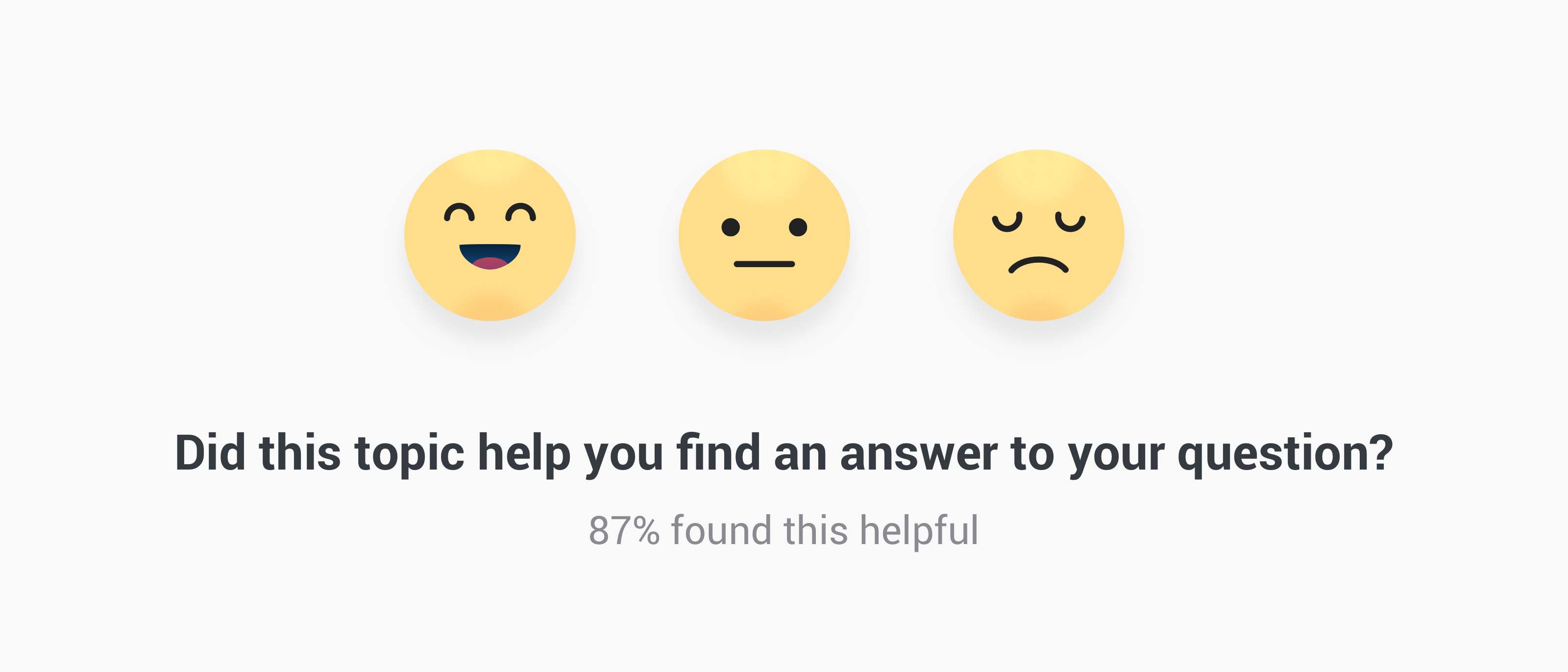
A feature added to topic pages where users can indicate if they found the topic helpful or not. Users can reply by picking an Emoji to indicate whether or not it has helped them. After they voted for a topic they will see a thank you message and will no longer be asked to vote. You have the possibility to show the helpfulness score (= helpful votes/all votes*100) to your users, this will only show the score after at least 5 votes have been submitted.

Where is it shown?

By default it will be shown below the opening post on all articles and topics that have a marked best answer. When the users starts scrolling to read the comments a small bottom bar will appear allowing the user to vote at any given moment.

Where can I see the results?

Votes are directly sent to the topic moderation page in the Control Environment. Topic that have topic helpfulness enabled will have an additional 'Content Helpfulness Performance' panel showing the distribution of votes and the helpfulness score


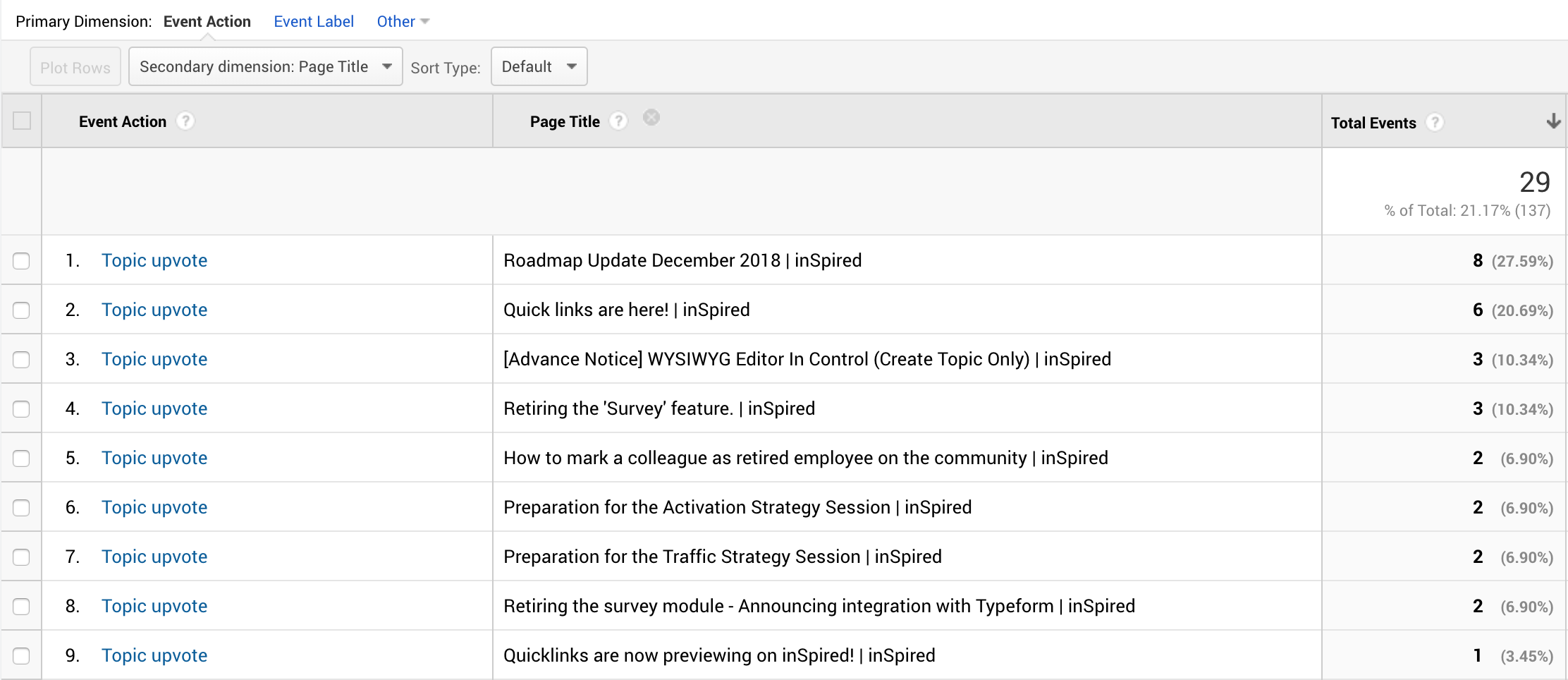
Next to that Data will be logged to your Google Analytics under Behavior > Events > Top Events. If you click on the event action 'Topic Helpfulness' it will show an overall distribution on the positive, neutral and negative votes. To see which topics are voted for you can set the Primary Dimension to 'Event Action' and the Secondary Dimension to 'Page title' this will show a list of topics and their votes.


Which configuration options are available?

In the Control environment you'll be able to view and change the following options:
  • Change the messaging
  • Toggle on/off to display the Helpfulness Score to your users
  • Change on which content types this feature should appear
Read the How To guid to learn more: How To Configure Content Helpfulness

What's next

We have more improvements planned:
  • Add data to Content Dashboard
  • Ability to toggle on/off this feature on individual topics
  • Improve our search algorithm with the helpfulness score, helpful content will rank better in the search engine
We'll keep you posted on updates here on inSpired

Thank you

A shout out to all pilot customers who helped us shape this feature from the start by giving feedback & spotting bugs @Stéphan Lam@Kat@ErikT@Florian@Hiewwaiy

*We renamed this feature from topic helpfulness to content helpfulness since this functionality may cover all the content types in your platform.

Update I January 16th

We deployed the ability to toggle on/off content helpfulness on individual topics. In the topic moderation page we added a configuration setting where you can determine the visibility:
  • Use default (inherits default setting for this topic type)
  • Enable (will show content helpfulness regardless the default setting)
  • Disable (will hide content helpfulness regardless the default setting)

Update II January 30

We shipped an improvement on the usability of the content helpfulness panel:
  • The panel will no longer appear when the user is scrolling down (and reading). The panel will only appear when the users stops scrolling down and starts scrolling back to the top.

22 replies

aluciani
Helper ⭐️
December 21, 2018
Great news and excited to see the results on my community.
freydrew
Contributor ⭐️⭐️⭐️⭐️
December 21, 2018
So happy to see this!
Drew -- Senior Communications Manager
Jurgen
Helper ⭐️
December 24, 2018
Cool! However, we have several users complaining that this hurts the usability of the forum on mobile and tablet. Anyone else getting this feedback?

Quotes:

Telfort Forum

"I might be the only one but on a tablet this is quite annoying. Unnecessary space use in my eyes, the idea that someone can click on the smiley if a topic has answered a question is something, but this is something I get to see too often."

"Annoying is an understatement, so I agree with you"

"The same here, quite annoying indeed when you use the tablet in landscape it looks like this. The popup jumps along with the rest of the page while scrolling until you click it away at the cross."

"I agree with your words to gentlemen. I also get to see this on tablet and phone, not just on this forum. QUITE a bit too often".

KPN Forum

"Every time you open a topic that has already been answered, that popup comes. And as always, people have not thought about when that popup should be shown. Even before you have been able to read a piece, that popup is already there and then you have not been able to determine 'the answer to your question'."

"I'm sick of it as well, I get it constantly! I did not notice that that it does when a topic is answered. But that aside, Insided simply shouldn't do this on the forum. Forum members find that irritating, at least I do."

"I also get sick of it, I also see these popups continuously. We do not need that, we help KPN, we are not faced with questions or problems. Then I do not want to constantly get the message whether it is the answer to my question. Insided should see our user roles [Superuser] and not ask us that question. Can they do this anyway? 🤔"
Jurgen
Helper ⭐️
December 24, 2018
My other feedback: please enable users to choose/upload their own icons. When using emoji, users will qualify topics that provide an answer they don't like as 'bad'. Letting customers upload their own icons is also another way to diversify forums.
Florian
Contributor ⭐️⭐️⭐️⭐️
January 2, 2019
My other feedback: please enable users to choose/upload their own icons. When using emoji, users will qualify topics that provide an answer they don't like as 'bad'. Letting customers upload their own icons is also another way to diversify forums.


Totally agree with you Jurgen!
Yoeri
YoeriAuthor
Gainsight Employee ⭐️⭐️⭐️
January 2, 2019
Thanks for sharing. Topic helpfulness panel + keyboard on smaller viewports doesn't look pretty indeed, we'll investigate usability on smaller viewports.

When using emoji, users will qualify topics that provide an answer they don't like as 'bad'.


I don't understand why this is a bad thing. A topic can be solved but when it collects a lot of unhappy votes the topic, answer or it replies are apparently not helping. This could be an indicator that the topic needs a new answer or some adjustments in order to become helpful.

Custom icon upload is not in scope. We might want to provide different icon sets where you can choose from, this way you can diversify and pick the icons that suit your scenario the best.
Group Product Manager, Customer Communities
aluciani
Helper ⭐️
January 2, 2019
I don't see a need for custom icon uploads - not sure how that can help.
Jurgen
Helper ⭐️
January 2, 2019
Thanks for sharing. Topic helpfulness panel + keyboard on smaller viewports doesn't look pretty indeed, we'll investigate usability on smaller viewports.


When using emoji, users will qualify topics that provide an answer they don't like as 'bad'.
I don't understand why this is a bad thing. A topic can be solved but when it collects a lot of unhappy votes the topic, answer or it replies are apparently not helping.


People who cast unhappy votes might be dissatisfied with a policy that's being described, while the content itself may be very helpful in providing an answer. People tend not to read, so when they see the emoji they'll just give a knee jerk reaction of how they feel after reading the answer.

If the goal is simply to gauge people's feelings when reading an answer, then 'content helpfulness' is a misnomer in my opinion. It's rather something like a sentiment measurement.
Jurgen
Helper ⭐️
January 2, 2019
Thanks for sharing. Topic helpfulness panel + keyboard on smaller viewports doesn't look pretty indeed, we'll investigate usability on smaller viewports..

Great. As you can see in the feedback, regular visitors also think it's annoying they get this question/banner in every single topic. Superusers are not the intended audience for the question anyway, seeing as they're often the ones providing the answer. They could be excluded by role, the banner could only be displayed for visitors that aren't logged in, or the banner could pop up at the first topic that's visited only.
Ditte
Helper ⭐️⭐️
January 2, 2019

Custom icon upload is not in scope. We might want to provide different icon sets where you can choose from, this way you can diversify and pick the icons that suit your scenario the best.


So if we turn this on, we're stuck with the smiley's you've chosen? I'm pretty sure branding is going to have a fit if we can't change them.
Currently rocking the Sonos Communities