🔁 Convert articles back to conversations

Related products:CC Moderation
  • April 1, 2021
  • 2 replies
  • 115 views

daniel.boon
Forum|alt.badge.img

We’ve delivered this highly-voted idea to convert articles back to conversations.

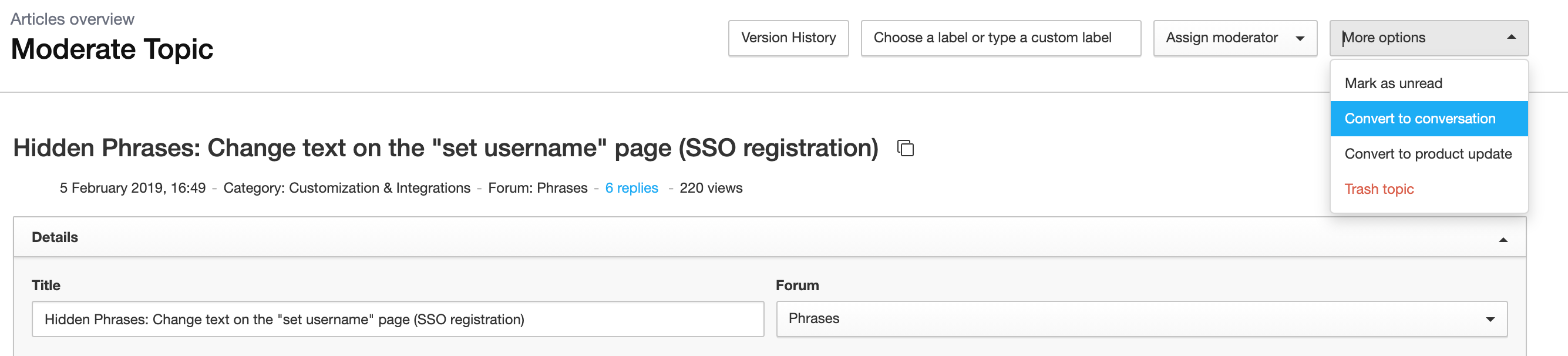
Accidentally converted a conversation to an article? No problem - now you’ll never be stuck or have to message our support team. You have the freedom to convert topics back and forth between the two content types to your heart’s delight.

Note: the following article data will be dropped and lost forever upon converting an article to a conversation:

  • Featured image
  • Article label
You can find the convert to conversation option under ‘More options’ on the topic moderation page of the article.

Please leave us a reply if you have any feedback!

2 replies

security_lion
  • Helper ⭐️⭐️
  • June 29, 2022

Hi @daniel.boon ! I noticed today what might be a bug or a potential gap in this update.


When you originally create an article, and then switch it back to a question or conversation, the update doesn’t take effect in the back end views. If you’re in Control and you go to Content and then under Content Types, click on Articles, it should be showing you a list of all topics which are articles. However, any post that was originally an article and is now a question/conversation is still showing up in this view.


The expected behavior would be for the topic to be considered a question/conversation in the front end and back end, so when you use these views or filter by content type, these posts are accurately accounted for.


jmyoung780
  • Helper ⭐️
  • November 19, 2025

​@daniel.boon I’m curious what the reason to do this is?  I just saw the feature/ability to do it and wondered to myself ‘Why would I do this?’   What are the benefits of switching an Article to a Conversation?  Please and thank you in advance!

Jamie