


kcronin
Gainsight Employee ⭐️
January 13, 2026

Gainsight CC: Accelerate Engagement with AI Answers (Open Beta)
Related products:CC Analytics & ReportingCC Others
  • January 13, 2026
  • 22 replies
  • 492 views

Supercharge your community experience with the power of generative AI.
 

AI Answers is now available in open beta, bringing conversational search to your Customer Communities. With this feature, your users can instantly find answers and uncover insights, all powered by AI.


Find Answers Instantly with AI-Powered Search (AI Answers)

Transform your community search into a dynamic, conversational experience.

  • AI-Driven Understanding: Interprets natural language to deliver relevant, human-like responses.
  • Cited Results: Includes source links for full transparency and context.
  • Streaming Responses: Watch answers appear in real time for an engaging, interactive feel.
  • Expandable Insights: Click to reveal additional context and related sources.
  • Continuous Learning: Improves accuracy based on user feedback and interactions.
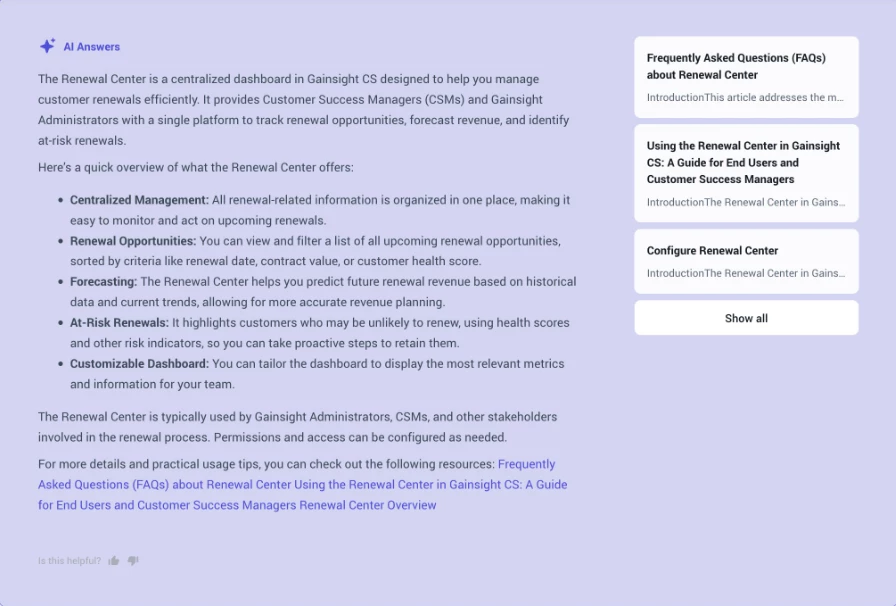
AI Answers helps members find information faster and with more confidence — making every search feel like a conversation with an expert.

How to Get Started

AI Answers is available in Customer Communities Control > AI

  • If you already use Smart Assistant or any of our other AI features, you’ll see the new AI Answers option automatically — no additional enablement required.
  • If you’d like to add this feature, you can activate it directly within the AI settings page.

Set Up in Minutes

Enable AI Answers

  1. Go to Customer Communities Control > AI > AI Answers
  2. Toggle Enable AI Answers
  3. Thats it! AI Answers will now be set up.

Also included in this open beta, Search Analytics Dashboard is a new dashboard that allows admins and community managers to review how users interact with search. Key metrics include total number of users, total searches, the no results rate and more!
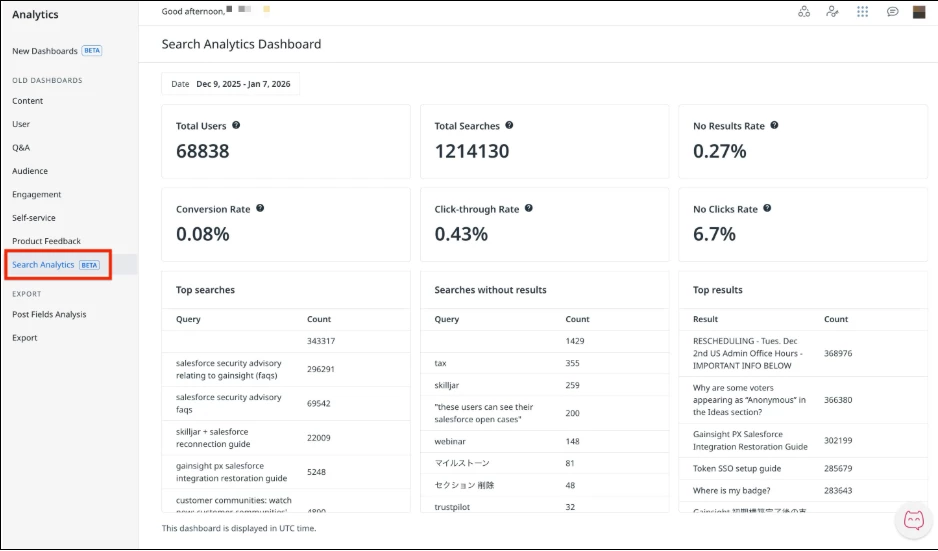
With Search Analytics, teams can now better understand how search is being used, identify gaps in the search experience, and make informed improvements.

👉 Check out the Release Notes for more details.

💬 Have questions or feedback? Drop a comment below — or better yet, ask our new AI!


22 replies

DannyPancratz
VIP ⭐️⭐️⭐️⭐️⭐️
January 13, 2026

Could you please share what the tooltip definition of Conversation Rate is in the Search Analytics Dashboard? 

FYI: I am no longer active in this community
DannyPancratz
VIP ⭐️⭐️⭐️⭐️⭐️
January 13, 2026

Could you please share what the tooltip definition of Conversation Rate is in the Search Analytics Dashboard? 

screenshot of the tooltip definition


FYI: I am no longer active in this community
ryanne.perry
Helper ⭐️
January 13, 2026

Are the AI search results only from data posted in the Community? Or would it also include our knowledge base as we have it set up for federated search via app integration?

🌻 Ryanne
atwhite
Helper ⭐️⭐️⭐️
January 13, 2026

Thank you! We’re excited for this feature! Some initial questions that came up:

How are Search Queries Without Results determined? Some terms in our list are accurate, while others (at least in our testing) do produce results. Are terms (and whether they produce results) role-dependent? 

Also: this seems to be the case from our testing, but I want to confirm that if we still have Search Summaries for All Users toggled off, the new AI Answers will not appear for them yet and only display for admins?


Jef Vanlaer
Helper ⭐️⭐️⭐️
January 14, 2026


  • If you already use Smart Assistant or Moderation AI, you’ll see the new AI Answers option automatically — no additional enablement required.
  • If you’d like to add this feature, you can activate it directly within the AI & Automation settings page.


Is there an option to enable AI Answers if we don’t use Smart Assistant or Moderation AI yet? I only have an AI (not AI & Automation) settings page in Control and don’t see the new feature listed.

JeppePeppe
Helper ⭐️⭐️
January 14, 2026


  • If you already use Smart Assistant or Moderation AI, you’ll see the new AI Answers option automatically — no additional enablement required.
  • If you’d like to add this feature, you can activate it directly within the AI & Automation settings page.


Is there an option to enable AI Answers if we don’t use Smart Assistant or Moderation AI yet? I only have an AI (not AI & Automation) settings page in Control and don’t see the new feature listed.


We’re missing that option in Control as well, although we use Moderation AI. We don’t have the option AI & Automation.

tah-dah
alan.edwards
Contributor ⭐️⭐️⭐️
January 14, 2026


  • If you already use Smart Assistant or Moderation AI, you’ll see the new AI Answers option automatically — no additional enablement required.
  • If you’d like to add this feature, you can activate it directly within the AI & Automation settings page.


Is there an option to enable AI Answers if we don’t use Smart Assistant or Moderation AI yet? I only have an AI (not AI & Automation) settings page in Control and don’t see the new feature listed.


We’re missing that option in Control as well, although we use Moderation AI. We don’t have the option AI & Automation.

We also do not have the AI & Automation option.

Graeme Rycyk
Gainsight Employee ⭐️
Gainsight Director of Product
January 16, 2026

Hey ​@ryanne.perry,


AI Answers will use both Community and Federated content to provide it’s answers and sources.


Cheers,


Graeme

Director of Product | AI & Search
Graeme Rycyk
Gainsight Employee ⭐️
Gainsight Director of Product
January 16, 2026

Hey ​@atwhite,


Searches without results can have two reasons. Either your users are searching for content you don’t have, or they can’t find it. Search terms and the data you see are not role dependant, and I would be happy for you to DM or email me the search terms that seem inaccurate to give some further clarity on them.

If you where using the Smart Assistant prior to the release of AI Answers your settings will be retained so All Users toggle should remain off.


Cheers,


Graeme

Director of Product | AI & Search
Graeme Rycyk
Gainsight Employee ⭐️
Gainsight Director of Product
January 16, 2026

Hey ​@Jef Vanlaer,

AI Answers has replaced the Smart Assistant, rebuilt, redesigned and rebranded. So yes, you can use AI Answers without Smart Assistant, and as our AI Moderation Agent is a different feature this is also not tied to AI Answers. You enable AI Answers by navigating to /settings/ai in the Control and scroll down to the AI Answers toggle and enabled it by toggling it on.

I have corrected a typo stating the tab name, it was initially stated as Customer Communities Control > AI when it should have been Customer Communities Control > AI. Sorry for any confusion here.

Cheers,

Graeme

Director of Product | AI & Search