


Gainsight CC: Deeper CS Sync, a New CLI, and More Preview Control
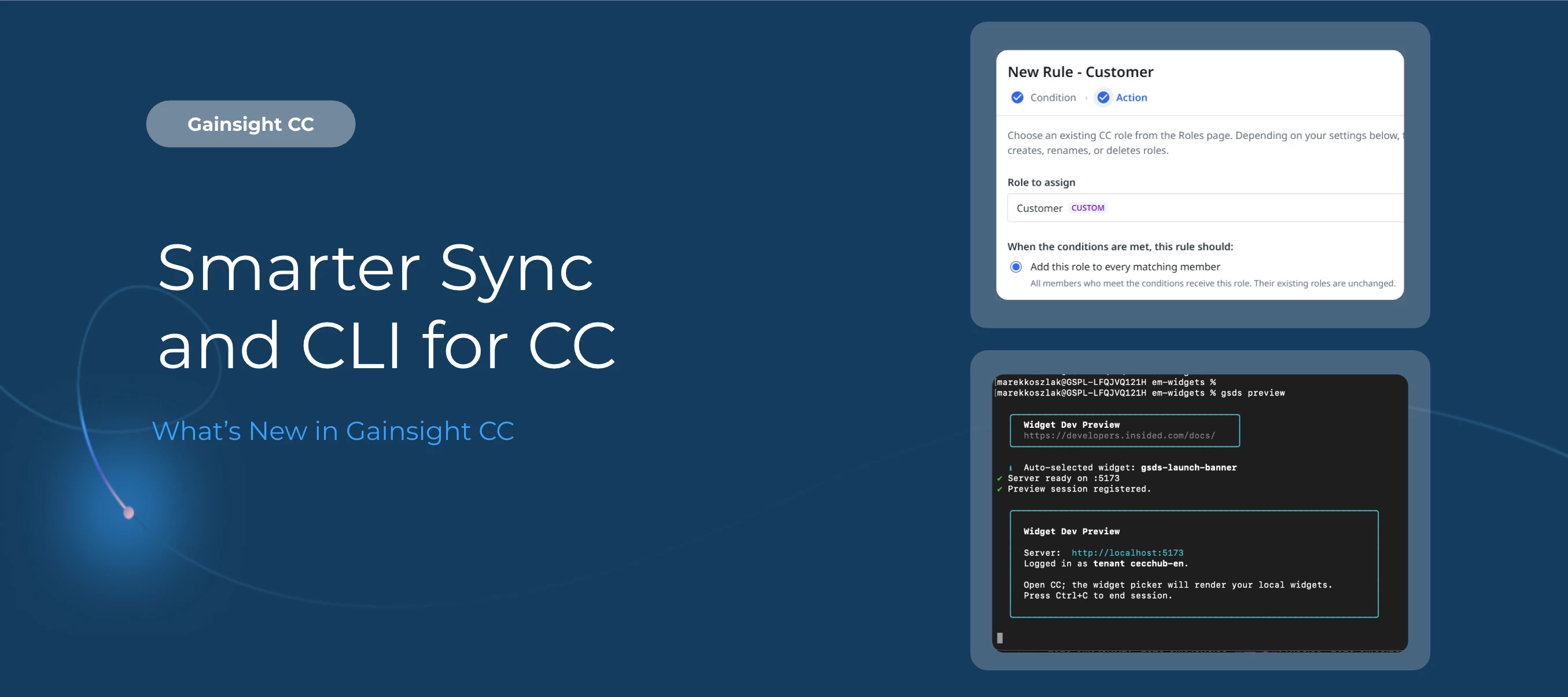
This release brings a mix of new capabilities and workflow improvements: automated role assignment from CS data, a local development environment for Developer Studio, category-level translations, and more. We're also introducing a new way for you to preview upcoming changes before they reach your members.
Here's What's New
Build and Preview Community Widgets Locally with the Developer Studio CLI
The Developer Studio CLI scaffolds the starting file structure for a new widget directly from your terminal, and pairs a local development environment with your live community instance. Widgets preview, served from a local server to the live instance with the same theme settings and branding, refreshing instantly whenever you save, and connectors can run against real data on your local machine, checking authentication, responses, and errors before anything reaches a hosted environment. Whether you test manually or hand the workflow to an AI agent, the CLI keeps development fast and in context.
These related Developer Studio updates apply whether or not you use the CLI:
-
Reference a community variable in a connector's host name, so one connector definition can point to different environments (like a staging Salesforce sandbox versus production) without maintaining separate configs
-
Add scripts and stylesheets globally or scoped to selected pages, so you can customize your community while keeping it performant
Assign Community Roles Automatically from CS Data
Community role assignment now extends the bidirectional sync between Gainsight CS and CC. Instead of assigning roles manually, admins can define rules that assign an existing Community role to any member whose CS data matches a set of conditions, such as NPS Score greater than nine.
-
Build rules from conditions based on Person, Company, or Company Person objects and attributes
-
Add a role alongside a member's existing roles, or Override to replace one role with another
-
Apply a rule to any number of matching members at once, ideal for larger communities
-
Run a rule immediately, or let it run automatically on the same four-hour cycle used for profile field syncing
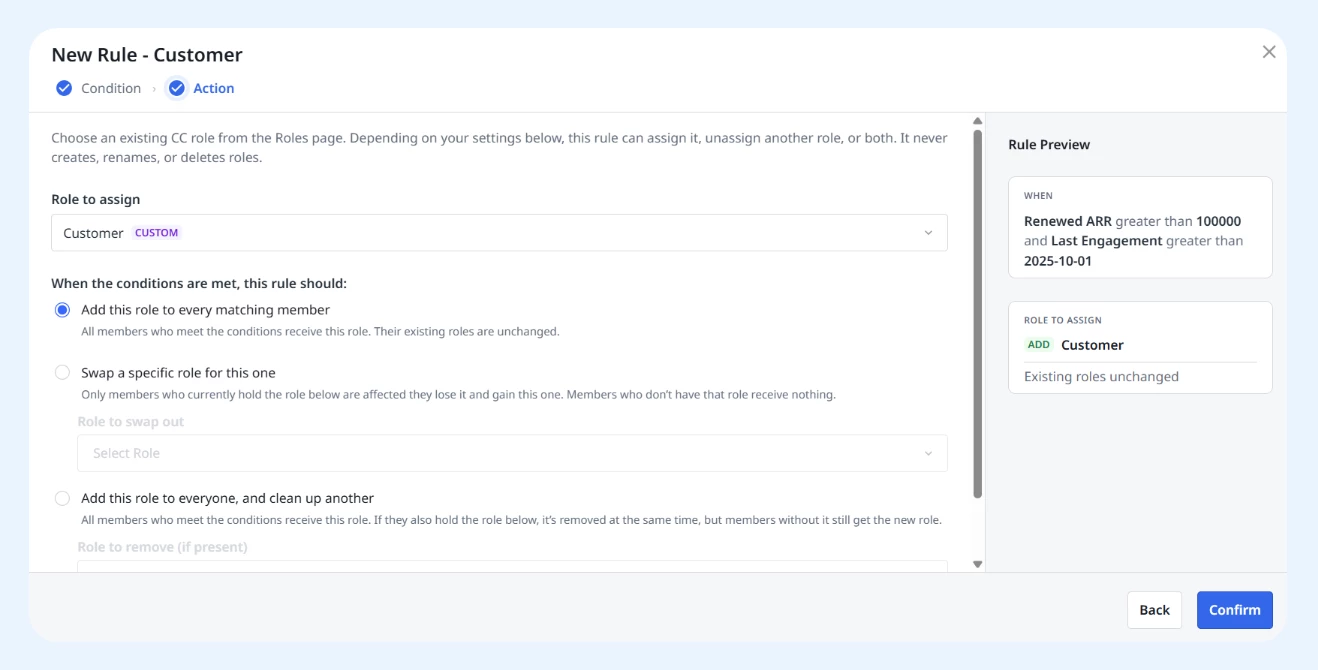
Supported field types in rule conditions include Text, Number, Date, Date & Time, True/False, Email, Currency, and Percentage. Picklist, Multi-Select Dropdown List, Rich Text Area, URL, Lookup, Who Id, and What Id fields aren't currently supported. Rule assignment currently supports Custom Roles only, not Primary Role.
Map Community Profile Fields to CS Data More Intuitively
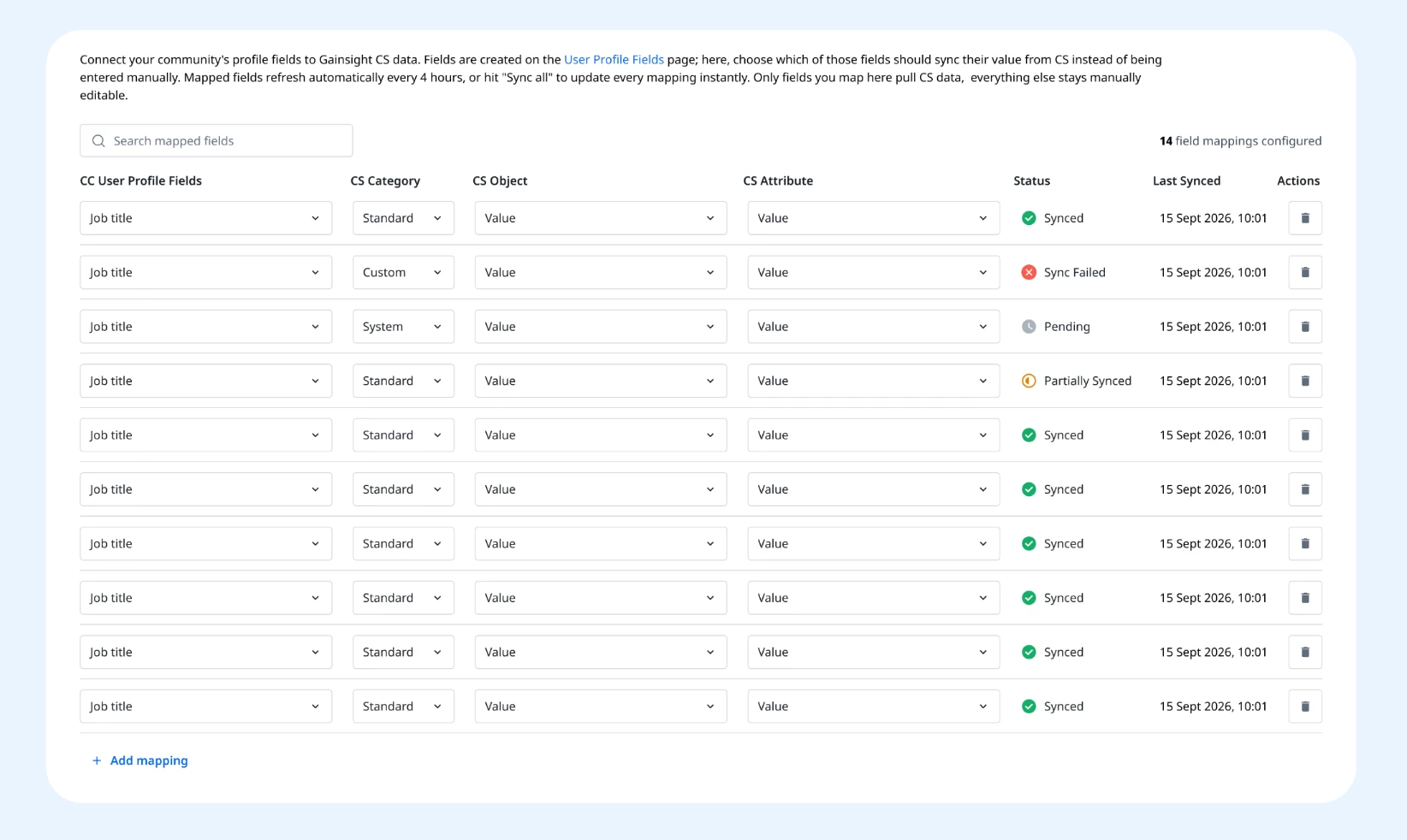
The User Profile Fields Mapping page now works in a more intuitive order. Select a CC User Profile Field first, then narrow down to a CS Category (System, Standard, or Custom Object), and finally the specific CS Object and Attribute to populate it. Mapped fields sync automatically every four hours, or click Sync All to refresh every mapping at once. Fields not added to this list stay manually editable as always.
Translate Category Titles Across All Enabled Languages
Admins can now generate AI-powered translations for category titles directly from category settings, so members see category names in their own language even when your community uses one shared set of categories instead of separate categories per language. A Translate button above each category title shows how many enabled languages are still missing a translation, and one click applies translations across all of them. Each translated title opens in an editable modal so you can adjust wording, save it as is, or retranslate later. Because translations are saved as reusable phrases, the localized title also appears anywhere the category is referenced, including breadcrumbs.
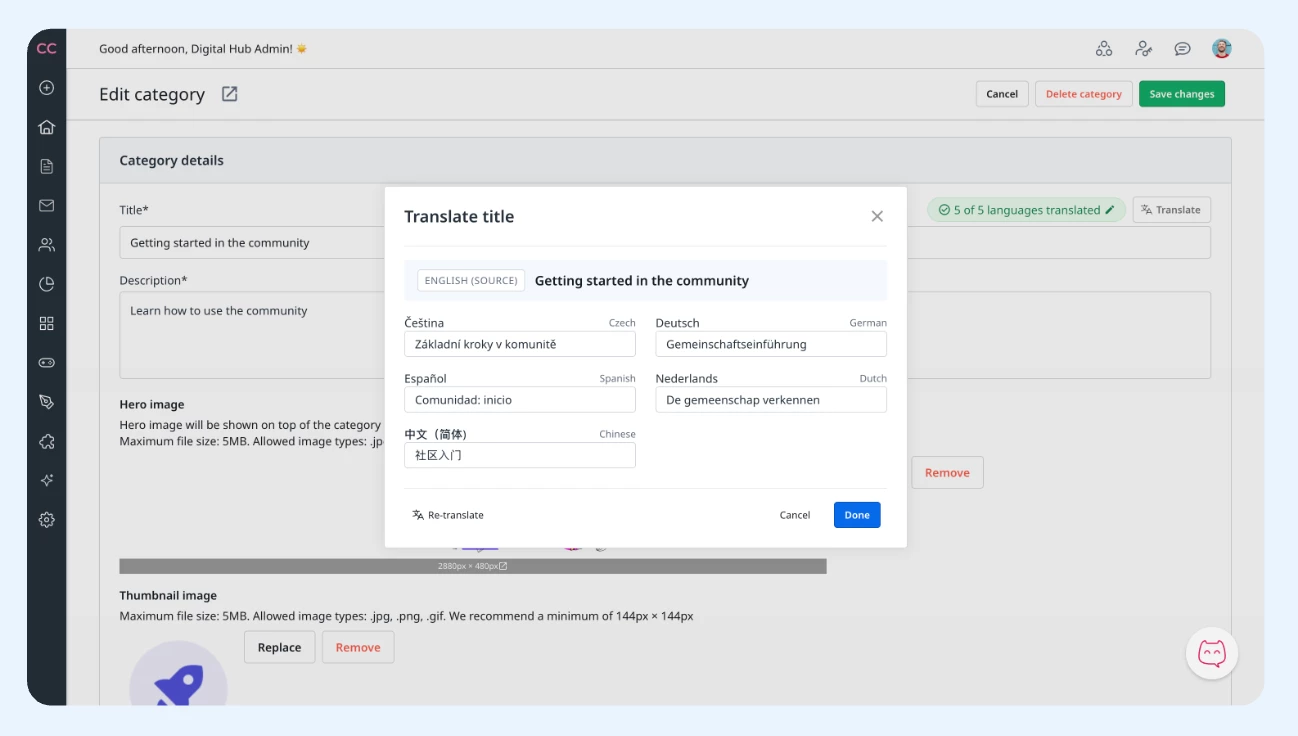
This capability applies only when language-specific categories are disabled, and only for enabled languages. Existing language-specific category titles aren't affected.
Customize Content Types Counted in the Self-Service Score
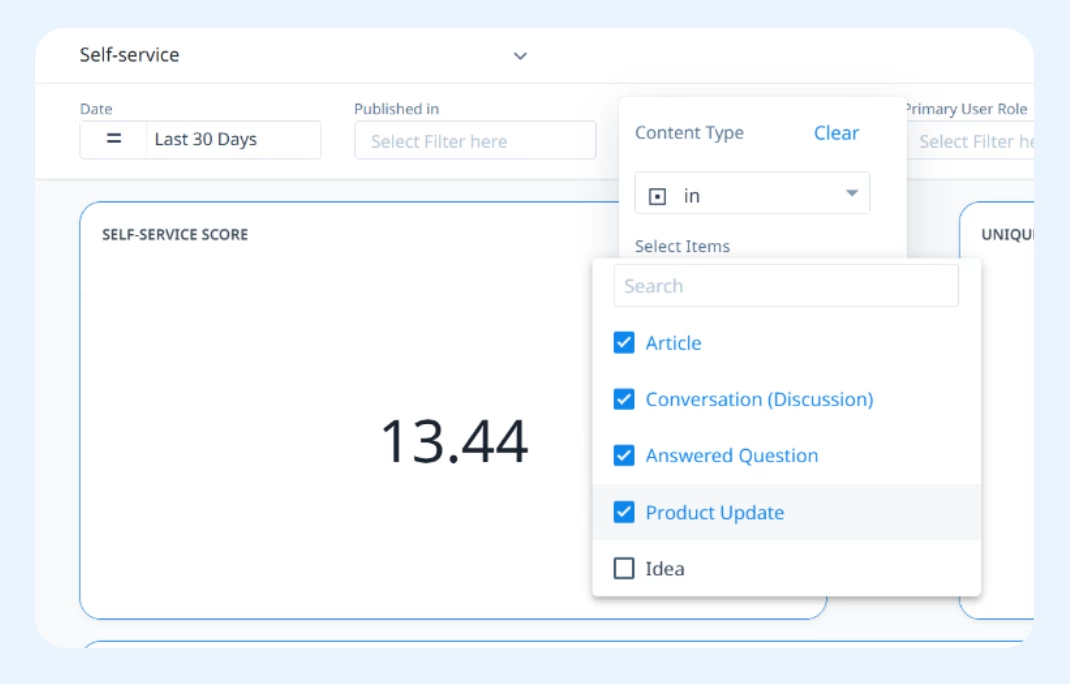
The Content Type filter behind the Self-Service Score now offers five content types to choose from. Article, Conversation, Answered Question, and Product Update are selected by default, with Idea available as an opt-in addition. If you choose "Yes" when prompted "Do you want Gainsight to remember the modifications you made to the dashboard?”, your chosen content types are saved and remembered going forward. The Groups filter now also aligns with the Content dashboard's Published In versus Groups split.
Enabling Product Update as a default selection changes existing Self-Service Scores when this release ships. If you'd like to preserve your previous score definition, adjust the Content Type filter to exclude Product Update. Note that this enhancement is only available in New Dashboards.
Read Community User Data in the Browser with the Web SDK
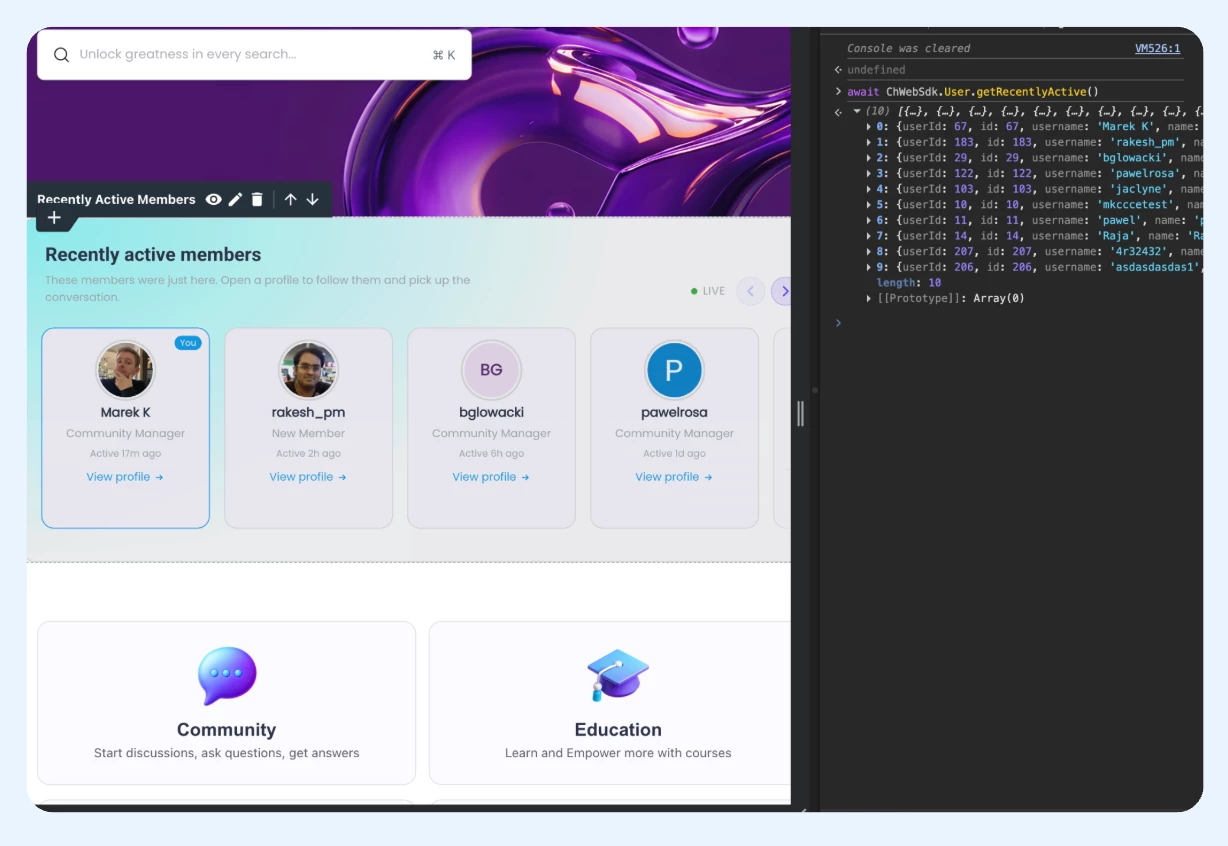
The Community Hub Web SDK (ChWebSdk) can now return the current viewer and look up community members directly from browser code, so widgets, scripts, and stylesheets no longer need a connector or a workaround to know who's viewing a page.
Use ChWebSdk.Context.User() to get the signed-in user, and the ChWebSdk.User.* methods to fetch, list, filter, and search members, including custom profile fields, batched lookups, and mention/autocomplete support. Every method returns the same unified user model, and signed-out visitors resolve to a predictable guest projection rather than nothing at all.
For more information, refer to the User Context documentation in the Developer Portal.
Introducing Feature Previews for Gainsight CC
We're changing how we release front-end changes to your community. Previously, new features that touch layout, styling, or markup would be enabled automatically. Now, they arrive switched off and go through a preview window first. For a limited time you can preview and test them on your community before they become standard for everyone.
Feature Previews live in Control > Settings > Betas and Previews, alongside your existing Open Betas, and each one stays active for a limited window before becoming standard for everyone.
👉 Read the full announcement in Community to learn how Feature Previews work and see what's live now.
Getting Started
-
Developer Studio CLI: Available now via the Developer Portal documentation
-
CS-Based Role Assignment: Configurable in Control; see the Configure CS-Based Role Assignment article
-
Profile Field Mapping: Update your mappings in Control's User Profile Fields Mapping page
-
Category Translations: Available in category settings for communities with language-specific categories disabled
-
Self-Service Score filters: Adjust in the Self-Service Dashboard settings
-
Web SDK User Context: Available now via the Developer Portal's User Context documentation
-
Feature Previews: Found in Control > Settings > Betas and Previews
👉 Check out the Release Notes for more details.
💬 Have a question for our team? Drop a comment below!