daniel.boon
Helper ⭐️⭐️⭐️
January 24, 2019
Update

Moderator primary role permissions have been reduced

Related products:CC Users & Roles
  • January 24, 2019
  • 20 replies
  • 1799 views
  • Update Thu 11 July: I've updated this article to reflect the fact that all moderator permissions we intended to remove have now been removed.
  • Update Wed 24 April: we're going to start removing permissions from the moderator primary role this week (sorry for the delay - I think my advance notice was a bit too in advance).
Read on for more details, and to see what actions you can take if you don't want this change to affect your moderation team!


What has changed?


We've removed the following permissions from the moderator primary role.

Here's a visual showing how permissions have changed for moderators in Control - everything in green is still available for moderators; everything in red has been removed for moderators.
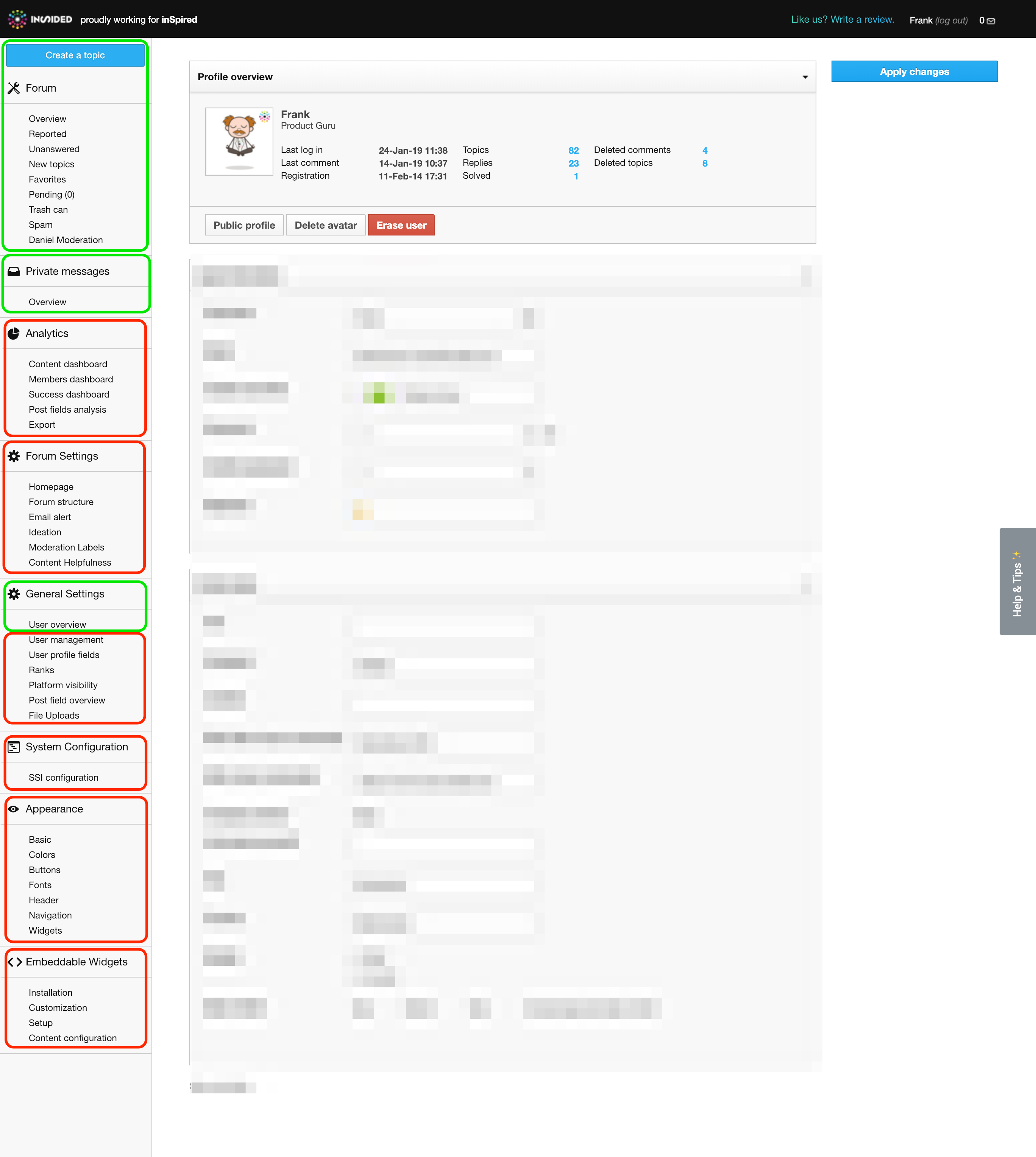


Click each spoiler below to see the details of the permissions that moderators have lost access to:

Analytics
  • Content dashboard
  • Members dashboard
  • Success dashboard
  • Post fields analysis
  • Export


Forum settings
  • Homepage
  • Forum structure
  • Email alert
  • Ideation
  • Moderation Labels
  • Content Helpfulness


General settings
  • User management
  • User profile fields
  • Custom User Roles
  • Ranks
  • Badges
  • Phrases
  • Platform visibility
  • Post field overview
  • File Uploads
  • Spam prevention
  • Integrations


System configuration
  • SSI configuration
  • Third-party Scripts


Appearance
  • Basic
  • Colors
  • Buttons
  • Fonts
  • Header
  • Navigation
  • Widgets


Embeddable widgets settings
  • Installation
  • Customization
  • Setup
  • Content configuration


Read on to see how you can adapt to this change if you want your moderators to maintain their access to these permissions.

Why did this change?

  • The Moderator primary role was not clearly distinguishable from the Community Manager/Administrator role.
  • By stripping away these default permissions from the Moderator primary role, the role has become much more flexible.
  • It means you can choose to add moderators with access to the bare minimum features needed for moderation.
  • However, if you want your moderators to have more access, you can simply grant them the extra permissions in a custom user role.


I'd rather keep my moderator's permissions the way they are right now. How can I achieve this?

This is really easy to do - just follow the steps below.

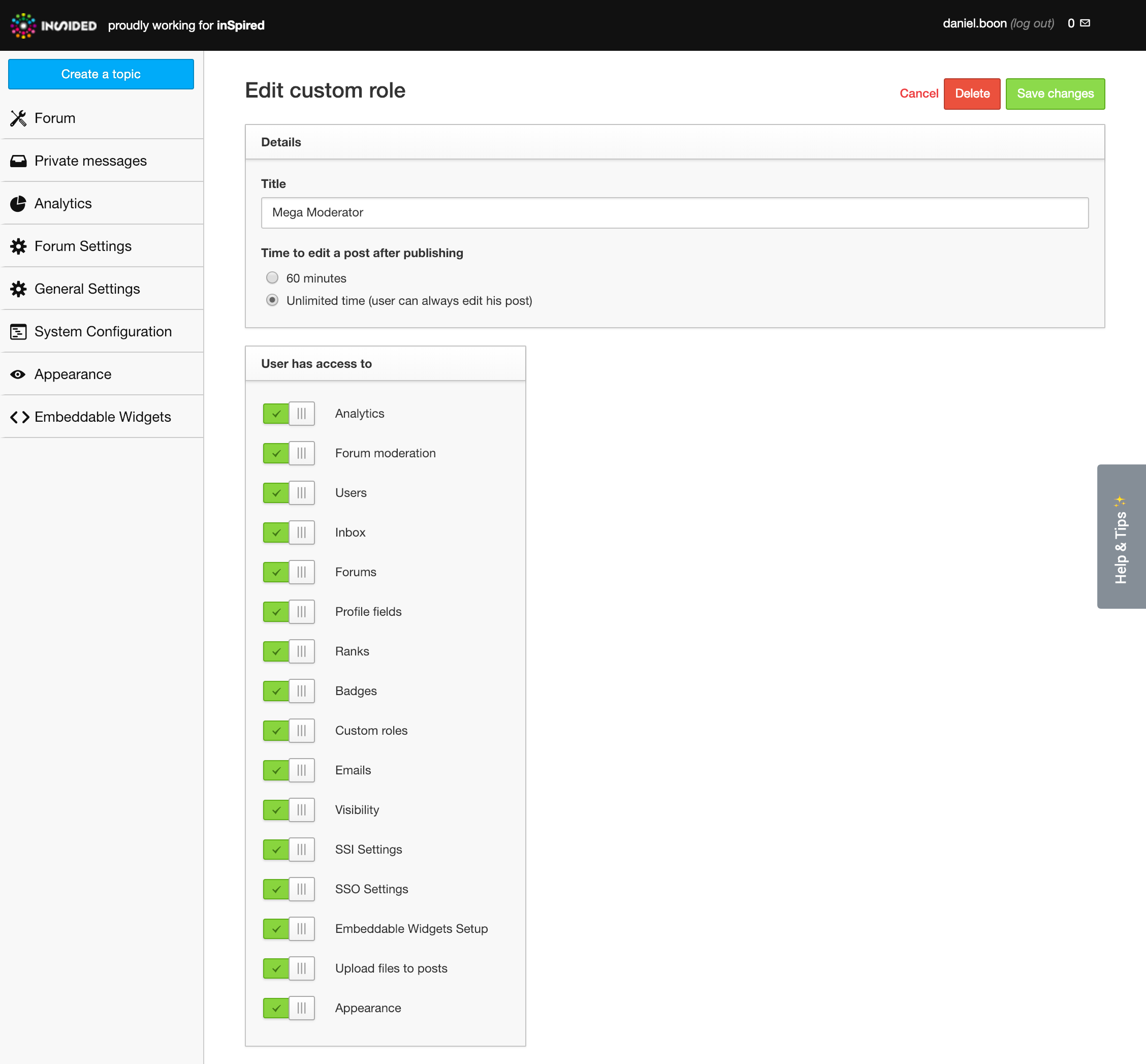
  • Create a custom user role as follows


  • Find the moderators you want to grant permissions to via Control > General Settings > User Overview and switch on the custom user role you created for them.
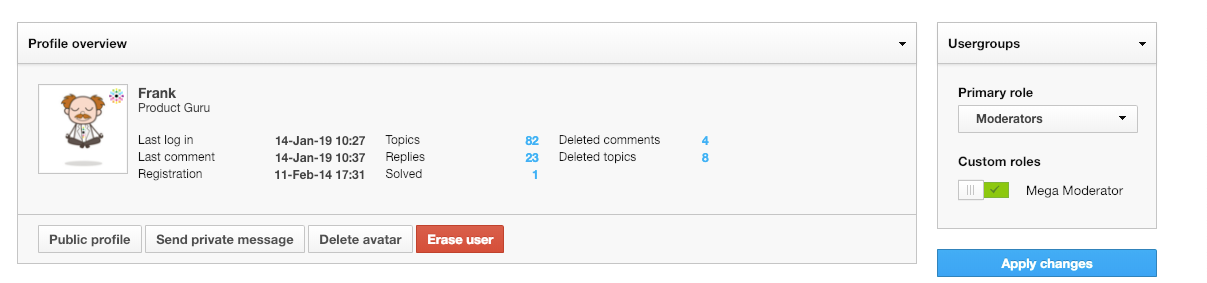


Voila! Please note that the following options still won't be available, even with the custom user role described above. Let us know if you think this'll be a problem for you in the replies.Forum settings
  • Content Helpfulness
General settings
  • File Uploads
  • Spam prevention
  • Integrations
System configuration
  • Third-party Scripts
Embeddable widgets settings
  • Installation
  • Customization
  • Content configuration


Any other questions/feedback? Let us know in the replies! 😁

20 replies

freydrew
Contributor ⭐️⭐️⭐️⭐️
June 13, 2019
Would really love for some of these permissions to be updated. Our mods have a bit too much access at the moment that is making me feel a bit unsettled.
Drew -- Senior Communications Manager
daniel.boon
Helper ⭐️⭐️⭐️
June 14, 2019
Hey Drew,

We encountered a few issues with removing the additional permissions, so we're going to resolve those first before continuing.

Just to check - anything in particular that you definitely don't want mods to have?
inSided product alumnus
freydrew
Contributor ⭐️⭐️⭐️⭐️
June 14, 2019
Thanks Daniel. Pretty much everything that you've highlighted in the screenshot in red, I would rather not give our Mods access to.
Drew -- Senior Communications Manager
Suvi Lehtovaara
Helper ⭐️⭐️
June 17, 2019
@daniel.boon So what's the situation with these permissions?

Our Mods already had these permission removed, has the change been reverted?
https://yhteiso.elisa.fi/
daniel.boon
Helper ⭐️⭐️⭐️
June 17, 2019
@Suvi Lehtovaara

Here's the current situation:

We've removed the relevant permissions from these categories:
  • General settings
  • System configuration
  • Appearance
We still plan to remove permissions in the following categories from the moderator role:
  • Embeddable widgets
  • Forum settings
  • Analytics
Hope that helps 🙂
inSided product alumnus
daniel.boon
Helper ⭐️⭐️⭐️
July 11, 2019
Update: we've now removed the embeddable widgets, forum settings, and analytics permissions for moderators, as planned. We also resolved the issues we ran into by removing the earlier permissions.

So now when you're a moderator, you only have access to the following by default:
  • Everything under 'Forum' (i.e. content moderation) + new topic creation.
  • Private messages.
  • User overview (under 'General Settings').
inSided product alumnus
tiffany.oda
Contributor ⭐️⭐️⭐️⭐️⭐️
July 29, 2022

Hey inSided Team, is there a way we can get an updated version of this article? Looks like the latest screenshots are with the old Control UI, I’m trying to get a clear picture of what perms in Control our Moderators and Community Managers have. Our team and various stakeholders who need access to Control is growing rapidly and I’m finding myself a bit confused while provisioning them to make sure they have the right level of access and permissions. 

Tiff
Eva
Helper ⭐️
September 4, 2023

Hi @daniel.boon,

I’m asking for the same thing as @tiffany.oda :
Can you update this article? 🙂 The screenshot looks quite old.

And what about this idea:
Provide a  glossary of main/relevant terms used in Insided/Digital Hub (UI) here in the Community
[including in this case e.g. the exact/sharp differences between moderator, admin, community manager roles] so users don’t need to search the Community (=many, many articles, infos etc.) to “combine” their solution from several answers (I landed here via a link in another article).
Thanks!

echen
Contributor ⭐️⭐️
February 23, 2024

Hey Gainsight team, 

Can someone confirm whether Moderator has access to the Analytics (specifically Export) tab? 

Thanks!

Program Manager | LinkedIn Sales Solutions Community
Contributor ⭐️⭐️⭐️
April 15, 2026

Hi Gainsight team, 

How about allowing customer to adjust themselves what Custom Moderator role can/can’t access? Any plans here?

Thanks a lot,
Lina