

Yoeri
Gainsight Employee ⭐️⭐️⭐️
February 22, 2019

Parent categories – Launching April 2, 2019
  • February 22, 2019
  • 26 replies
  • 1243 views
Parent categories – Launching April 2, 2019
In the past months we have released a number of improvements which help you guide your users to the most relevant content. We believe that our next improvement will also be a major step forward in making access to the most relevant content much easier and more efficient.

By introducing parent categories as a clickable page, you will soon be able to offer users a new area which includes all content from all categories in one overview. Difficult to explain, so maybe it’s better to define what we mean with (parent) categories and give some examples to avoid any confusion.

Category, Forum, Board

When a user creates a topic he needs to select a place where it will be posted. You might have different names for this place (category, forum, subforum, board, section, etc), but for clarity we are calling it a category. To make sure we’re all speaking the same language we have created a visual that explains what we at inSided refer to as parent categories and normal categories.
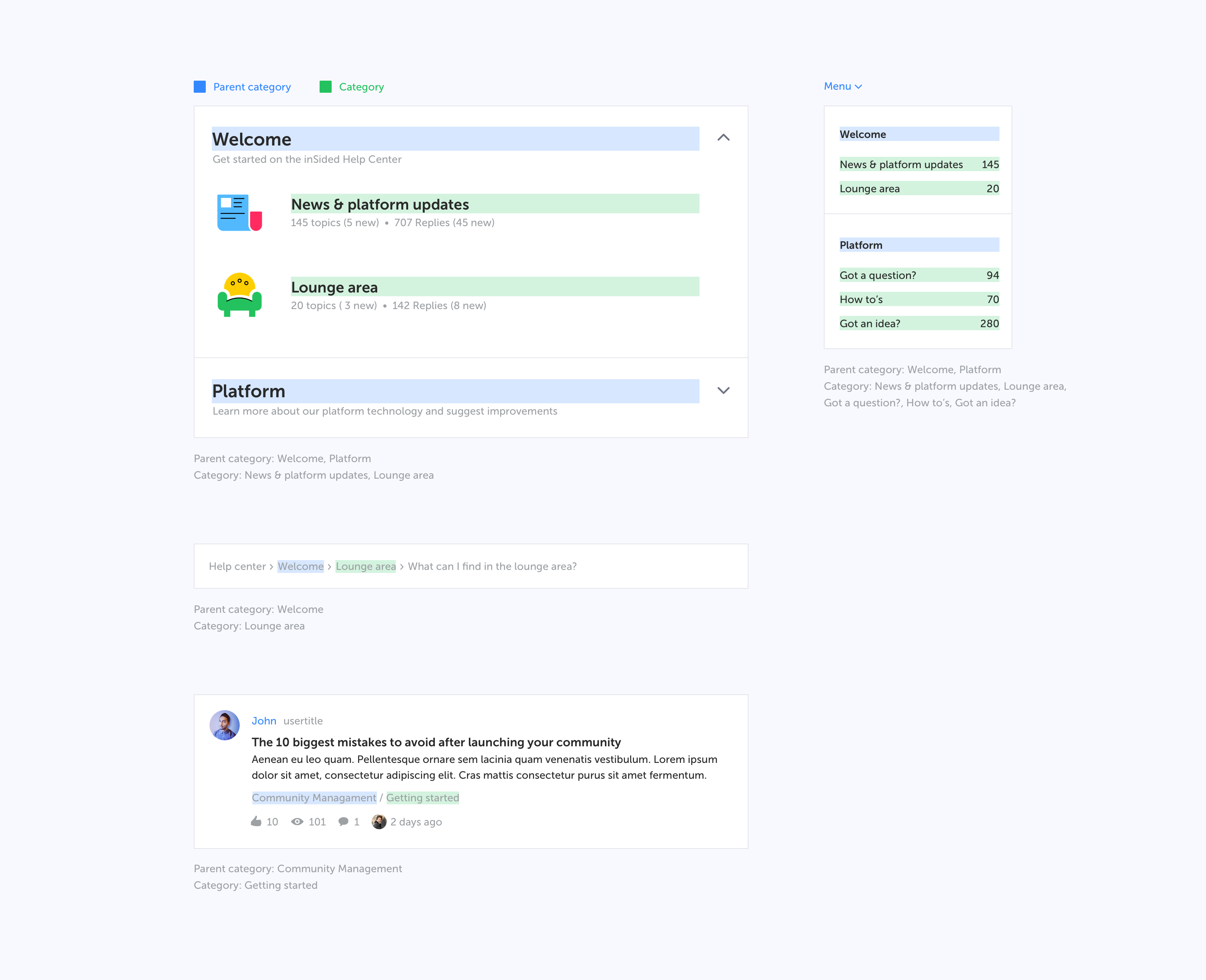
Various examples on where (parent) categories are displayed in the platform


Why are we doing this?

We see that specifically larger, mature communities with many categories would like to offer their (super)users a better experience while navigating the community. A parent category usually includes many related categories which all cover a product or a specific field of interest. Instead of having them change categories just to be up-to-date with the hottest discussions and latest questions, a separate parent category page with all content combined makes more sense.

But this does not just provide value for large or established communities, it’s valuable for all shapes and sizes.. You as a community Manager are now able to structure content better, lowering the barrier between different categories in a knowledge base, improving the overall browsing experience.

Last but not least: integrations. Why share a link to the entire community on a product page, when a link now can also present all FAQs, discussions and ideas in a single page? We would recommend you to start reviewing your integration plan to maximize the added value for your users.

What will change?

Throughout the platform changes will be made to facilitate and show this new parent category:

  • Parent categories become a destination page that users can visit
  • Parent categories will become clickable in the navigation (menu dropdown and homepage category stream)
  • Parent categories will be listed in the topic streams
  • Parent categories will be listed in the breadcrumbs
  • Naming in Control

FAQ


Q: What will this new parent category page look like?
A: Example of a parent category page "Community Management" with multiple categories “Getting started, Moderation tips & tricks etc.”
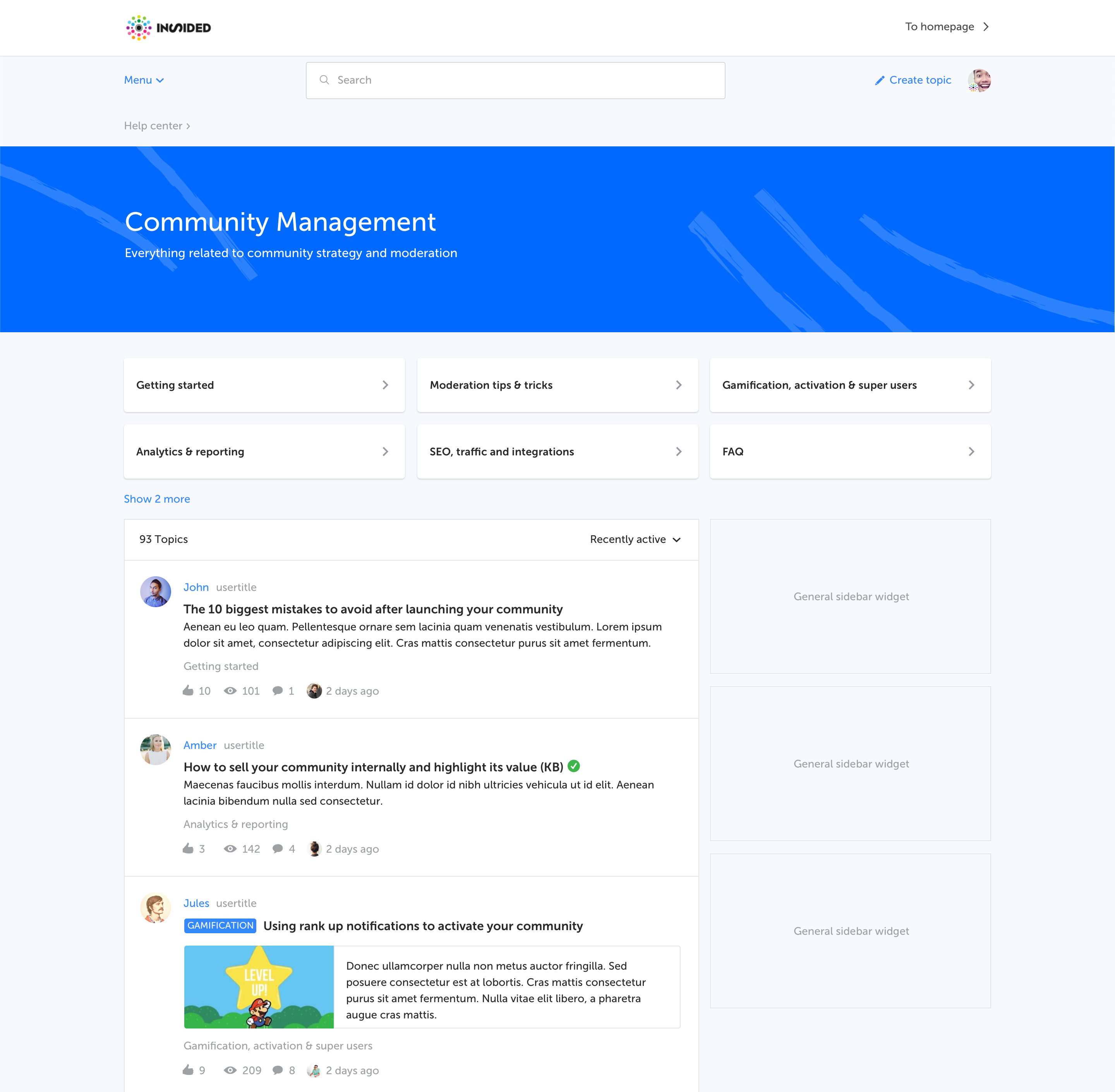

Q: Which elements are shown?
A: Hero banner with title and description
Categories as navigation cards
Topic list displaying topics from all categories sorted by recent activity
General sidebar

Q: Do I need to enable this new page for my users?
A: No, the moment we enable this parent category page it’s always accessible for your users through the homepage, menu, breadcrumbs or direct URL.

Q: Do I need to prepare anything?
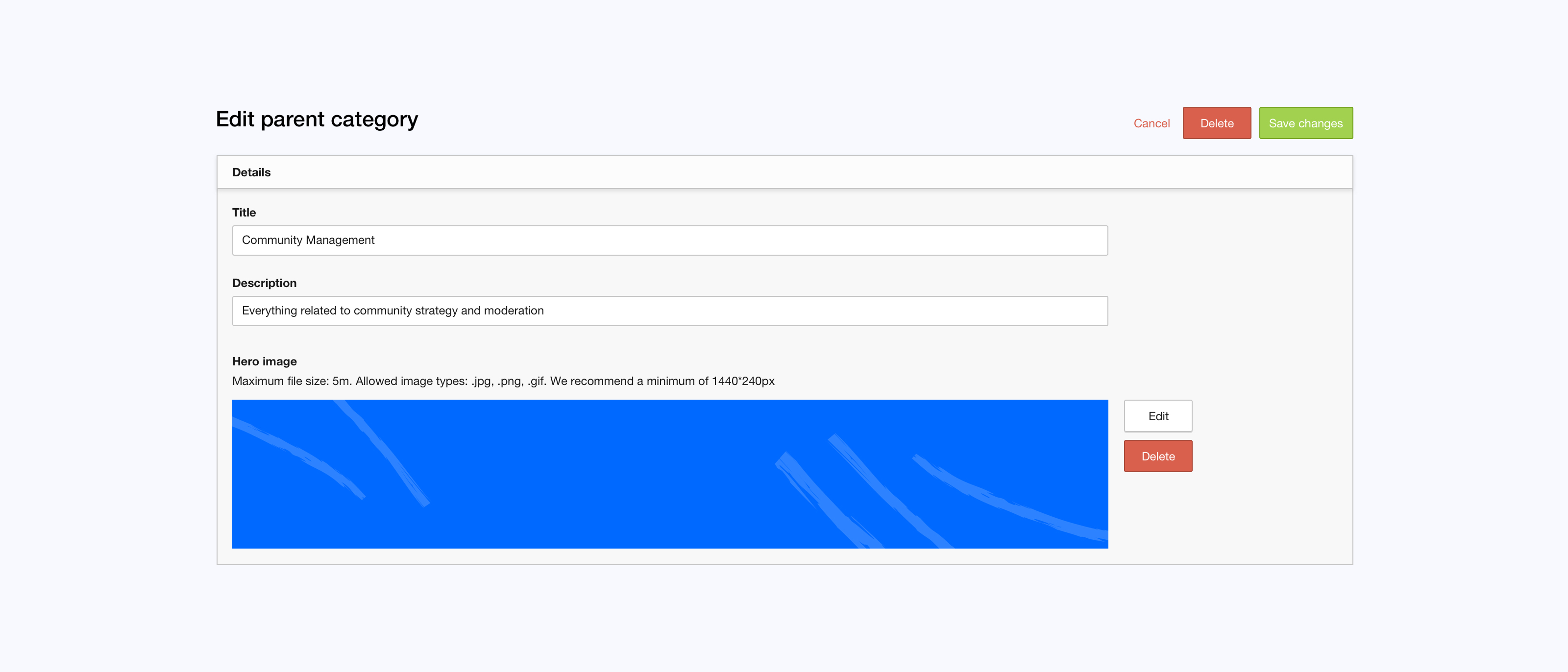
If you want to display a banner/image on top of the parent category page you have to provide one in the Control environment.
Q: When will this be enabled on my production environment?

April 2, 2019


Test on staging

Although we're still working on this functionality we enabled the parent category page on your staging environment already. There you can see and test all the changes mentioned above yourself, right now.

We're looking forward to see the new categories in your platform. If you have any feedback or spot something unusual please let us know.

26 replies

Yoeri
YoeriAuthor
Gainsight Employee ⭐️⭐️⭐️
February 27, 2019
But we want to show the description text on the new landing page, because of user-friendliness and SEO.

Got it. This is not something we originally planned for but you have a valid point here. We'll need to investigate this :)

do you have a clearer roll-out date for this?

I do not have an exact release date yet. When we set on the release date we'll communicate it here on inSpired prior to the release 🙂
Group Product Manager, Customer Communities
bjoern_schulze
Helper ⭐️⭐️⭐️
March 1, 2019
Minor bug: The (preview) banner image isn't showing in Control Panel when I come back to the "edit forum" page. Instead it shows the "broken image" icon. (The actual banner image in frontend is not affected, it works as intended.)

Tested on Live and Staging, so I assume it's a global issue.

Suvi Lehtovaara
Helper ⭐️⭐️
March 4, 2019
Hi,
one more question, we have 4 sub-forums and looking in staging it add 3 on the first row and 1 on the second row, is their a function to move the 3 sub-forum to the second row so that we have 2 sub-forums on each row?

That would look better?.


@Claudia.Willunat We also have a category with 4 sub-forums - it would definitely look better with 2 on a row :)


do you have a clearer roll-out date for this?
I do not have an exact release date yet. When we set on the release date we'll communicate it here on inSpired prior to the release :)


@Yoeri do you have a rough estimate? Next week, next month, after summer? And how much prior you will communicate?

I, for one, want to pick out hero images etc before hand so I need some time to prepare for this 🙂
https://yhteiso.elisa.fi/
Julian
Gainsight Employee ⭐️⭐️⭐️
March 4, 2019
Hey!

Yoeri is not in the office this week, but we plan to release this "a few weeks from now". 🙂 I cannot say if it is rather four weeks than two, but I hope that this will give you enough time to work on those hero images! :)

Cheers,

Julian
I follow my nose, it always knows
Suvi Lehtovaara
Helper ⭐️⭐️
March 5, 2019
Hey!

Yoeri is not in the office this week, but we plan to release this "a few weeks from now". 🙂 I cannot say if it is rather four weeks than two, but I hope that this will give you enough time to work on those hero images! :)

Cheers,

Julian


Thanks for this - this way I can start working on this rather now than later 😉
https://yhteiso.elisa.fi/
Ditte
Helper ⭐️⭐️
March 14, 2019
I'm looking forwards to utilizing this across the majority of our current parent categories, but I'm already foreseeing a bit of a challenge with our 'Other Language Forums" area.

When this will be turned on by default, we see a benefit in having a page where we can direct all non-English speaking users, for them to find a place to discuss in their preferred language. We might even consider starting additional languages as this new feature will be super helpful!

However, with all the different language topics being mixed together in one overview, I can foresee a glorious pot of confusion which is highly unlikely to help anyone. So, would it be possible to add in an option to either section off the sub categories' topic streams, or turn it off sub category by sub category? For instance as part of the setup of each sub category in the Forum structure overview in control: "Show content stream in parent category (ON / OFF)"

In addition to that, with our separate German, Dutch and French communities, I would love to be able to link to those from that specific parent category page as it will all be related to different languages.

Additional question: Would it be possible to cross reference sub categories in these parent pages? For instance our "Getting Started" parent category can easily also incorporate sub categories from other parent categories, namely "Amazon Alexa and Sonos", and "Home Theater".

Cheers,
Ditte
Currently rocking the Sonos Communities
Yoeri
YoeriAuthor
Gainsight Employee ⭐️⭐️⭐️
March 18, 2019
I'm back and have some fresh updates from the development team

Release date

We didn't set a release date yet. Later this week you can expect on update on the exact release date. Our aim is to release the extra category layer this quarter.

We worked on the following items:

  • Sticky topics won't longer show on parent category pages
  • We fixed a visual UI bug where longer category titles broke the navigation cards design
  • New parent category page will be listed in the breadcrumbs
  • Breadcrumbs will show the active page
  • We updated the responsive behaviour of the category cards. 4 categories will be shown in 2 rows with 2 categories
  • We improved the layout of (parent) category pages that don't have an hero image

Other updates and answers to your questions


Are there any plans to give us an option to hide the description on the homepage?

Yes, we refined your idea and want to go for it. We don't know if we can include this in the first release already

The (preview) banner image isn't showing in Control Panel when I come back to the "edit forum" page. Instead it shows the "broken image" icon.

We'll fix this

So, would it be possible to add in an option to either section off the sub categories' topic streams, or turn it off sub category by sub category?

No, this is not something we planned for. We'll have to discuss this with the development team to see the possibilities. Could you give some more details on the exact use case for this? As far as I understand there is a parent category 'Other languages' which holds multiple categories for each other language. Having one overview with a mixed of different languages would be confusing for the end user?

With our separate German, Dutch and French communities, I would love to be able to link to those from that specific parent category page as it will all be related to different languages.

We provide the option to place URL's in the category description. This way you can link to your separate communities from a (parent) category page. See "Place URLs in category description" in this topic for more information.

Would it be possible to cross reference sub categories in these parent pages?

No, this is not possible, categories can only have one parent. Parent categories will display categories that were created under its parent.

Keep an eye on inSpired for more updates.
Group Product Manager, Customer Communities
Yoeri
YoeriAuthor
Gainsight Employee ⭐️⭐️⭐️
March 22, 2019
April 2 we will enable parent categories on your production environments. Once enabled we will notify you here via inSpired.
Group Product Manager, Customer Communities
Claire
Contributor ⭐️⭐️⭐️
March 22, 2019
Will we be able to add a set of quicklinks to the parent category pages similar to what we get for the home page but with different content?

Also, will we be able to customize (some of) the sidebar widgets for each parent category page to display content that's only relevant to that category?
Suvi Lehtovaara
Helper ⭐️⭐️
March 25, 2019
I'm back and have some fresh updates from the development team


So, would it be possible to add in an option to either section off the sub categories' topic streams, or turn it off sub category by sub category?
No, this is not something we planned for. We'll have to discuss this with the development team to see the possibilities. Could you give some more details on the exact use case for this? As far as I understand there is a parent category 'Other languages' which holds multiple categories for each other language. Having one overview with a mixed of different languages would be confusing for the end user?


So @Ditte and @Yoeri, we also have an area for "Other languages" and I am trying to figure out what will it look like.

Have I understood correctly that it will look like this


and then there will be a topic stream with topics from both sub categorys ---> meaning that there will be topics in two different languages mixed together?

And if I understood correctly, @Ditte - you suggested that could we perhaps have an option to have separate topic streams for each sub category? If so, I think that would perhaps be a good idea :)

And please, do correct me if I've understood incorrectly 🙂
https://yhteiso.elisa.fi/