

Jessica.Quazza
Contributor ⭐️⭐️⭐️
January 30, 2025
Release

Stay Connected, Organized, and Engaged: What’s New in Customer Communities
Related products:CC Analytics & ReportingCC CommunityCC CustomizationCC IdeationCC Notifications & SubscriptionsCC Product Updates
  • January 30, 2025
  • 14 replies
  • 456 views
Stay Connected, Organized, and Engaged: What’s New in Customer Communities

Great communities are dynamic spaces where conversations thrive, ideas flow, and solutions come together. Our latest release includes new features and enhancements that are designed to strengthen how your community connects and discovers content making it easier for you to cultivate this dynamic space.

Let’s take a closer look at each feature & enhancement:

Notification Center

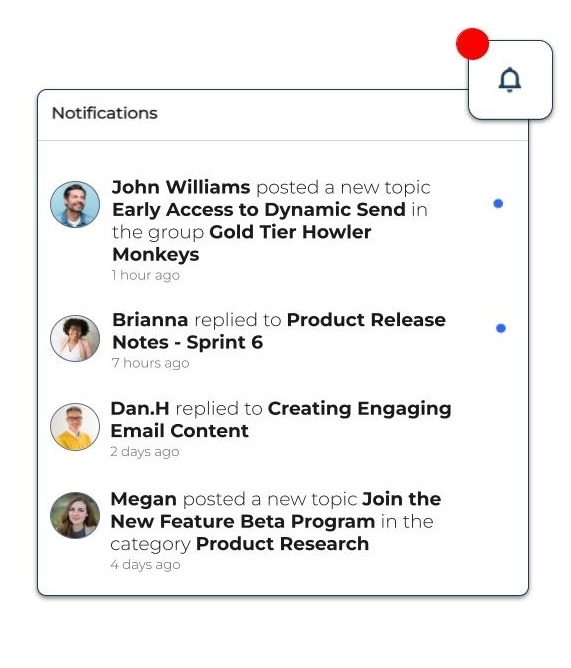
Never miss a beat with the new Notification Center, designed to keep your community members informed in real-time. Accessible directly from the navigation bar, users will receive updates on replies, mentions, and new activity. This enhancement helps drive engagement by keeping users actively participating in discussions and responding to important conversations, improving the overall community experience.
Hierarchy in Product Areas

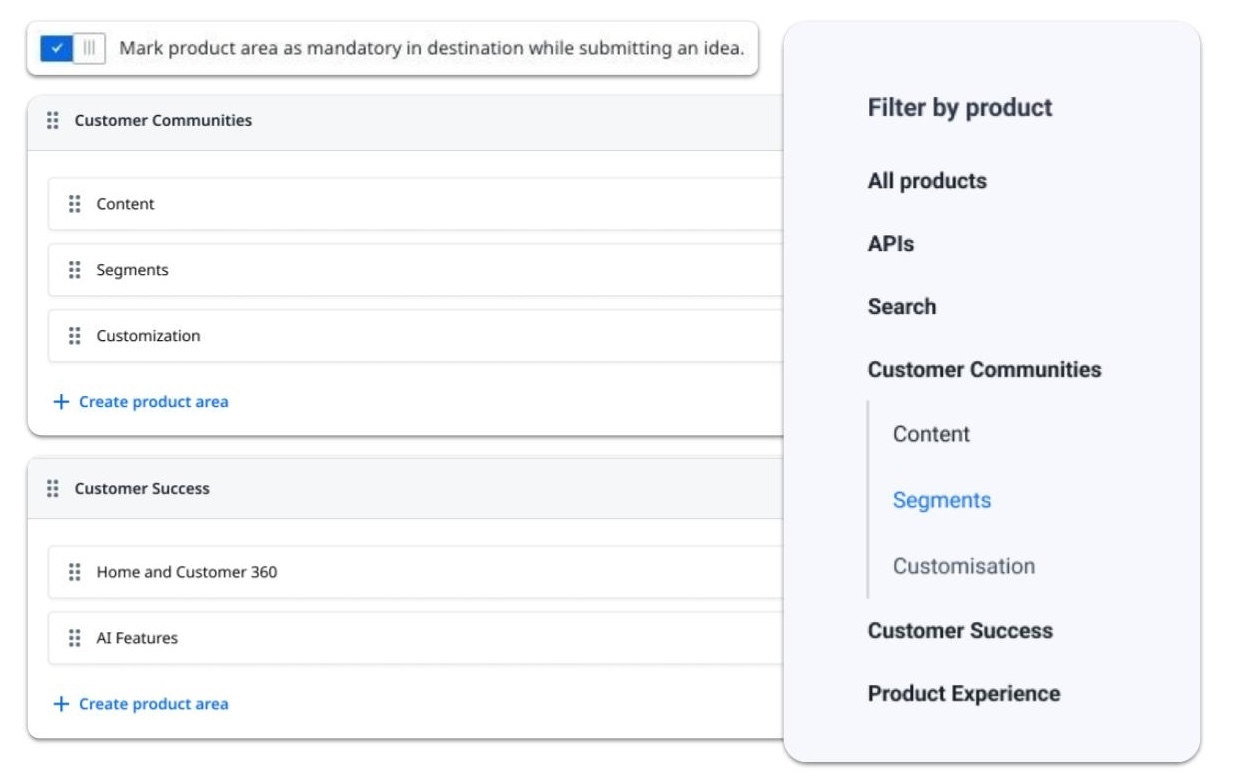
Organizing content across multiple products just got easier. With the new 2-level hierarchy for product areas, community managers can categorize Ideas and Product Updates under both products and their associated features. This structure simplifies navigation for your users, allowing them to filter and find relevant content faster. 
To make idea submissions even smarter, you can now require users to tag ideas with a product area, ensuring every submission is properly categorized—saving you valuable time and keeping your community organized.
User Interface Refresh

We’ve given your community a sleek, modern refresh to make navigating and engaging even easier. The refresh includes:

  • Read/Unread Visual Indicators: Unread topics and replies now stand out in bold, helping users focus on new content.
  • Build Bar UI Updates: A modern design has been introduced for a consistent, professional feel across the platform.
  • Simplified Customization: The “Customize” button is now renamed to “Edit Layout,” making the entry point to customization mode clearer.


​​​​​​Smarter Spam Prevention

Protect your community’s integrity with smarter, more robust spam prevention tools. We’ve improved our integration with Akismet to include:

  • Contextual Intelligence: Tags from parent topics are now sent to Akismet, ensuring replies align with the context (e.g., cooking tags vs. unrelated spam topics like software).
  • Accurate User Agent Identification: Submissions now include the actual user’s browser information instead of internal system data for better spam classification.
  • Enhanced Detection with Post Titles: Titles are now included in Akismet submissions, providing a more complete context for spam evaluation.
  • Privacy-Compliant Spam Reporting: IP addresses and email data for manually marked spam are now hashed, improving data privacy and detection accuracy.


Zero Reply Filter in the Dynamic Content Widget

Help ensure no question goes unanswered with the new Zero Reply filter in the Dynamic Content Widget. This enhancement makes it simple for community managers and moderators to identify unanswered posts and prioritize follow-ups. By addressing unanswered questions faster, you’ll drive engagement, improve user satisfaction, and foster stronger community participation.

Related Ideas Closed:


Undo ‘Best Answer’ Solution in the Front End

We all make mistakes, and now you can fix them instantly. With this enhancement, community managers and moderators can undo a “Best Answer” designation directly from the front end. Whether it’s correcting an accidental click or updating a solution, this feature gives you the flexibility to maintain accurate and helpful responses for your community.

Related Idea Closed:


We hope these updates make managing and engaging in your community simpler and more effective. Have feedback or questions? Let us know in the comments below!

    14 replies

    Daniele Cmty
    Helper ⭐️⭐️
    January 30, 2025

    Thank you for the update!


    • Build Bar UI Updates: A modern design has been introduced for a consistent, professional feel across the platform.

    Sorry, what is the Build Bar exactly? I never heard of it.

    DannyPancratz
    VIP ⭐️⭐️⭐️⭐️⭐️
    January 30, 2025

    @Daniele Cmty First I’m hearing the phrase too. And it’s the first time it’s mentioned here on the community (according to search), so it appears to be a new modern naming convention in addition to the new modern UI. 🙃

    But I’m pretty sure it’s this:

    I think this is the Build Bar; it shows for Admins on the front end UI


    FYI: I am no longer active in this community
    DannyPancratz
    VIP ⭐️⭐️⭐️⭐️⭐️
    January 30, 2025

    I would love some documentation on how the Notification Center works. Especially in relation to notification settings and how it works (or does not) with email notifications and other user activity. 

    For example:

    1. I got an email notification about a private message.
    2. I clicked the link in the email; read the message. 
    3. Later, I noticed that I had the same notification in my notification center; it didn’t seem to clear out because I had already read the message. 
      1. Is that a bug should I report? Or is it a limitation of the current setup? 


    FYI: I am no longer active in this community
    Matthew Thompson
    Contributor ⭐️⭐️⭐️
    January 30, 2025

    @deepan -


     Feedback from our Superusers regarding the Notification Center. Potentially looks like a bug? Thanks.

    Matthew Thompson
    Contributor ⭐️⭐️⭐️
    February 3, 2025

    @deepan -

    Some more feedback from a different Superuser on iD Community, looks like progress has been made, but the right click functionality has been taken away. Can this be reintroduced? Thanks.

    Product Manager
    February 3, 2025

    Hi All,

    Thanks for your feedbacks. we have pushed a new version of In-app notification center and fixed the bugs identified. we have also published a document about Notification feature here 


    I have also took note of other feedbacks and we will review the same internally.

    Thanks

    Product Manager
    February 7, 2025

    @deepan -

    Some more feedback from a different Superuser on iD Community, looks like progress has been made, but the right click functionality has been taken away. Can this be reintroduced? Thanks.

    Thanks, Right click functionality has been fixed now.

    maxwell.malone
    Helper ⭐️
    March 6, 2025


    Hierarchy in Product Areas

    Organizing content across multiple products just got easier. With the new 2-level hierarchy for product areas, community managers can categorize Ideas and Product Updates under both products and their associated features. This structure simplifies navigation for your users, allowing them to filter and find relevant content faster. 
    To make idea submissions even smarter, you can now require users to tag ideas with a product area, ensuring every submission is properly categorized—saving you valuable time and keeping your community organized.


    Out of curiosity, will this change how these fields appear in data exports? We are pulling our ideation board data into Snowflake, and there’s a field that displays the Product Area associated with each topic. Should we expect that field to show all levels of the hierarchy strung together (e.g. Customer Communities > Segments), the most specific part of the hierarchy (e.g. Segments), or are there now multiple fields that separate Product Areas by hierarchical placement (e.g. Product Area 1 = Customer Communities, Product Area 2 = Segments)?

    We’d like to switch to using the new hierarchical structure, but want to understand what accommodate these changes data-wise before making the change!

    juan.delrio
    Helper ⭐️⭐️⭐️
    March 6, 2025

    I have a hierarchy for my enablement videos Video Vault- Deep Dive
    They show up in data as Category Title and Subforum title in the Topic Export.

    maxwell.malone
    Helper ⭐️
    March 7, 2025

    Thanks ​@juan.delrio! Unfortunately, I don’t think that’s what I’m looking for. Category Title and Subforum Title only apply to Conversation- and Question-type posts. They are always blank for Idea-type posts. Product Area would be the right field to look for, but it doesn’t show up at all in the Topic or Post report exports 😔

    I think the only way I might be able to determine if any new data fields were created through the addition of ideation hierarchies is by chatting with another user that pushes ideation data out to a data warehouse/data lake or by hearing from Gainsight themselves