

Gamification
Using rank up notifications to activate your community
This FAQ has been last updated on 07.03.19
Hi all!
You might remember receiving a private message from me after your registration here? Well of course I am not sending all of them individually. 😉 Such notifications can support the activation of your community, as they inform the user that their activity is being appreciated with a higher rank.
As some of you have wondered how to set this up properly and asked me for some tips, I have decided to share this small article with you which will show the best practices around this. Hopefully there will be also valuable information for those amongst us who have activated rank up notifications already!
Just scroll all to the end and you will find the settings:
There are two ways to notify your users that they have ranked up:
Private Message
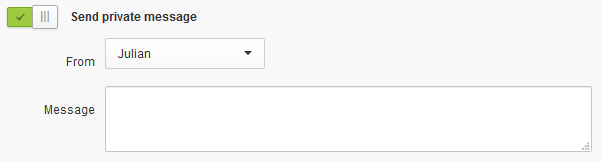
If you activate this, then the user will receive a private message (duh!). You will have to select a Moderator from whose account this private message will be send:
Inflation of notifications
Bare in mind that every private message will trigger an Email notification to the user. If a user ranks up fast and receives all these notifications in a short amount of time, it can easily feel annoying. A superuser might be happy to receive a private message, but on lower ranks I would recommend not to use it for every rank.
Dummy accounts
You might want to use a dummy Moderator account to send rank notifications from. The reason is that every private message that the system sends will also be displayed in that Moderators' inbox. If your community is seeing a lot of new registrations on a daily basis, this might have a negative impact on how you can manage your private messages. Should you decide to use a dummy account, maybe think about adding a sentence like "this is an automated message" to prevent users from responding to it.
Notifications for reaching the first rank
I am also sending a notification after the registration, to welcome new users:
While I think it is nice to give each user a welcoming message, I am a bit hesitant to recommend this for larger communities. Again it feels a bit like spam to receive a second notification right after a user has received the "your account has been activated"-notification just a few seconds earlier...
Your community probably will own more ranks than displayed here. My point is that you should match your notification settings to the level of the rank:
Starter Ranks
Even though notifications will have the biggest impact on the lower ranks, I would recommend to not send notifications too often at this stage. Users are progressing through the ranks rather quickly, so having a notification being send every second rank should be just fine. You might want to start with the second rank, due to reasons mentioned above.
Mid-level Ranks
At this stage, users are not reaching the next rank very quick any more. Therefore it is fine to send a notification for every rank. Also, at this level users are more likely to find it important which rank they own.
Superuser Ranks
As the group of superusers often is very loyal to the community (and the community team), they will really appreciate to get a private message for reaching a new rank. Celebrate their achievement with them by using a more personal tone of voice in your message, this will show that you acknowledge their achievement.
Of course this is simply my own recommendation on how to structure your notifications - there might be other, perfectly fine ways of doing it. So if you are applying another strategy, please let us know in the comments! :)
Cheers,
Julian
Hi all!
You might remember receiving a private message from me after your registration here? Well of course I am not sending all of them individually. 😉 Such notifications can support the activation of your community, as they inform the user that their activity is being appreciated with a higher rank.
As some of you have wondered how to set this up properly and asked me for some tips, I have decided to share this small article with you which will show the best practices around this. Hopefully there will be also valuable information for those amongst us who have activated rank up notifications already!
Some general stuff to start with
You can find the settings for these notifications when you select to edit (or add) a rank in the rank overview: https://YOURNAME.insided.com/settings/rank/overviewJust scroll all to the end and you will find the settings:
There are two ways to notify your users that they have ranked up:
Private Message
If you activate this, then the user will receive a private message (duh!). You will have to select a Moderator from whose account this private message will be send:
Things to consider when using this
I strongly recommend to think about the effect that sending these notifications will have on you and your users:Inflation of notifications
Bare in mind that every private message will trigger an Email notification to the user. If a user ranks up fast and receives all these notifications in a short amount of time, it can easily feel annoying. A superuser might be happy to receive a private message, but on lower ranks I would recommend not to use it for every rank.
Dummy accounts
You might want to use a dummy Moderator account to send rank notifications from. The reason is that every private message that the system sends will also be displayed in that Moderators' inbox. If your community is seeing a lot of new registrations on a daily basis, this might have a negative impact on how you can manage your private messages. Should you decide to use a dummy account, maybe think about adding a sentence like "this is an automated message" to prevent users from responding to it.
Notifications for reaching the first rank
I am also sending a notification after the registration, to welcome new users:

While I think it is nice to give each user a welcoming message, I am a bit hesitant to recommend this for larger communities. Again it feels a bit like spam to receive a second notification right after a user has received the "your account has been activated"-notification just a few seconds earlier...
Best practices
The table below is what I would suggest as a good structure for your notifications: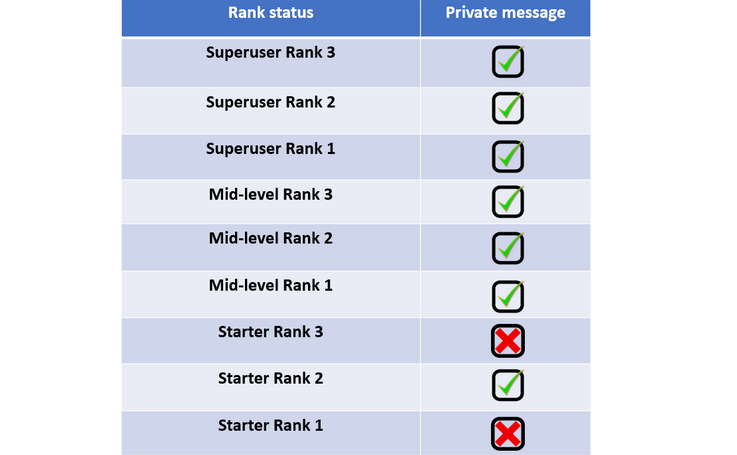
Your community probably will own more ranks than displayed here. My point is that you should match your notification settings to the level of the rank:
Starter Ranks
Even though notifications will have the biggest impact on the lower ranks, I would recommend to not send notifications too often at this stage. Users are progressing through the ranks rather quickly, so having a notification being send every second rank should be just fine. You might want to start with the second rank, due to reasons mentioned above.
Mid-level Ranks
At this stage, users are not reaching the next rank very quick any more. Therefore it is fine to send a notification for every rank. Also, at this level users are more likely to find it important which rank they own.
Superuser Ranks
As the group of superusers often is very loyal to the community (and the community team), they will really appreciate to get a private message for reaching a new rank. Celebrate their achievement with them by using a more personal tone of voice in your message, this will show that you acknowledge their achievement.
Of course this is simply my own recommendation on how to structure your notifications - there might be other, perfectly fine ways of doing it. So if you are applying another strategy, please let us know in the comments! :)
Cheers,
Julian