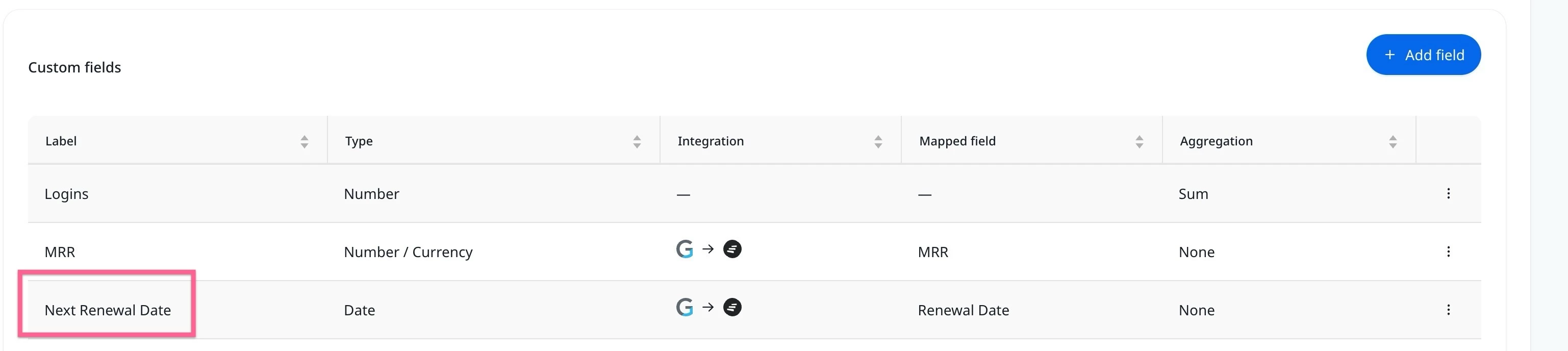
Can the field labels sync from the provider be updated? For example, field name is Renewal Date I want to add the work Next so our organization knows the specifics since many of our customres may have multiple renewal dates. This seems to be one field that is locked and we can't edit.
Great question! The fields you're seeing in Settings > Fields > Account fields under the "System fields" section are locked by default. Labels like "Renewal Date," "Revenue," "Status," etc. can't be renamed because Staircase's AI engine references them internally. You can change what source field maps to them, but not the label itself.
The workaround: create a Custom field.
Scroll below the System fields section on that same page and you should see a Custom fields area. From there you can:
Add a new custom field
Name it whatever makes sense for your org ("Next Renewal Date," "Secondary Renewal Date," etc.)
Map it to the appropriate source field from your integration
This is actually a handy solution if you have customers with multiple renewal dates, since you can create separate custom fields for each one and label them however your team needs.
You’re correct that the field is locked. What you could do is create a custom field called “Next Renewal” with the information you want populated. This is a bit of a workaround, so you’d need to do a bit of enablement, but it would be a quick solve to the problem you’re facing.
Great question! The fields you're seeing in Settings > Fields > Account fields under the "System fields" section are locked by default. Labels like "Renewal Date," "Revenue," "Status," etc. can't be renamed because Staircase's AI engine references them internally. You can change what source field maps to them, but not the label itself.
The workaround: create a Custom field.
Scroll below the System fields section on that same page and you should see a Custom fields area. From there you can:
Add a new custom field
Name it whatever makes sense for your org ("Next Renewal Date," "Secondary Renewal Date," etc.)
Map it to the appropriate source field from your integration
This is actually a handy solution if you have customers with multiple renewal dates, since you can create separate custom fields for each one and label them however your team needs.
If you already have a profile on Gainsight Community or Gainsight University, there's no need to create another one. If your email address has changed or you can't remember your login, email community@gainsight.com.
Otherwise, continue with the registration below.