Frank
Product Guru
December 5, 2017

How To Send a Private Message to Lots of Members At Once

  • March 18, 2026 at 2:51 PM
  • 10 replies
  • 686 views
  • Translate All

Need to ask the same question to all of your super users but want individual responses? Or perhaps you want to send a standard welcome to a group of newcomers who’ve just landed in your community? With mass messaging, you can send batches of individual private messages to your members.


How to send a private message to lots of members at once

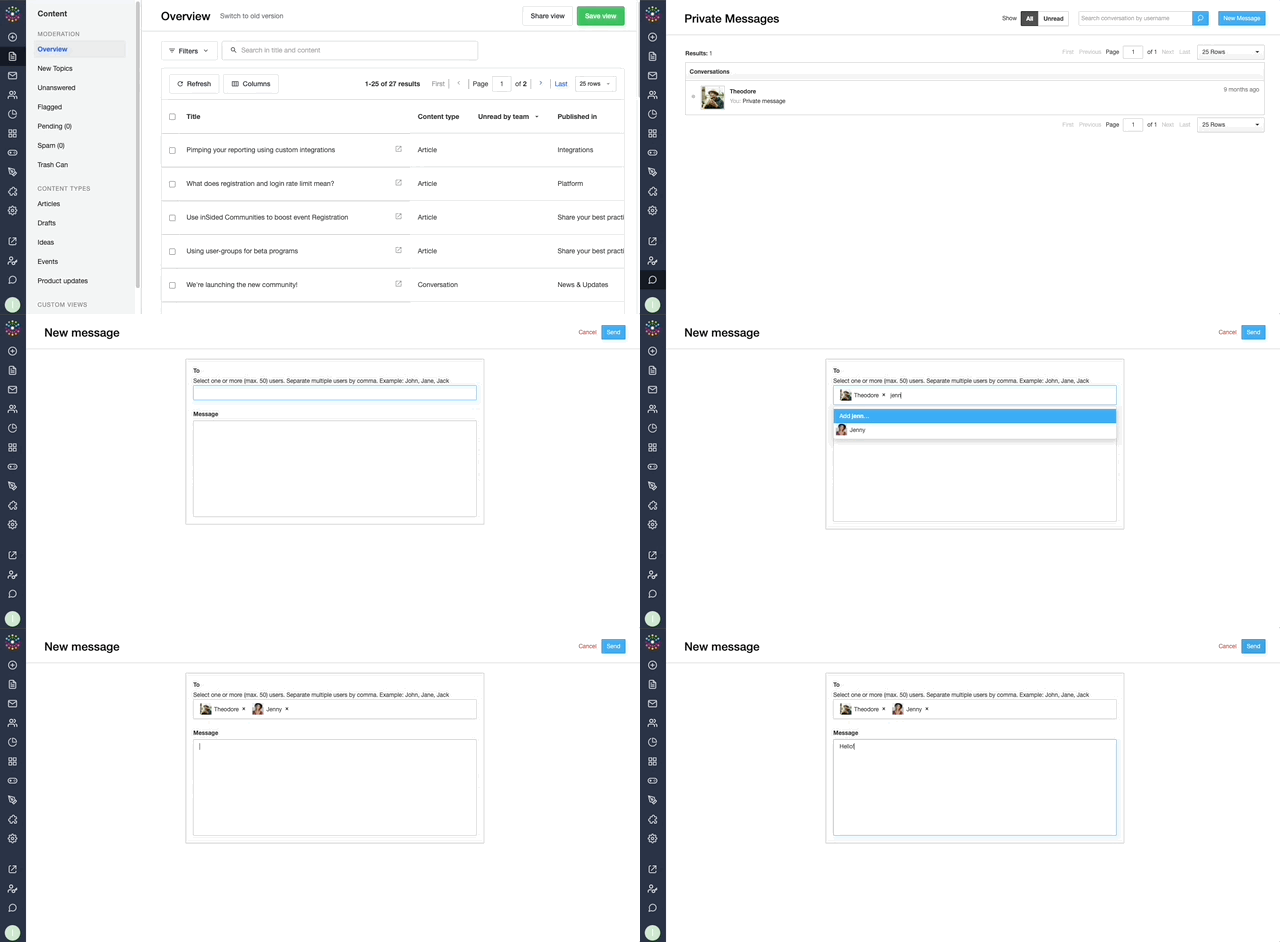
  1. Go to Control > Private Messages > New Message
  2. Type the username of one or more members that you’d like to message.
  3. Type your message and then hit Send.


:gear:  Tips, Tricks, & Technical Bits:
 

⚠️ Currently, there’s a limit of 50 members per message.

🎯 You can copy and paste a list of usernames separated by commas into the “To” field to speed things up. 

:bulb: If you have a list of users that is separated by returns instead (for example from an export), you can turn this into one line of usernames separated by commas using this script. It's automatically grouped into lists of 50 members. (Thanks to Joran from the KPN forum team for this trick!!)

💎 Mass messages are sent to members in a Bcc manner (members don’t know that others have received the same PM), so your messages retain a personal touch from a member’s point of view.


10 replies

ThomasMalingre
Contributor ⭐️⭐️⭐️
June 21, 2018
Hey Frank,

Very useful functionality as we send out our NPS this way. As you guys are (I believe) working on attachments in private messages I was wondering if we'll be able to send the samen attachments to multiple users in the same manner as described above.

Greetings,
Thomas
Translate
Jr. Community Manager Simyo >> Always happy to share info and experiences
Shane1
Helper ⭐️⭐️⭐️
June 21, 2018
Hey Thomas,

We're actually not working on file uploads for private messages. We're only doing this for topics currently. But enabling attachments for private messages has been a popular idea, which you can vote on here.
Translate
Jurgen
Helper ⭐️
October 25, 2018

⚠️ Currently, there’s a limit of 50 members per message.

🎯 You can copy and paste a list of usernames separated by commas into the “To” field to speed things up.


Making a list seperated by commas can be quite a hassle. If you have a list of users that is seperated by returns instead (for example from an export), you can turn this into one line of usernames seperated by commas using this script. It's automatically grouped into lists of 50 members.

code:
name 1
name 2
name 3


becomes:

code:
name 1, name 2, name 3


Credit goes out to Joran from the KPN forum team.
Translate
Contributor ⭐️
November 23, 2021

Hello Insided Community!

I am working on a re-engagement strategy for the Klaviyo Community, by sending private messages to our inactive members. In order to make this a scalable solution by sending to groups of people at one time, are there any personal variable syntax, like {recipient_username}, that I can use in the private message to personalize these messages for our members? I’ve tried to use the syntax used in the emails (the example I used above) but that doesn’t seem to work and I can’t find any documentation on this. Any advice would be amazing! Thank you.

Translate
-Stephen
Daniele Cmty
Helper ⭐️⭐️
November 24, 2021

Same question as @Stephen.Trumble

Furthermore, I would like to know if there is a way we can insert Links / Hyperlinks in those messages?

Cheers!

Translate
November 25, 2021

@Stephen.Trumble you can’t use variables in private messages — they aren’t supported on insided. 
 

@Daniele Cmty you can insert markup in private messages using BBCode syntax. I’ve used links via this approach but haven’t tested out all the markup options to see what may work but would be surprised if they were not supported. 

Translate
Daniele Cmty
Helper ⭐️⭐️
November 25, 2021

Thanks a lot @Scott Baldwin, that was very helpful. I’ve just used BBCode for URL, Bold, and underline and they worked perfectly.

Cheers

Translate
revote
VIP ⭐️⭐️⭐️⭐️⭐️
January 24, 2023

Is there any plans to increase the number of how many recipients can be added once?

50 users per set is pretty low though.

I wish I can send private message using roles - I can add certain role as a recipient and users with that role gets my message.

Translate
Contributor ⭐️⭐️
August 22, 2024

Hi there! Is there a way to message members in a group conversation? The intention here would be to match members 1:1 for a professional connections. 

Translate
Kenneth R
Expert ⭐️⭐️
August 27, 2024

Hi @lindsayrothfeld - you can send a private message to up to 50 individuals at once from within the Control environment. When you’re in a Group in the Control environment you can export the list of members to a CSV file.  From there it’s quite easy to craft a private message to all of those members.  It’s a manual task to get those usernames into the addressee field but very manageable unless you have a very large Group.

I’m not 100% clear on what you’re envisaging with matching members for 1:1 connections.  If you didn’t mean Groups, but rather to have a ‘group’ private message conversation with 3 or more members, that’s currently not possible.  If you’re setting up 1:1 intro’s it might be better to consider taking that to email as a workaround?

Translate