daniel.boon
Helper ⭐️⭐️⭐️
February 10, 2020

How To Set Up The Points-Based Leaderboard

  • February 10, 2020
  • 26 replies
  • 1853 views

A points-based leaderboard is a great way to identify, highlight and motivate active users. In this article, you can learn how to configure your own point values, configure the dedicated leaderboard page, and set up leaderboard widgets on the homepage for different user roles (e.g. one for your customers, another for your employees).


How to set up a points-based leaderboard

Setting up the point values & select the time zone

  1. Log in to Control and navigate to Gamification → Point system
  2. Configure the point values you want to award for each activity on the community and make sure the toggles are enabled.
  3. Set the timezone for your leaderboard. The weekly leaderboard will always reset at midnight (in the selected timezone) on Sunday/Monday.
  4. Press save changes, and you’re done!


Configure the users shown on the dedicated leaderboard page
The leaderboard page is available by default at yourcommunity.com/leaderboard. Both a weekly and all-time view are available. Up to 1000 users can be shown on both the weekly and all-time leaderboards. 

You can also configure user roles to exclude from the leaderboard page.

  1. Log in to Control and navigate to Gamification → Point system
  2. Under Leaderboard page setting, select any user roles you want to exclude from the leaderboard page (both primary and custom roles are supported).
  3. Press save changes, and you’re done!


Add a leaderboard widget to the homepage
See this article for more information about homepage widgets.

  1. Go to the homepage and enable customization mode.
  2. Add a Container 2:1 widget. Press the + button in the sidebar panel and add the Leaderboard widget
  3. Choose a title, the max amount of users to show, the time ranges you want to display, and any user roles you want to exclude from the leaderboard.
  4. Add an empty status that will show when the leaderboard resets each week. This message will only be shown until there are > 3 users on the leaderboard. (Example below)
  5. Choose whether you want to show the current logged-in user’s ranking and points for this leaderboard (example below)
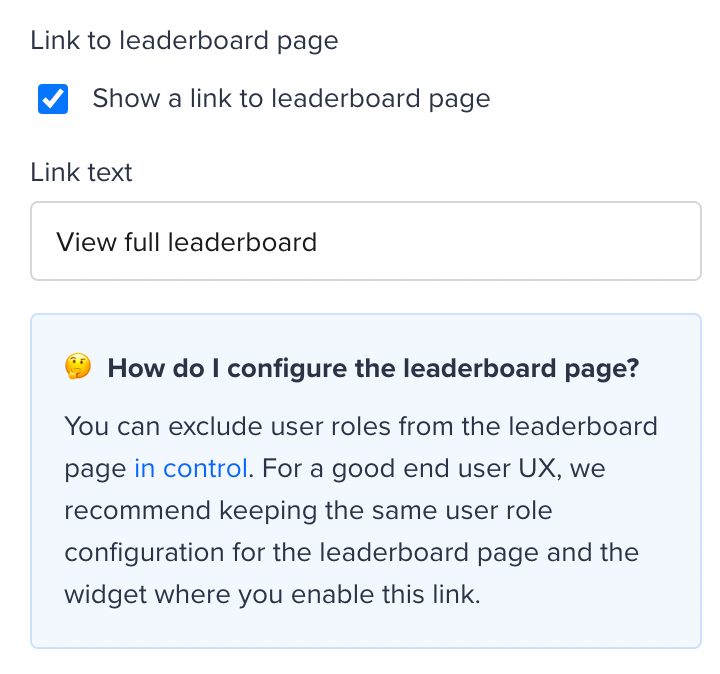
  6. Choose whether you want to show a link to the leaderboard page, and customise the text of the link. We recommend aligning the user roles you exclude from the widget and the leaderboard page, to avoid confusion.
  7. Press Done
  8. Press Publish - your leaderboard will now be visible on the homepage!
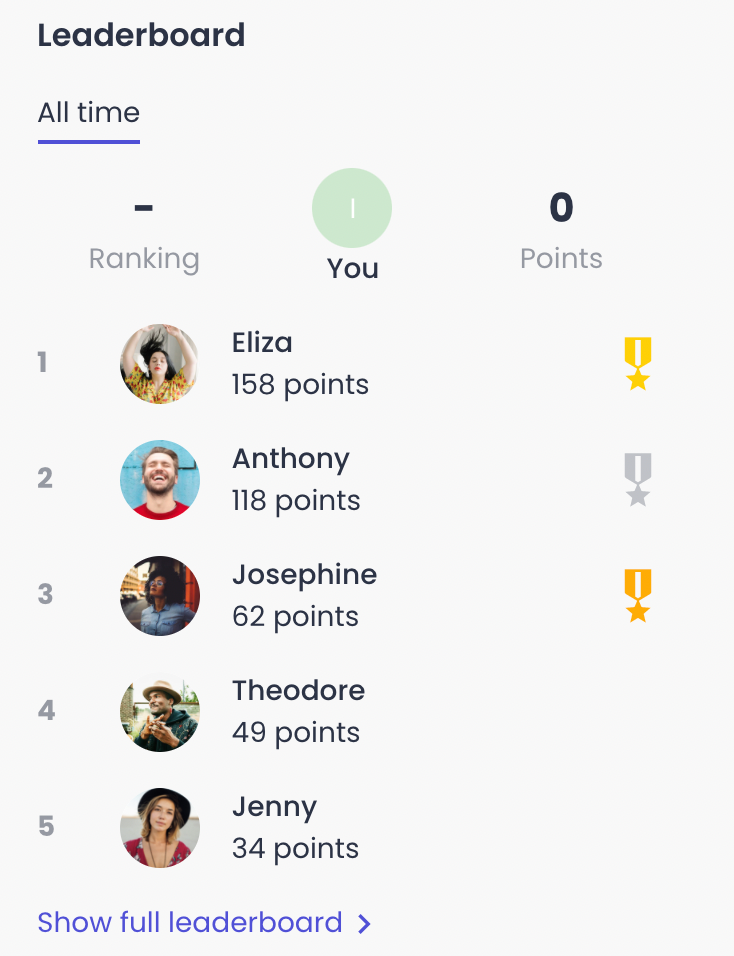
An example of a leaderboard configured with the ‘current-logged in user’ setting checked.
How to configure a link to the leaderboard page


Example end result for the empty state of the leaderboard, and some starting HTML to build your own!

When there are less than three users listed on the leaderboard, the leaderboard will show something different. You can either add text or, even better, an image which you can add via HTML. Below you can find an example as well as some code to get you started.
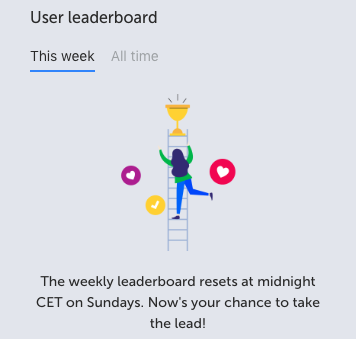
 

Add the code below to the empty status HTML field on the leaderboard widget configuration
<div style="padding: 0em !important; text-align:center;"> <div><img src="https://i.ibb.co/938sZLz/leaderboard-image-inspired.png" alt="trophy" style="max-width: 100%; padding:1em 2em" /> <p>The weekly leaderboard resets at midnight CET on Sundays. Now's your chance to take the lead!</p></div></div>


FAQ


How can users earn points?

Users can earn points based on the following community activities

  • Reply marked as best answer (points awarded based on when the best answer is marked, not when the reply was created)
  • Reply created
  • Topic created
  • Like received (or idea vote received)
  • Like given (or idea vote given)

What’s the time range of the weekly leaderboard?

  • ‘This week’ is a fixed 7 day time period (Monday-Sunday), rather than a rolling 7 day period.
  • This creates a weekly competition/race to the top

Other things that are good to keep in mind:

26 replies

Contributor ⭐️⭐️
February 28, 2020

Hi there! Nice job!

One question: Can I set up the Leaderboard monthly rather than weekly ? 

Thx

David T-Mobile
Contributor ⭐️⭐️⭐️
March 9, 2020

Hi @daniel.boon,

I like this new feature, it has sparked quite a bit of commotion with our users (good and bad :grin:), so that's always fun! 

I was wondering if there is a way to check the statistics of the leaderboard? We’d like to check the scores and stats over the next weeks, to make sure that we have assigned the right amount of points to every action. We’re also a bit fearful that this one user will always be at the top the board, every single week… So we'd like to check that as well, to make sure that its not going to be counterproductive in terms of motivation and competition. 

Thanks!

daniel.boon
Helper ⭐️⭐️⭐️
March 10, 2020

Hey David!

Good that you’re having fun 😉.

There’s an idea for point system enhancements on inSpired which I think covers your request, so make sure you give that a vote!

What data do you need to see to make sure you’ve assigned the right amount of points to every action?

inSided product alumnus
David T-Mobile
Contributor ⭐️⭐️⭐️
March 16, 2020

Hi @daniel.boon,

Thanks for the reply! 

In regards to the data, today is quite a good example. We can't see who came in first (or second, third...), since the leaderboard has been refreshed last night. This would mean that we manually should check all the actions a user took and add the points manually as well, seems like a lot of hassle for the previous leaderboard(s). 

So a dashboard in which we can see who came in first the previous weeks and how they earned their points would be really helpful. 

We'd like to reward users for their contributions by giving them some sort of reward, like a badge or rank, but also vouchers, gifts, whatever. However, if we would simply choose the #1 every week, we’d probably end up with the same user 90% of the time, which beats the entire purpose.. 

Hope you can help! :slight_smile:

timcavey
Helper ⭐️⭐️
March 17, 2020

Hi folks, 


I have added this feature to our sidebar homepage, following the advice above, by doing it on the front end. 


It’s not showing up in the backend ‘Customization > Side section, not as a live widget or as a widget to add. Is this always going to be the case?


learning, sharing and repeat
daniel.boon
Helper ⭐️⭐️⭐️
March 17, 2020

In regards to the data, today is quite a good example. We can't see who came in first (or second, third...), since the leaderboard has been refreshed last night. This would mean that we manually should check all the actions a user took and add the points manually as well, seems like a lot of hassle for the previous leaderboard(s). 

So a dashboard in which we can see who came in first the previous weeks and how they earned their points would be really helpful. 

Thanks for the extra details David!  All makes sense - I can’t confirm a concrete date, but we’d definitely like to add way to report on this data.

We'd like to reward users for their contributions by giving them some sort of reward, like a badge or rank, but also vouchers, gifts, whatever. However, if we would simply choose the #1 every week, we’d probably end up with the same user 90% of the time, which beats the entire purpose..​​​​​​.

Just my two cents - but one thing you could consider some kind of ‘points for swag’ mechanism where you offer end users something in return for ‘cashing in’ their points - you’d have to track points earned (this would have to be in an external sheet), points spent, and the current balance of the user. That way it’s not about being #1 every week, but consistent/cumulative rewards.

inSided product alumnus
daniel.boon
Helper ⭐️⭐️⭐️
March 17, 2020

It’s not showing up in the backend ‘Customization > Side section, not as a live widget or as a widget to add. Is this always going to be the case?


Hi Tim.

Great that you’ve added the leaderboard!

Widgets added via the frontend customization tool do not have a relation with the customization > side widget. Is there any reason you’re expecting the points leaderboard to show there?

inSided product alumnus
timcavey
Helper ⭐️⭐️
March 17, 2020

 Is there any reason you’re expecting the points leaderboard to show there?

Hi @daniel.boon 


I have just seen the new release topic which showed all the front end customization options. 


Nope, there’s no reason I need it to show up. But it seems counter intuitive to have the two seperate. Should I stop using the backend options completely to avoid confusion?


learning, sharing and repeat
bjoern_schulze
Helper ⭐️⭐️⭐️
March 18, 2020

Should I stop using the backend options completely to avoid confusion?

My understanding is:

If you want to configure the sidebar for the homepage, you do it with the new frontend configuration tool. If you want to configure the sidebar for all category pages and for all topic pages, you do it in the Control Panel.

Yoeri
Gainsight Employee ⭐️⭐️⭐️
March 18, 2020

Thanks for jumping on this Björn, you are correct;

The recent rollout of the ‘Customization’ mode focuses on making changes to your community; our Homepage knowledge base is filled with more information around this. 

If you want to make changes to the sidebar used in other pages of your community (like topic, category, profile) you can do this in Control > Customization > Sidebar.

Group Product Manager, Customer Communities