

darkknight
Expert ⭐️
August 7, 2019

Questions about New User Management UI

  • August 7, 2019
  • 10 replies
  • 125 views
I am in the process of testing the July and August updates in my QA org and I've got a couple of questions about the new User Management UI:

1. I have 5500 users (synced from SF), and of those, 5495 are showing "ACTIVE" - whereas in my Production environment (still on the old UI) the majority of my users are "INACTIVE". My understanding has always been that only users with Gainsight License assigned would be ACTIVE - is that incorrect or has that changed with the new UI?

QA:
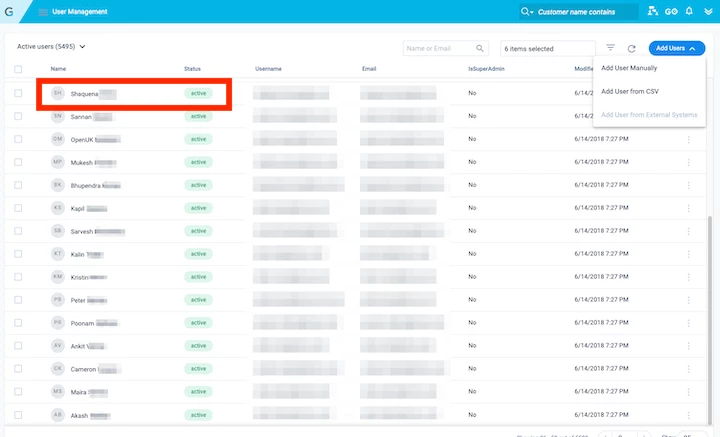
PROD:


2. In the online documentation examples, you show the User Management UI is sorted alphabetically - but in my environment (as you can see above) it's not, and I see no way to change the sort order - am I overlooking it?

Please forgive me if I've missed a documentation point someplace.

    10 replies

    kate_green
    Helper ⭐️⭐️
    August 7, 2019
    I've also noticed that in the new UI there isn't the ability to sort users by any of the shown fields. This would be helpful!

    darkknight
    Expert ⭐️
    August 7, 2019
    Ok so I'm not crazy (about this anyway LOL) Thanks!

    Do you happen to have any insights on the Status, Kate? Is my understanding of what Active vs Inactive inaccurate?

    Jeff Kirkpatrick
    angelahibdon
    Contributor ⭐️⭐️⭐️⭐️
    August 7, 2019
    I was having issues with this too and was told by support that nothing in User Management auto updates from Salesforce. I had to write a rule to deactivate users in the User Management section when we deactivate them in Salesforce. I don't think you can show anything regarding permissions they have in Salesforce on this page either, which is a bit frustrating.

    Angela Hibdon
    darkknight
    Expert ⭐️
    August 7, 2019
    I've been told that Salesforce DOES update User Management (as long as the user is active in SF) but once the user is deactivated in SF, then it no longer updates (which leaves the status "Active" in User Management)

    There definitely needs to be clarification on this entire process. @lila_meyer can we get some clarity here?

    Jeff Kirkpatrick
    darkknight
    Expert ⭐️
    August 7, 2019
    @angela_hibdon_0e7963 - if you don't mind my asking, how exactly did you create a rule to disable the user? I don't have the User object in Data Management as an option to add as a "load to" object.

    Are you on NXT or Salesforce edition of Gainsight?

    Jeff Kirkpatrick
    darkknight
    Expert ⭐️
    August 7, 2019
    Forget the last question I asked (I deleted it). Brain stammer. :)

    Jeff Kirkpatrick
    lila_meyer
    Gainsight Employee ⭐️⭐️⭐️
    August 7, 2019
    @kunal_bhat Can you help respond?

    Lila Krutel, Dir. Global Education Services
    angelahibdon
    Contributor ⭐️⭐️⭐️⭐️
    August 7, 2019
    Hey, Jeff ( @darkknight ) -

    My rule takes MDA users that are active and SFDC users that are inactive and merges them, retaining the common set of users. Then in the action, Action is Load to User, Operation is Update, the SFDC User ID is the identifier and you add a custom field for IsActiveUser (boolean). It's not allowing me to add a screenshot to this post. Feel free to contact me directly at angela.hibdon@silkroad.com if you want to walk through what I have.

    Angela Hibdon
    darkknight
    Expert ⭐️
    August 7, 2019
    Thanks @angela_hibdon_0e7963 - yes I spaced on the "Load to User" action - I never have had a need to use it before, so I forgot it existed.

    Some days there's just not enough coffee in the world. :)

    Thanks!

    Jeff Kirkpatrick
    kunal_bhat
    Helper ⭐️⭐️⭐️
    August 8, 2019
    Hey Jeff,

    The UI update should not change the status of any users. Were the users in your QA org showing up as Inactive before the new UI change and this changed now?

    With regards to sync from Salesforce, we sync all Active users to Gainsight but if the user was made inactive in SF, we don't capture this and the user will continue to be active in Gainsight.

    We'll be adding options to sort users soon!

    Thanks,

    Kunal
