Frank
Product Guru
January 5, 2018

How To Configure Badge Notifications

  • January 5, 2018
  • 18 replies
  • 734 views

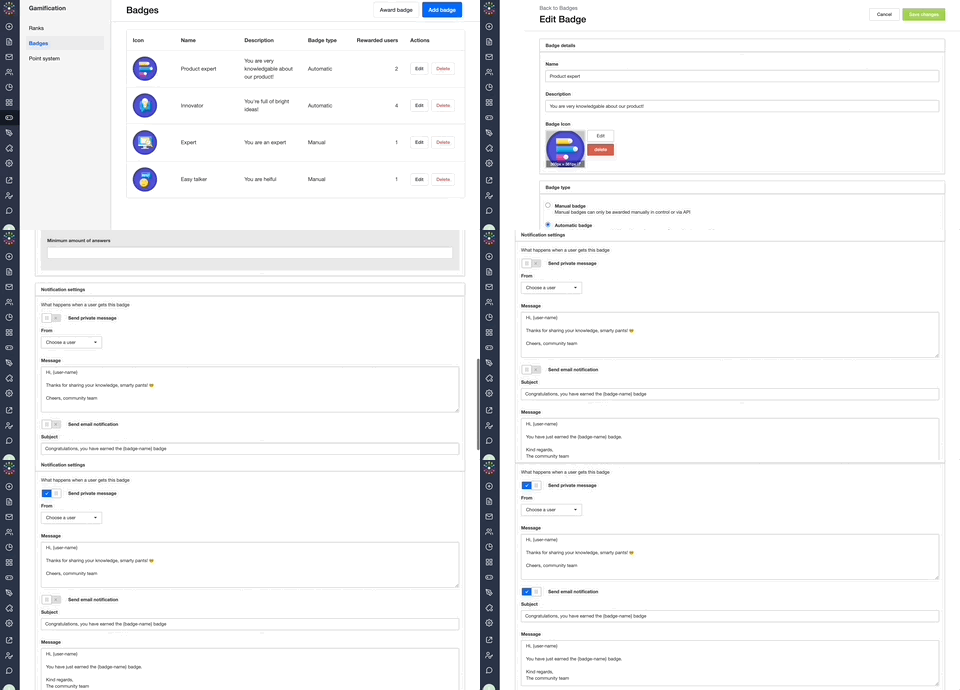
Once you’ve created a stylish set of badges, set up badge notifications to notify your members by email or private message to let them know when they’ve been rewarded with a badge.
 

How To Configure Notifications For Badges

  1. Add or Edit a badge and scroll to the ‘What happens when you get this badge’ section.
  2. Enable either ‘Send Private Message’ or ‘Send notification’ (email).
  3. (Optional) Edit the default message to something that suits the badge and matches your community’s tone of voice (plus, for a private message choose which moderator it should be sent from and for an email, define the Title (subject line)).
  4. Click ‘Save Changes’ and you’re done!


:gear:  Tips, Tricks, & Technical Bits

 ⚠️ Notifications must be set up individually for each badge - there’s not currently a way to set a global default message/notification across all of your badges.

💎 Members receive email notifications for private messages, so we don’t advise setting up both private message and email notifications for your badges. Help your members achieve Email Zen.
​​

:incoming_envelope: Available variables for badge notification messages are {user-name}: the name of the member who received the badge and {badge-name}: the title of the badge.

    18 replies

    Tanja
    Helper ⭐️
    January 10, 2018
    Hi Frank, i agree on achieving Email Zen, not spamming.

    I got a question regarding this. When someone receives a PM, they receive a mail notification that they have received a PM. Is this also the case when someone is loged-in at the time?

    Because a badge is given after someone is in the community and completes the goals for a certain badge. Then sending a mail is not so relevant because the person is already in the community..

    * I think something like a pop-up notification showing the badge would be les spamming then sending them a PM and email.

    Tip for users: i'm using a fake moderator account for notifications. Because its not possible to send notifications from an admin account and i don't want to overload my moderators with a giant inbox and replies.

    Groetjes, Tanja
    Frank
    FrankAuthor
    Product Guru
    January 10, 2018
    Thanks for your question, Tanja.

    At the moment, even if a user is logged in when they receive a PM, they'll still get an email notification. Without a pop-up notification like you've suggested (which would be awesome, by the way), the user might miss the message (e.g. if they don't navigate to another page / refresh their current page).

    Good tip to use a fake moderator account to avoid overloading an inbox - the product team is also considering making it so that admins can be selected as the sender - would that work for you?
    😌
    Tanja
    Helper ⭐️
    January 11, 2018
    HI Frank, thanks for the explanation.

    hmm, i don't think i would set it in my own admin account. Then my inbox will explode, and i already get a lot of messages from users.

    I'm quite happy with my fake account 😉 (most users know that the account is fake and that it's not being used for conversations).
    Tanja
    Helper ⭐️
    January 12, 2018
    HI Frank, i use +/- 20 'legacy' badges and not planning to add some. But now i can't use the notifications?

    To do so i need to delete them and make them again with the tool? But then they first will be deleted at all my users, and after rebuilding added again... And then they receive notification for all the ones they already received?
    Jurgen
    Helper ⭐️
    January 12, 2018
    You can't delete and rebuild, so your community would get all badges again if you'd add them again using self-service. I'd start adding notifications after your active members have received the badges again.

    Check out my comment here as well:
    https://community.insided.com/news-updates-16/self-service-badges-has-arrived-create-and-edit-badges-in-control-365#post1338
    Jurgen
    Helper ⭐️
    January 23, 2018
    Could you guys standardize the phrases between brackets? You've got so many phrases for the addressee now, it's a bit ridiculous ...
    Selina
    Contributor ⭐️⭐️⭐️
    March 23, 2020

    Hey guys :) 

    is there a possibility to fill in the usernames automatically in private messages for badges? 

    Like: Hi {Username}, you received a new badge! 

    Thank you in advance! 


    daniel.boon
    Helper ⭐️⭐️⭐️
    March 23, 2020

    Hey @Selina,

    You can use these two variables in private messages for badges :)
    {user-name}
    {badge-name}

    inSided product alumnus
    Selina
    Contributor ⭐️⭐️⭐️
    March 23, 2020

    Very nice! Thank you @daniel.boon! 😊

    Suvi Lehtovaara
    Helper ⭐️⭐️
    April 20, 2020

    Hi!

    I’m using a PM to let user’s know they’ve been awarded a badge. The PM should be:

    “Moi {user-name}!

    Sinulle on juuri myönnetty {badge-name} kunniamerkki.

    Kiitos aktiivisuudestasi OmaYhteisössä!

    Terveisin,

    OmaYhteisön ylläpito”

    But in the community it has too many line breaks… How can I avoid this from happening?


    https://yhteiso.elisa.fi/