Frank
Product Guru
January 5, 2018

How To Configure Badge Notifications

  • January 5, 2018
  • 18 replies
  • 734 views

Once you’ve created a stylish set of badges, set up badge notifications to notify your members by email or private message to let them know when they’ve been rewarded with a badge.
 

How To Configure Notifications For Badges

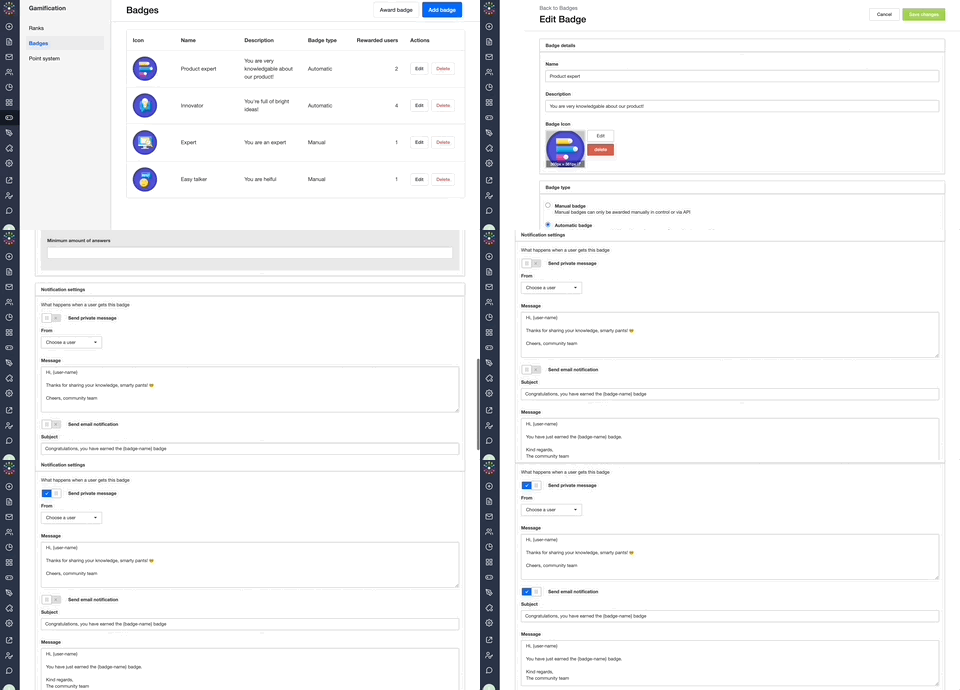
  1. Add or Edit a badge and scroll to the ‘What happens when you get this badge’ section.
  2. Enable either ‘Send Private Message’ or ‘Send notification’ (email).
  3. (Optional) Edit the default message to something that suits the badge and matches your community’s tone of voice (plus, for a private message choose which moderator it should be sent from and for an email, define the Title (subject line)).
  4. Click ‘Save Changes’ and you’re done!


:gear:  Tips, Tricks, & Technical Bits

 ⚠️ Notifications must be set up individually for each badge - there’s not currently a way to set a global default message/notification across all of your badges.

💎 Members receive email notifications for private messages, so we don’t advise setting up both private message and email notifications for your badges. Help your members achieve Email Zen.
​​

:incoming_envelope: Available variables for badge notification messages are {user-name}: the name of the member who received the badge and {badge-name}: the title of the badge.

    18 replies

    Julian
    Gainsight Employee ⭐️⭐️⭐️
    April 22, 2020

    Hi Suvi,

    thanks for raising this here.

    First, I thought I could not help you without one of my colleagues from technical support, but I am proud to tell you that I can help you with this myself! :)

    So I did some testing, and I have found that this issue only occurs when you use the standard template text - I assume you did that? I was able to reproduce the issue this way.

    What I did then: I simply removed all empty lines that are in this template:

    Now, the private message actually looks good again:

    So this way you can send private notifications for Badges that actually look good. 🙂 I think there is an issue with HTML code in the original template, I will have support create a ticket so this can be fixed.

    Let me know if there are any questions or other issues!

    I follow my nose, it always knows
    Suvi Lehtovaara
    Helper ⭐️⭐️
    April 29, 2020

    @Julian thanks for the work-around, this solved our problem :ok_hand_tone1:

    https://yhteiso.elisa.fi/
    Julian
    Gainsight Employee ⭐️⭐️⭐️
    April 30, 2020

    Good to hear that! 🙂 I just received the confirmation that this problem has been resolved as well, so it will not happen again the next time you create a badge notification!

    I follow my nose, it always knows
    daniel.balan
    Contributor ⭐️
    January 26, 2021

    Hi All !

    Does the Badge notifications support adding images to the notification? What I mean by that is that it would be super useful if the icon of the badge would also be included in the notification email/message? Is something like {badge-image} possible? Thank you!

    Julian
    Gainsight Employee ⭐️⭐️⭐️
    January 26, 2021

    Hi!

    You can include the images in Badge email notifications (not in the private message notifications). I actually find it a really cool idea to include the image in the notification as well!

    This is not possible as what I call a variable (e.g. {badge-image}), but you can use HTML for this mail.

    As this field recognizes HTML, I would recommend that you use the notification template from other notifications (e.g, “new reply”) and use this template to create a notification email that follows the styling of all other email notifications your community sends out. As the badge already exists on your community, you can also use the image url from this Badge from the community (of course only if your community is publicly available).

    Hope this will help you further?!

    I follow my nose, it always knows
    Contributor ⭐️⭐️
    November 15, 2021

    Thanks for this article! It is posible to have a {badge-description} variable? That would be very useful.

    cstrange
    Contributor ⭐️⭐️⭐️
    November 16, 2022

    Hey there, 

    When it comes to the messaging sent after a badge is awarded - something that we have heard would add value is making it easier to share on social. Is this on the roadmap? The ideal state would be a linked CTA to share on Linkedin and then when redirected, it includes the asset for the badge, all ready to go. 

    Thanks!

    Chloe

    ~Chloe
    Suvi Lehtovaara
    Helper ⭐️⭐️
    June 6, 2023


    :incoming_envelope: Available variables for badge notification messages are {user-name}: the name of the member who received the badge and {badge-name}: the title of the badge.

    Are these still the only variables available? @Julian 😊

    https://yhteiso.elisa.fi/