
Julian
Gainsight Employee ⭐️⭐️⭐️
November 18, 2019
Tutorial

Setting up, rewarding and revoking manual badges

  • November 18, 2019
  • 21 replies
  • 1124 views

​In this tutorial you can learn more about manual badges. Different to automatic badges, these badges cannot be earned automatically by creating content on your community - this type of badge can only be awarded manually via the Control Environment or by using our API.

Setting up manual badges

Within the badge menu, you can decide if a badge can only be received manually or automatically (following the rules you have set up):
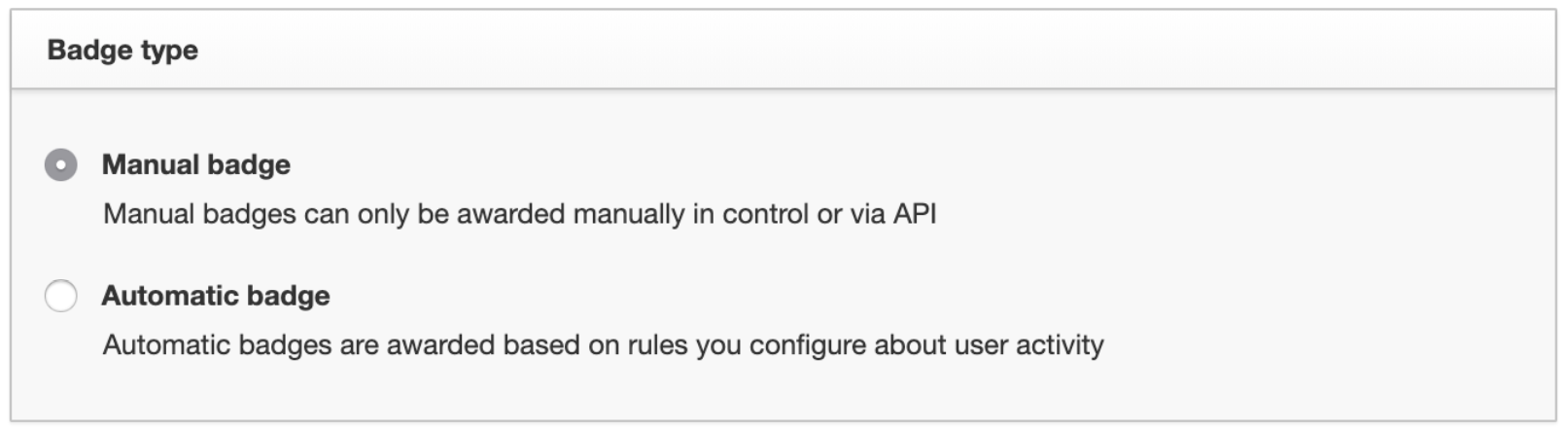
Note: If you set up an Automatic badge, you can still hand this badge out manually as well. And if you decide you want to switch an Automatic badge to a Manual badge, that’s also possible!

How to manually award a badge to a user

There are actually three different ways to award badges to users:

1. Assigning a Badge to an individual user

You have the option to assign a badge via the user profile page within the Control Environment:
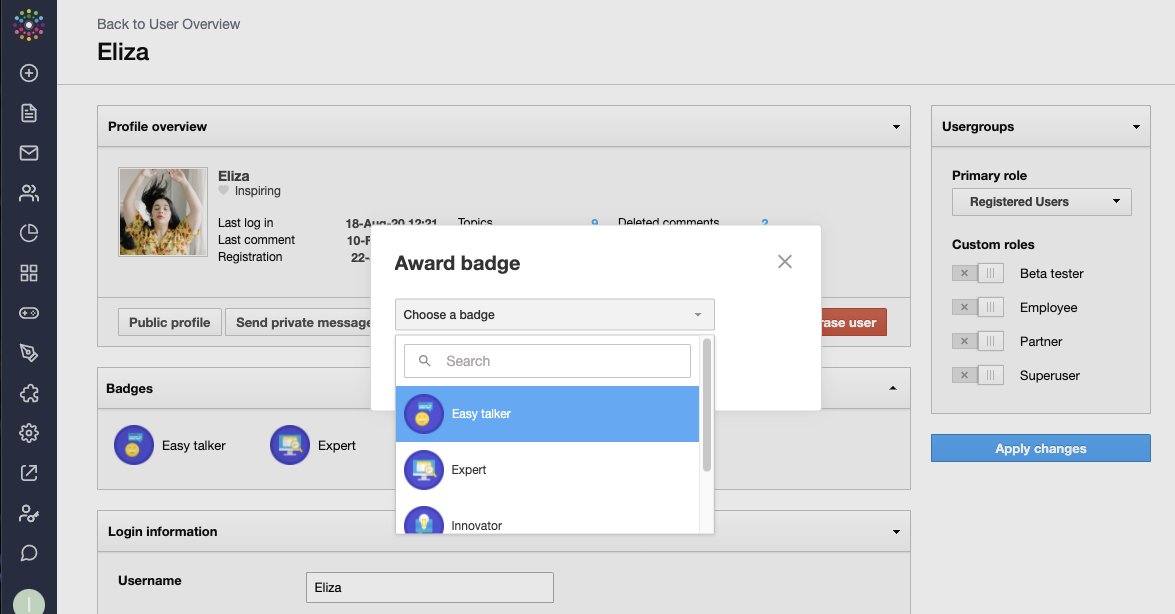

Simply select the badge from the drop-down list. You will receive a message that this was successful and the badge directly will be visible in the profile.

2. Assigning a badge to a group of users

If you want to award a badge to a group of users at the same time, then you can use the “Award Badge”-feature, located at the top-right of the badge overview page (you can use this method to award a badge up to 50 users at one time):

An interface will load where you can add usernames (comma-separated):
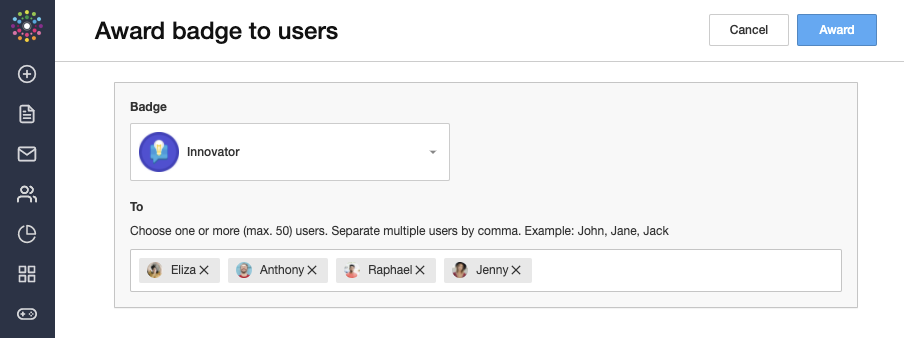
Note: If a username does not exist, you will see an error message. It’s also possible to copy/paste a comma-separated list into the ‘To’ field. You can use online tools to convert columns containing user names from a spreadsheet into a comma-separated list - just search for ‘Convert Column to Comma Separated List”.

3. Assigning a badge via API

You can also award a badge via our API, e.g. if a user completes a course in your learning environment, or completes a certain amount of actions in your product. For this kind of implementation, we recommend that you take a look at our API documentation.

Can I also manually remove a Badge from a user?

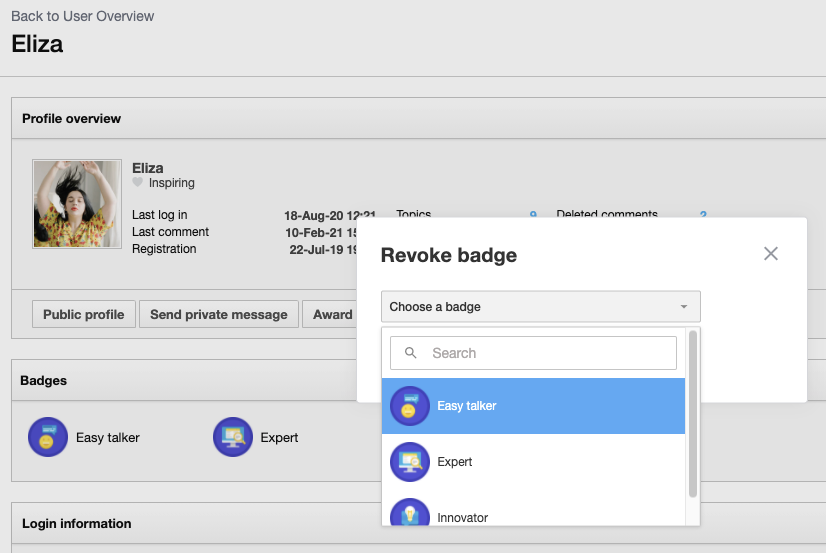
To revoke a badge, simply click on “Revoke Badge” on a user’s profile page:
 

    21 replies

    Julian
    JulianAuthor
    Gainsight Employee ⭐️⭐️⭐️
    April 11, 2021

    Yes, this can be found at the top of your profile settings:


    I follow my nose, it always knows
    nate2
    Contributor ⭐️⭐️⭐️
    April 11, 2021

    Hey @Julian !


    Thanks, for the answer.

    In this case, you can show or hide all your badges, the question s if you can select which badge to show and which not? 


    JKelley
    Helper ⭐️
    May 14, 2021

    Hi @nate2 @Julian we have this question too - can either an admin or an end user select and pin certain badges? 


    That would be helpful to spotlight some like certification creds and deprecate some of the more temporal system generated ones.

    Julian
    JulianAuthor
    Gainsight Employee ⭐️⭐️⭐️
    May 18, 2021

    @nate2 no it is not possible to select individual Badges to show or not to show.

    @JKelley I know of a community that is experimenting with this, but I don’t think this is ready just yet. Basically, you can control with custom script how certain Badges are shown (or not).

    I will have an eye on the development and share the code with you here once it is ready, then you can customize this for your community as well!

    I follow my nose, it always knows
    nate2
    Contributor ⭐️⭐️⭐️
    May 18, 2021

    Thanks @Julian 

    JKelley
    Helper ⭐️
    May 19, 2021

    Yes, thanks @Julian! Another question related to integration with open badges like Credly.  Can Insided badges retain metadata/links or graphic/visual only?

    Casstastr0phee
    Contributor ⭐️⭐️⭐️⭐️⭐️
    August 19, 2021

    hey @JKelley! so great to meet you and really loved some of your questions on this thread! I was wondering...you mentioned adding badges for certifications. do your certifications expire? we are exploring adding certification completion as a badge, but certifications expire every 1.5 years, so curious to know how other people are approaching certification badges and whether you manually revoke badges, or if there’s another workaround or solution you’ve implemented? 


    Thanks in advance! 
    -Cass.

    I follow Julian's nose, it always knows
    anirbandutta
    Expert ⭐️
    July 22, 2022

    hey @JKelley! so great to meet you and really loved some of your questions on this thread! I was wondering...you mentioned adding badges for certifications. do your certifications expire? we are exploring adding certification completion as a badge, but certifications expire every 1.5 years, so curious to know how other people are approaching certification badges and whether you manually revoke badges, or if there’s another workaround or solution you’ve implemented? 


    Thanks in advance! 
    -Cass.

    My 2 cents as a Community Manager:

    P.S. Badges 2 and 3 are  the same Credly graphic that double up as Community manual badges for us

    The only difference in the flavour of a badge on a user profile on a Community vs a Credly for e.g. is that badges on a user profile on the community denotes the Customer journey IRL for that person and helps primarily in 3 ways:

    • Makes the User feel proud
    • Help networking: others in the Community to know specifics of the users skills, expertise. See related improvement idea in this direction
    • Helps Elevate the Program the badge stands for creating a pull for others

    and that is the distinction from a Credly badge on the same person’s linkedIn profile which has to have an element of the Certification validity itself in addition to the Social reward aspect.

    Thanks again @JKelley for your thread I reverberate to… on a daily basis


    So in short @Casstastr0phee, I’d think baking in a duration (for the certification usecase) is a good-to-have piece of engg. that I’d not worry about in a Community-context, but automation options around Manual badges, like synced to Group-memberships, Role-permissions based, Points, etc etc… bring-em-on! :)

    cc @Sebastian 

    It's an opportunity for engagement
    JKelley
    Helper ⭐️
    July 25, 2022

    Hi @Casstastr0phee nice to meet you - and @anirbandutta you too!

    We solved for this - for now - by meeting some of the requirements manually. A lot of it came down to resourcing choices (doesn’t it always?!) since there isn’t an obvious way to automate.

    • We did / do manually upload badges for the group of people who have achieved our highest level certification, Commvault Certified Expert, since it’s a more manageable and stable sized group and also they double up with our community Super Users frequently
    • In a perfect world we’d also badge / recognize the bigger pool of lower-level certifications, but we don’t consistently have resources who can keep tabs on the list / cross-reference membership / upload
    • We don’t worry today about expirations or badge removal, both because it’s not as big as big a priority for our Enablement organization and also, within the realm of community, it helps us more to honor that someone achieved that level (ever) even if they haven’t maintained every current exam. It would be much tougher to manage manually and also potentially cause friction we don’t want to create with our SMEs.

    I’m sure there are always better ways of doing things so please keep sharing ideas and what you’re doing! I hope to do more here someday.

    anirbandutta
    Expert ⭐️
    July 28, 2022

    @JKelley ditto 🙌

    It's an opportunity for engagement