

Gainsight CE FAQ Series - How do I use Milestones in CE?

  • January 16, 2024
  • 2 replies
  • 199 views

kathleenkenny23
Forum|alt.badge.img+3

Add a Milestone


Milestones are a helpful way to ensure your learners are engaging with content in the way you need them to.


👀(More FAQs listed at bottom of page on Milestones!)


What is a Milestone?

Think of milestones as specific metric learners must meet in order to proceed within the course. You can choose to leverage milestones to encourage users to voluntarily engage with the content in a specified manner, or to require users to complete the criteria before they can move forward in a course.


Why would I want to use Milestones?

Many Gainsight CE (FKA Northpass) clients create milestones that require users to complete a quiz with a particular score, for example, 70%. The users will not be able to view content or complete the course until they successfully receive 70% or greater on the quiz and successfully meet the milestone. This ensures your learners are absorbing material presented and that you're able to measure success.


How do I set up Milestones?


Step 1

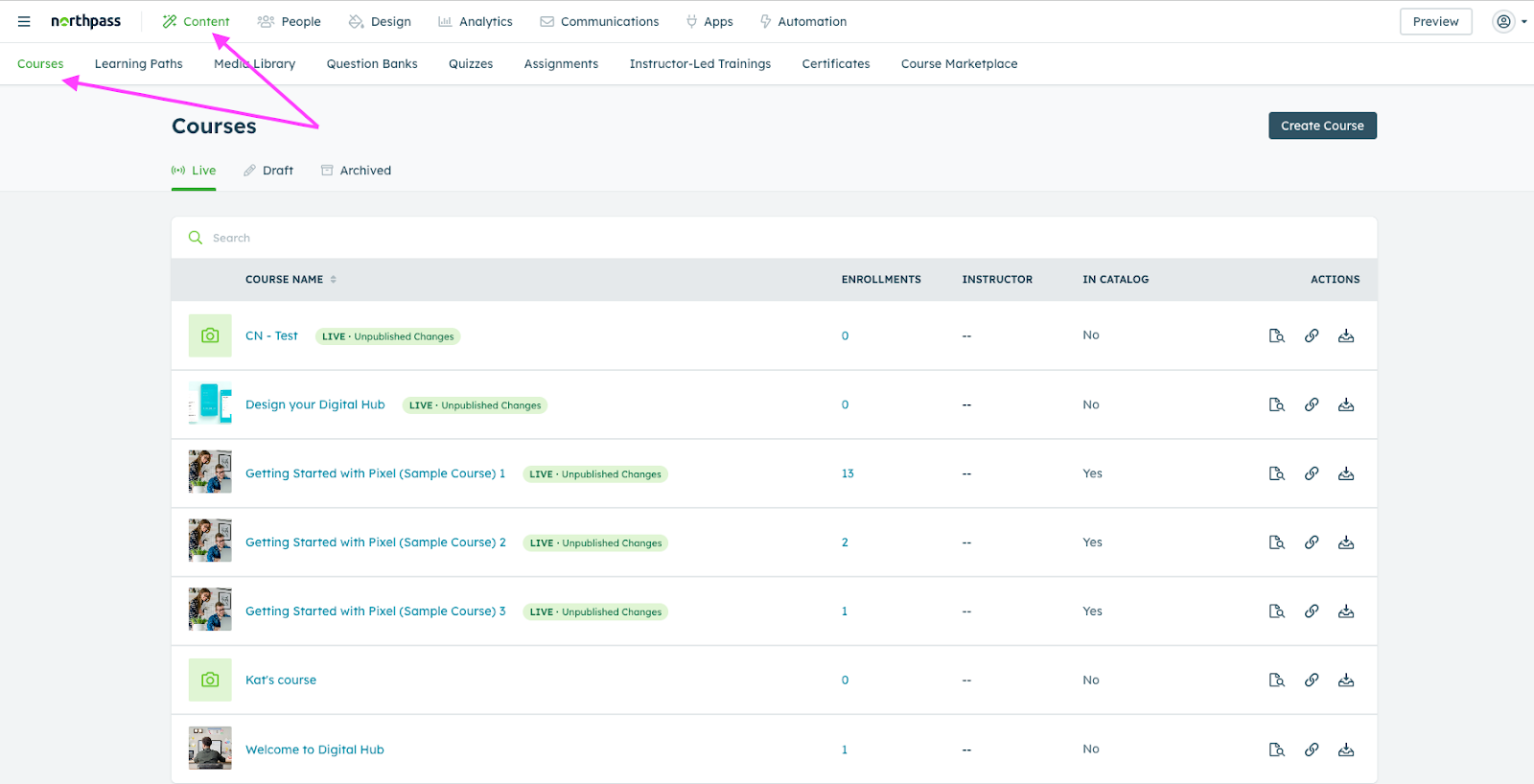
Start in the Content tab of the navigation bar and select Courses. Now select the particular course you'd like to add a milestone into.
rFCnAnJjlgbvLH-88Sh-ZnjrTIP1U9Bt5JsQWkZVy55TFoXGooQA2TCzZfEny1pyPVohtztT96ULXZ6uLeO2EDGVstIQRzyFYsTj4dOBtjq64ecu8RAgyXNtyBJWxXfmtgsDT5l2pkUZMpv-NwTGD8E


📣IMPORTANT:  in order to add a Milestone. For video activities, the video must be uploaded to Northpass (not embedded).📣


Step 2

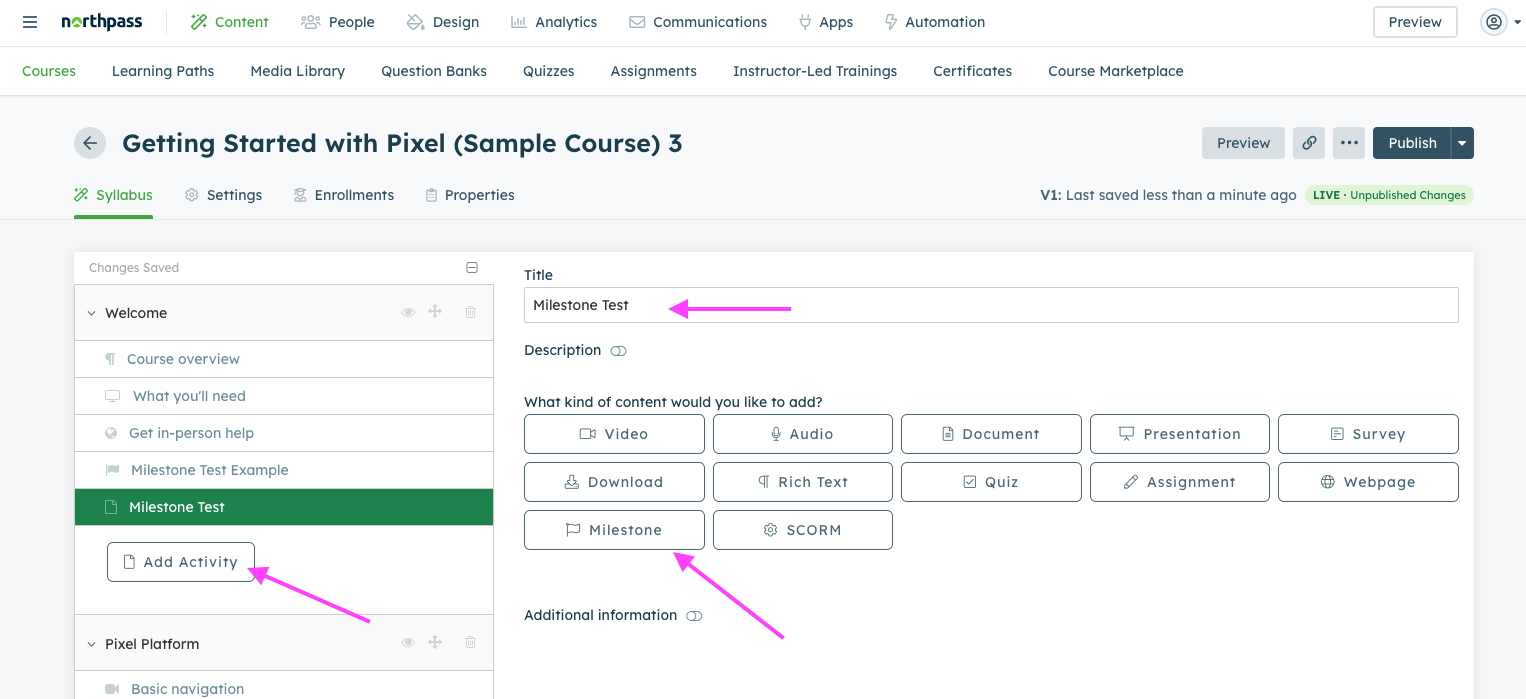
Click Add Activity and add a name. Next, select Milestone as the activity type.
5BIkIvnxa9sziaSnjlSrndwC3eW0gtGx6onePymB_xxs4dovbZixKa5B1veyrwyopzskuohVdm9HiPHRfGG6LBzh4Q8a3RohlmmrUyDgrXVAmRLnbG3ZU-kLDZctGjSu0bEdWWDrPPK23sXOTR-ysK4


Step 3

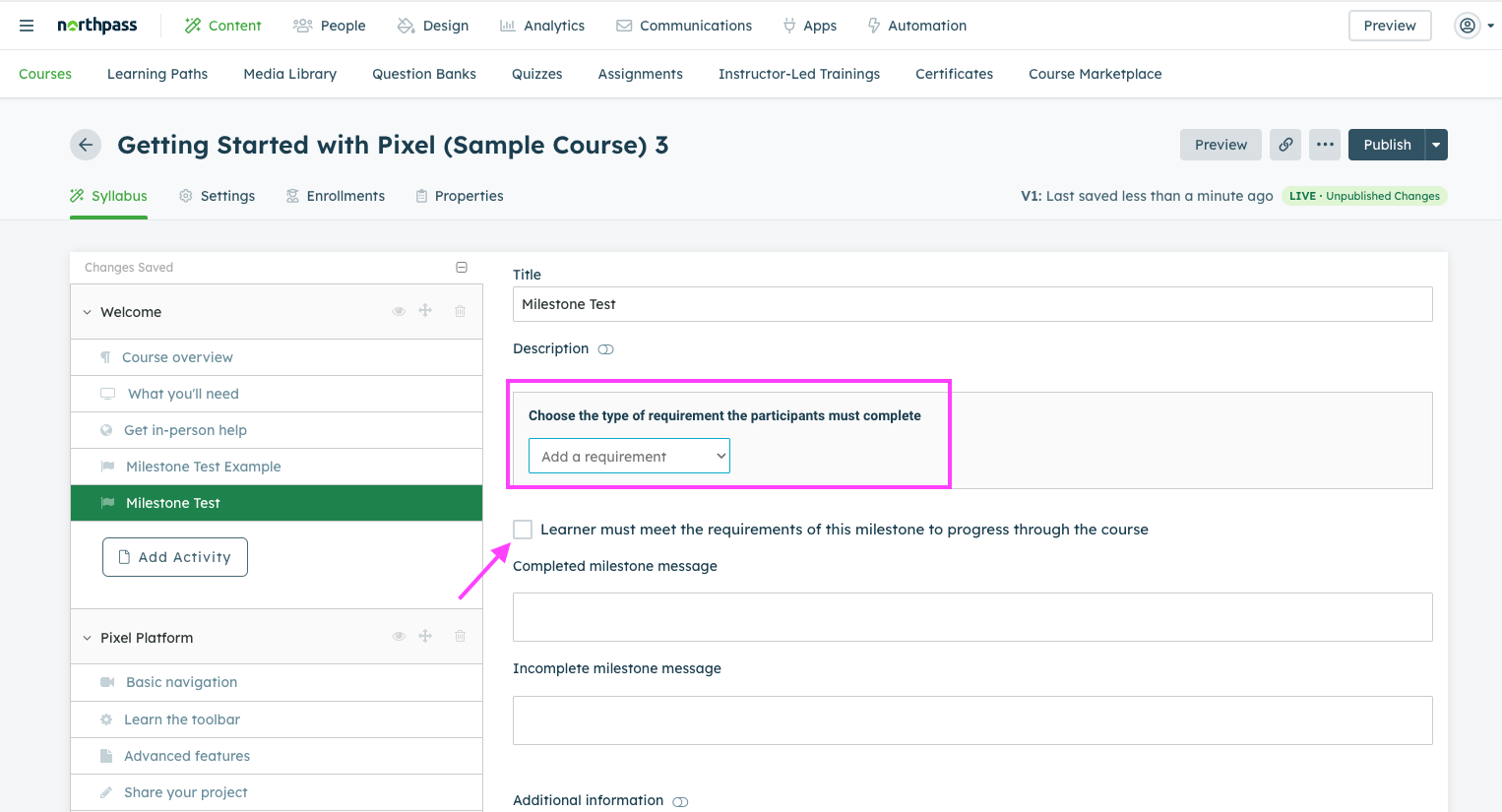
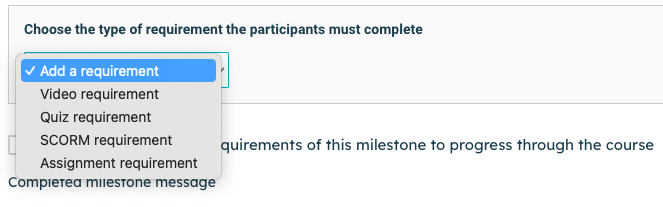
Click on the dropdown menu next to Add a requirement, select a requirement, and add the criteria.
9eZtk1_quzRaEQt6ZDREjnLJ4PkrGOh0Zd2fzXTSFIrXtRNV4ijsYdEEiADcMEv705x5lOlnQSql3ZX3lJLDOM6GXF2L_PjJ1CvS6d82AhN5zkhIGEfUmHg-1ugWUbLfiudwwyU-gHn8W0E_UE3AQ4E


XCvpzYxdgSe9iX9VA40eyVWtNHh0mw0m-Jszt_22sPqSZUMLlXZcVXuWoxFtazziksLpXqnYxKCxIM_ZzOomAdS9KT9q1SLW4xq52m4L9rvX6N1uxxbu3YSrFj3g8yAt-f6-u72EVl1nqXTywo9kr4k


Other FAQs around Milestones:


  1. Q: Can I prevent someone from fast forwarding a video? 
    1. A: CE can’t stop someone from fast forwarding, but it won’t let them pass the milestone.
  2. Q: Can I prevent someone from moving forward on a course without passing a quiz?
    1. ​​​​​​​A: Yes, this is what a quiz milestone does! It’s best to have the course set as linear progression so they can’t skip around the course and go to the next activity too.


2 replies

  • Contributor ⭐️
  • December 23, 2025

Hi! I’m trying to set up a course so that learners can “test out.” The quiz is at the beginning, if you pass it with 80%, then that completes the course for you - you do not need to go through any more content. If you get less than 80%, you have to go through the full course content and then take the quiz again at the end.

Is this possible using the quiz and milestone activities?


cdonargo
Forum|alt.badge.img
  • Gainsight Employee ⭐️⭐️
  • January 2, 2026

Hi ​@lpalmeri

You can get close to this workflow in CE. Milestones can control activity and course progress/completion, but they can’t automatically mark a course complete or skip remaining content based on an early quiz score.

That said, here’s the best workaround to test:

1. Set the course to freeform navigation in the course settings
2. Add a quiz at the beginning with an 80% passing score.
3. Create a quiz milestone tied to that quiz.
4. Use milestone messaging:

  • If the learner passes, show a message saying they’ve effectively tested out and don’t need to continue.
  • If they don’t pass, guide them through the remaining content and have them retake the quiz at the end (this is needed in order for them to “complete the course” 

We can continue to work through this via CE office hours at your connivence!