


Salesforce Security Advisory FAQs
All previous updates/FAQs have been consolidated into this post, and we’ll continue adding new information here. Please subscribe to status.gainsight.com to stay informed when this post is updated.
Earlier answers remain accurate unless a question is addressed again in the latest update. As we learn more, some details may change.
Feel free to share any questions you may have in the thread below and we’ll ensure they get answered.
RESOURCES:
- Install and Configure Gainsight SSO Managed Package
- Systems Integrations - Rotating Keys and Reauthorization
- S3 - How to Reset Access Key
- Configure SAML SSO with Okta in Gainsight
- Configure SAML SSO with Azure Entra ID in Gainsight
- Configure SAML SSO with Google Workspace in Gainsight
- Configure SAML SSO with OneLogin in Gainsight
January 26th Update (Posted 9:41PM UTC)
Update: Salesforce Connector Reauthorization Requirement Removed
We have an important update to share following our earlier communication about Salesforce connector reauthorization.
After extensive technical and executive-level discussions with Salesforce, the previously observed requirement for Salesforce connectors to be reauthorized every ~30 days has been removed.
Why the Change was Made
This resolution was reached after Gainsight and Salesforce teams collaborated to review the connector’s underlying architecture. A key finding in these discussions was that the Gainsight Managed Package already leverages Refresh Token Rotation (RTR).
Because our integration ensures that credentials are automatically rotated, the additional 30-day reauthorization layer was deemed unnecessary for maintaining a secure, active connection.
What this means for Customers
- No Recurring Reauthorization: Salesforce connectors will no longer require manual reauthorization due to a fixed 30-day window.
- Seamless Operation: Actively used connections will continue to operate as expected without recurring disruption.
- No Action Required: No additional steps are needed from your team as a result of this change.
We recognize that the earlier behavior caused confusion and interruption for some teams. We appreciate your patience while we worked through this, and we’re glad to share this resolution as part of our continued effort to provide a stable and predictable integration experience.
Thank you for your partnership—we will continue to work closely with our platform partners to ensure long-term reliability.
January 20th Update (Posted 11:22PM UTC)
Action Required: Rotate Security Keys for 3rd-Party Integrations (Deadline: February 13th)
Periodic credential rotation is a standard security best practice and an important part of maintaining a hardened environment.
Following the Salesforce Security Advisory, some customers are required to rotate authentication keys used for specific third-party integrations connected to Gainsight. These include:
- Zoho
- Pipedrive
- MS Dynamics (U2M)
- Jira
- MS Dynamics (M2M & M2M Certificate)
- ServiceNow
- Gainsight API (OAuth)
- Gainsight Bulk API (OAuth)
- BigQuery
- Databricks
- Freshdesk
- Product Board
- Aha
- Ecosystems
- Mixpanel
- Gainsight API (Access Key)
- Gainsight Bulk API (Access Key)
- Intercom
- Zuora
Important Note:
- Customers impacted by this requirement were notified directly with a list of applicable connectors.
- Keys that have not been rotated recently will be temporarily disabled starting February 13th, 2026, until credentials are refreshed. Note: The originally communicated deadline of January 19th, 2026 has been extended to February 13th, 2026.
- This action is preventative and intended to reduce risk associated with long-lived credentials.
Additional guidance on how to rotate keys and reauthorize integrations is available in the documentation included in this post.
Part 1
To ensure uninterrupted service and maintain compliance with these new security standards, please complete the following steps:
- Rotate Keys: Generate new API keys or secrets for the following 3rd-party connectors:
- BIGQUERY
- DATABRICKS
- SERVICENOW
- DYNAMICS (M2M_OAUTH)
- ZUORAV2
- FRESHDESK
- AHA
- PRODUCTBOARD
- ECOSYSTEM
- MIXPANEL
- REDSHIFT
- MYSQL
- HAPOSTGRES
- GAINSIGHT_API (Access Key)
- GAINSIGHT_API (OAUTH)
- GS_BULK_API (Access Key)
- GS_BULK_API (OAUTH)
- SEGMENT_IO
- USER OAUTH
- Reauthenticate: Update the credentials within your Gainsight Integration settings to re-establish a secure connection.
Part 2
Security keys for the following connectors will be rotated on your behalf February 17th, 2026. Once the credentials have been updated, Gainsight will notify you. Please reauthenticate to re-establish service.
- JIRA
- PIPEDRIVEV2
- ZOHOV2
- INTERCOMV2
- DYNAMICS(OAUTH- U2M)
Need Help?
Additional detail on actions required can be found in our documentation here. For questions, reach out to support@gainsight.com. Thank you for your partnership in keeping our ecosystem secure.
Salesforce UI Managed Package Migration (By February 13th, 2026)
To remain aligned with Salesforce’s security standards and ensure uninterrupted access to Gainsight widgets within Salesforce, customers using the legacy “Gainsight CSM” (JBCXM) managed package must migrate to the updated “Gainsight Customer Success” package.
- The legacy package will be deprecated and no longer supported after February 13th, 2026.
- The new package uses an updated name and namespace and is the supported path forward.
- Impacted customers have received direct communication with detailed migration steps which are also available here.
This change applies only to customers still using the legacy UI managed package.
January 12th Update (Posted 12:19AM UTC)
Update: Salesforce Connector Reauthorization Behavior
We want to share an important update regarding Salesforce connector authorization behavior that may impact all customers using the Salesforce connector once a specific time window is reached.
What you might experience
Customers using the Salesforce connector may see their connection become disconnected and require reauthorization after 30 days, even if the connector has been actively used and functioning normally during that time.
If this occurs, Salesforce-related jobs (such as connectors, rules, or data syncs) may pause until the connection is reauthorized.
Through investigation, we observed that Salesforce is currently enforcing a fixed 30-day authorization window that starts from the time the connector is authorized. This window applies regardless of ongoing usage, and the authorization period does not automatically reset as tokens are refreshed.
This was unexpected, as the Gainsight Salesforce connector already uses refresh token rotation (RTR).
What we’re doing
- We’ve validated this behavior through detailed log analysis to confirm the cause.
- Our Support and Services teams have been fully briefed to assist customers quickly.
- We are actively working with Salesforce to review this behavior and determine whether the current enforcement aligns with intended token rotation and authorization semantics for actively used connectors.
What you need to do
If your Salesforce connector disconnects:
- Reauthorize the Salesforce connector to restore service.
- No data is lost as part of this process.
- No additional configuration changes are required.
We recognize that unexpected reauthorization can be disruptive, and we appreciate your patience as we work closely with Salesforce to minimize ongoing impact. We’ll continue to share updates as more information becomes available.
January 12th Update (Posted 5:17PM UTC)
Upcoming Security & Salesforce Integration Updates (For Applicable Customers)
As part of our continued security hardening and alignment with Salesforce’s evolving requirements, we want to share an update on a few upcoming actions related to third-party integrations and Salesforce UI managed packages.
Note: Customers who are directly impacted by these changes have already received (or will receive) a targeted email/in-app message from Gainsight with specific instructions. This Community post is shared for broader visibility and awareness.
Who is impacted?
This update applies only if one or more of the following are true for your environment:
- You use third-party connectors (outside of Salesforce and S3) where access keys have not been rotated recently
- You are currently using the legacy “Gainsight CSM” Salesforce UI managed package (namespace: JBCXM)
- You received a direct email from Gainsight outlining required actions and timelines
If none of the above apply, no action is required at this time.
January 7th Update (Posted 9:18AM UTC)
Update: Gainsight Salesforce Managed Packages Are Now Approved and Available
We wanted to clarify the current state of Gainsight-managed Salesforce packages following recent approvals. All relevant managed packages are now approved by Salesforce and visible on the AppExchange, and customers can proceed with installation and reconnection as needed.
What’s Approved and Available
The following managed packages are approved and searchable on the Salesforce AppExchange:
Gainsight Customer Success (CS)
- UI Package – Enables secure access to Gainsight CS within Salesforce (and login via Salesforce)
- Data Connector Package (US & EU packages) – Enables bi-directional data transfer between Salesforce and Gainsight CS
Northpass (NP)
- UI Package
- Data Connector Package
Skilljar (SJ)
- Data Connector Package
Product Experience (PX)
- Data Connector Package
Staircase (ST)
- UI Package
- Data Connector Package
All of the above packages are approved, published, and discoverable on the AppExchange.
What this means for Customers
You may see multiple Gainsight-related listings on the AppExchange—this is expected.
- UI packages and Data Connector packages serve different purposes and may both be required depending on how you integrate with Salesforce
- Customers can now proceed with connecting or reconnecting their Gainsight products using the appropriate packages
Our restoration team or support team can provide guidance on which package to use and when, but wanted to confirm that all required managed packages are now fully approved and available.
December 27th Update (Posted 7:33 PM UTC)
Salesforce has approved the managed packages for Customer Community (CC), Skilljar, Northpass, and PX. Customers can now begin reconnecting these products to Salesforce. Additional guidance will be shared as reconnections progress.
December 24th Update (Posted 12:27 AM UTC)
Zendesk Connector Availability for Gainsight CS
We’re happy to share an update on the status of the Zendesk integration for Gainsight CS.
What’s Now Available
- Zendesk Connector 2.0 is now available for customers to authorize or reauthorize their connections
- Customers can resume using the Zendesk integration through Connector 2.0, which is the supported path moving forward
What’s Not Available
- Zendesk Widget (UI embedded inside Zendesk) is not yet enabled
- Zendesk Connector 1.0 is deprecated and is not supported with the new connected app
A small subset of customers who were still running jobs on Connector 1.0 prior to the incident will need to migrate to Connector 2.0 to continue using the Zendesk integration.
Next Steps
If you’re using Zendesk with Gainsight CS, please ensure your instance is connected using Zendesk Connector 2.0
Authorization steps for Zendesk Connector 2.0:
- Navigate to the Connectors 2.0 page in Gansight
- Click on Kebab Menu (three dots) in Zendesk Connection Card
- Click on Authorize Connection
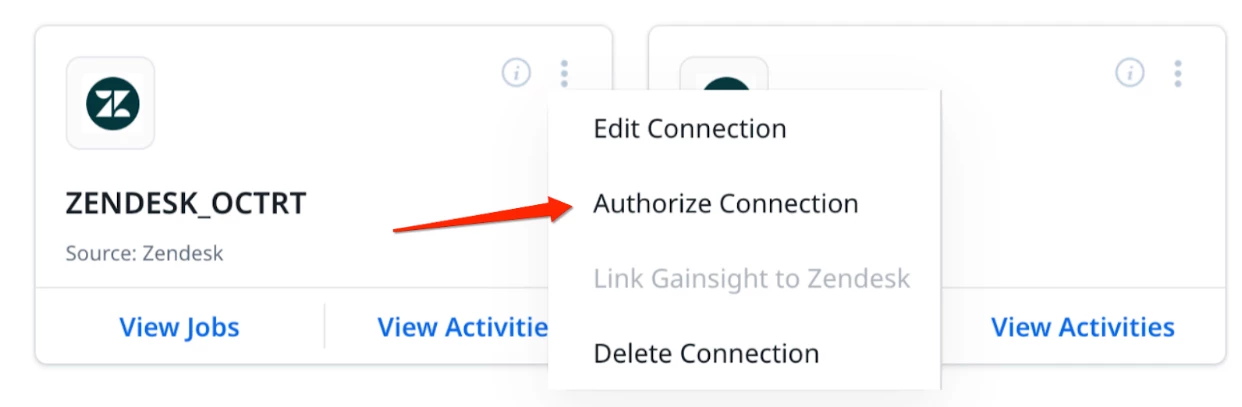
We’ll continue to share updates as additional Zendesk-related functionality becomes available. Thank you for your patience and partnership as we continue restoring and stabilizing third-party integrations.
December 22nd Update (Posted 10:04PM UTC)
Staircase: New Salesforce Connector Now Available
We’re happy to share that the new Salesforce Connector for Staircase is now enabled and available. Going forward, this is the recommended connector for connecting Staircase with Salesforce.
New Connector (AppExchange): https://appexchange.salesforce.com/appxListingDetail?listingId=2d9749a2-ebcd-4228-a04d-8b6ddd8057a7
This new connector aligns with Salesforce’s latest requirements and will be the supported path moving forward.
What this means for Customers
- New Connections: All new Staircase–Salesforce connections should use this new Salesforce Connector.
- Existing Connections (Older Connector): If you are currently using the previous Salesforce connector, it will continue to work for now for backward compatibility.: However, Salesforce has indicated that older connectors are likely to be disabled in the coming weeks, and long-term availability of the previous version cannot be guaranteed.
Our Recommendation
While no immediate action is required if you are already connected, we strongly recommend planning a migration to the new connector to avoid any future disruption.
We recognize that many customers have recently reconnected, and our goal is to help you make this transition once and with confidence, rather than having to take action again on short notice.
Documentation & Next Steps
Step-by-step documentation for connecting Salesforce with Staircase is available here: https://support.gainsight.com/Staircase_AI/Integrations/CRM_and_Data/Salesforce
We’ll continue to share updates and guidance as more customers migrate to the new connector.
December 20th Update (Posted 8:25PM UTC)
CS SSO Managed Package Is Now Available on Salesforce AppExchange
We’re excited to share that the Gainsight CS SSO Managed Package has now been approved and published on the Salesforce AppExchange.
With this package installed, customers can enable Salesforce-based login for Gainsight CS plugins and mobile applications, allowing users to authenticate via Salesforce when accessing:
- CS browser extensions
- Mobile apps
- Other CS plugin experiences that rely on Salesforce-based login
- Gainsight App for Zoom
This package is designed specifically to support secure, Salesforce-managed authentication for these extended experiences and complements the broader Salesforce restoration work already underway.
What this means for you:
- Users can log into supported CS plugins and mobile apps using their Salesforce credentials
- Authentication is managed through Salesforce, providing a familiar and centralized login experience
- No changes are required if you don’t use these plugins or mobile apps today
We’ll continue to share guidance and best practices as more customers adopt this package. If you’re planning to enable Salesforce-based login for CS plugins or mobile access, this managed package is now available to get you started.
More updates coming soon as we continue restoring and enhancing Salesforce-connected experiences.
December 19th Update (Posted 8:12PM UTC)
Update: Temporary Adjustment to Gong.io Call Sync Schedule
Following the re-enablement of the Gong.io OAuth application, we made a temporary adjustment to the call sync configuration to help stabilize the system as traffic ramps back up. To reduce sync failures caused by historical data processing and elevated incoming traffic, call syncs will now run twice daily at the following times:
- 12:00 AM UTC
- 12:00 PM UTC
This change is intended to improve overall reliability while the system stabilizes after re-enablement. We will continue monitoring performance closely and will share updates once we’re ready to return to the standard sync cadence. Thank you for your patience as we ensure a smooth and reliable experience!
December 19th Update (Posted 7:03AM UTC)
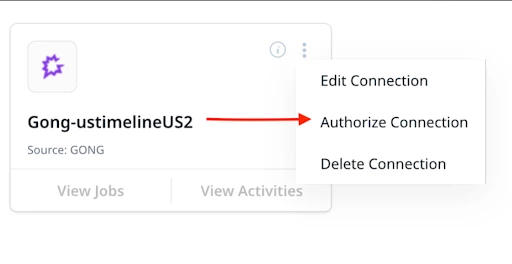
Gong.io connector with Gainsight has been approved for use. Here are instructions on how to re-enable your Gong.io connector.
Steps to Authorize Connection:
- Navigate to the Connectors 2.0 page in Gainsight
- Click on Kebab Menu (three dots) in Gong Connection Card
- Click on Authorize Connection
December 18th Update (Posted 5:59PM UTC)
Resolved: Salesforce Connector Issue
Earlier today, some customers experienced an issue where the Salesforce Connector temporarily lost object- or field-level access, which could cause Rules, Data Designer jobs, or connector jobs to fail. We apologize for the disruption this may have caused and appreciate how quickly customers alerted us.
What Happened?
Following recent Salesforce connector re-authentication, a configuration issue resulted in an incorrect connector URL state for a small number of environments. This issue was not related to Salesforce permissions or customer data changes.
Current Status
This issue has been fully resolved from our side. All Salesforce Connector runs should now complete successfully, and no customer action is required.
Additional Context
Earlier today, some customers were provided a temporary workaround through Support while the issue was being investigated. That workaround is no longer needed, as the underlying issue has been fixed.
We’ll continue monitoring closely to ensure continued stability. Thank you for your patience and partnership.
December 18th Update (Posted 8:03AM UTC)
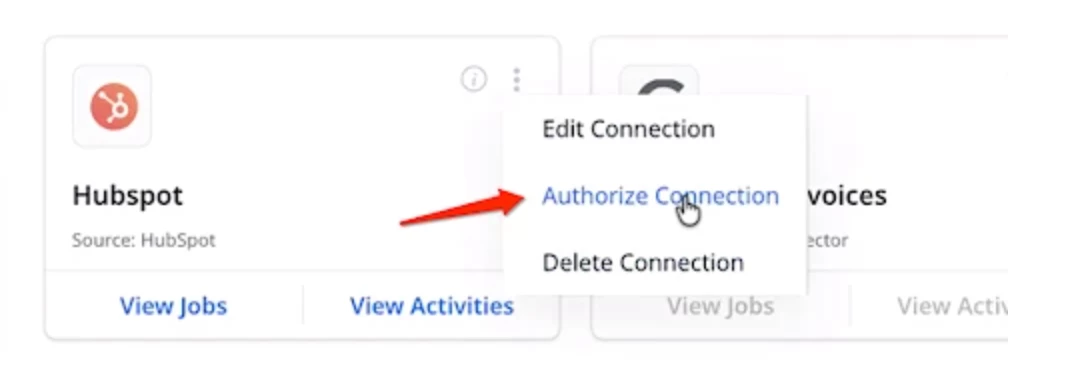
Hubspot connector with Gainsight has been approved for use. Here are instructions on how to re-enable your Hubspot connector.
Steps to Authorize Connection:
- Navigate to the Connectors 2.0 page in Gainsight
- Click on Kebab Menu (three dots) in Hubspot Connection Card
- Click on Authorize Connection
December 18th Update (Posted 12:37AM UTC)
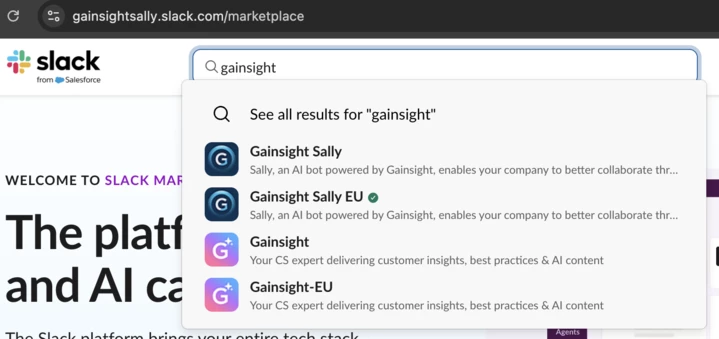
CS Slack apps have been re-enabled and re-listed!
December 15th Update (Posted 12:16AM UTC)
Update on Third-Party Integrations (HubSpot, Gong.io, Zendesk)
We wanted to share an update on the status of our third-party integrations and acknowledge the patience many of you have shown.
We’re in the final stages of coordinating with HubSpot, Gong.io, and Zendesk to bring these integrations back online. As part of this work, we’re engaging directly with each partner and sharing the appropriate investigation context along with the independent Mandiant report, so they have what they need to proceed with confidence. The Staircase Slack app is now re-enabled, with other CS Slack apps coming soon.
We understand how critical these integrations are to your daily workflows, and we recognize the impact of having them unavailable. Restoring them safely and responsibly is a priority, and we’ll continue to keep you informed as progress is made and as each integration is re-enabled.
Thank you for your continued patience and partnership — more updates coming soon.
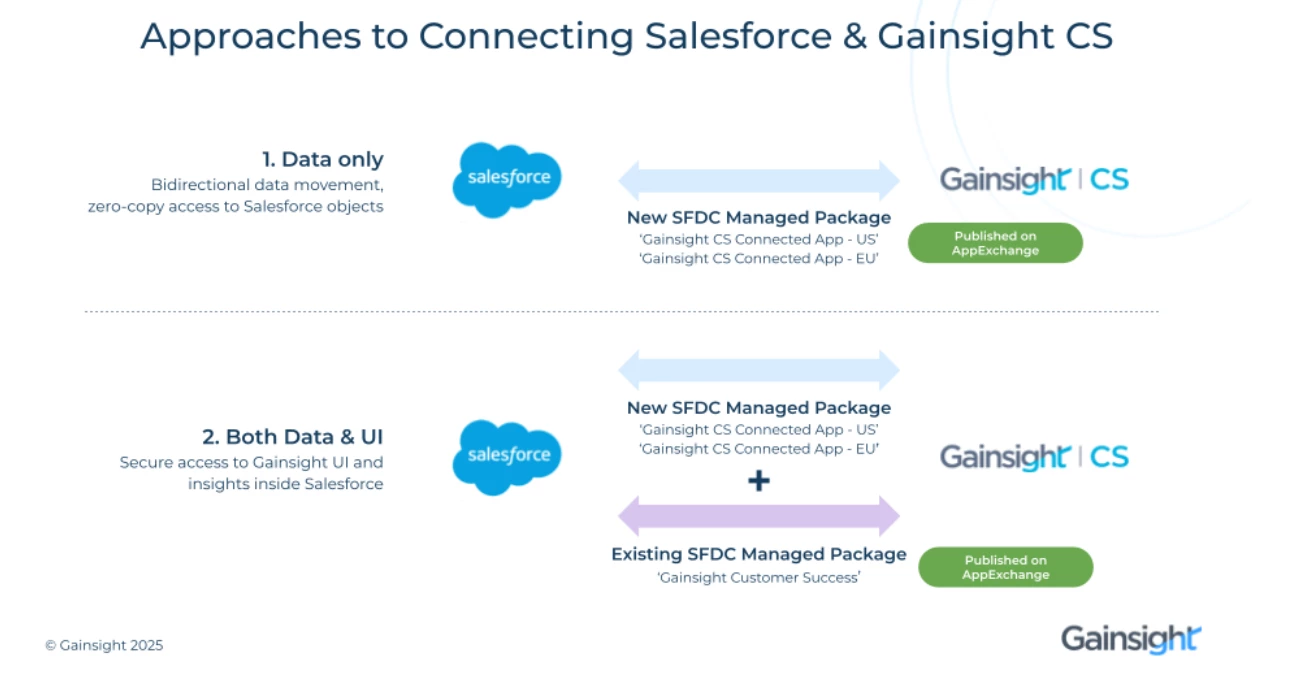
Understanding Gainsight’s Salesforce Managed Packages and When to Use Them
We’ve heard from many customers that it can be confusing to understand the different Gainsight-managed packages available in Salesforce and how they’re each used. This post is intended to clearly explain what each package does, when it’s needed, and how they work together, so you can confidently set up or restore your Salesforce and Gainsight integrations.
1. Gainsight CS Connected App (US / EU)
Purpose: Bi-directional data movement between Gainsight and Salesforce
The Gainsight CS Connected App (available as US and EU versions) is used to enable secure, bi-directional data exchange between Gainsight and Salesforce.
What this package is used for:
- Salesforce Connector jobs
- Salesforce-based Rules
- Salesforce Data Designer datasets
- Salesforce-driven Journey Orchestrator programs
- Timeline and Task sync between Gainsight and Salesforce
- Renewal Center and CSQL sync (Note: Data integration features that work in logged-in user's context are working now for US1 and US2 customers. EU customers can expect them to be functional tomorrow.)
If you rely on data flowing between Gainsight and Salesforce, this is the package you need.
Availability
- Available and approved
- Requires reauthorization to resume data exchange
2. Gainsight Customer Success (Managed Package)
Purpose: Secure access to Gainsight UI inside Salesforce
The Gainsight Customer Success managed package is used to provide secure access to the Gainsight UI and insights from within Salesforce.
What this package is used for:
- View Gainsight data directly inside Salesforce
- Access embedded Gainsight dashboards and components
- Log in to Gainsight through Salesforce
What this package is not used for
- It does not move data between Salesforce and Gainsight
- It does not power connectors, rules, or data sync
Think of this package as UI access and visibility, not data movement.
Availability
- Available and approved
- If your Salesforce admin did not remove it, the Gainsight UI should already be visible in Salesforc
3. Upcoming Managed Package for Extended Experiences
Purpose: Login via Salesforce for Extensions and Apps
To support logging in via Salesforce for extended experiences, such as:
- Chrome Extension
- Outlook Add-in
- Mobile Apps
- Zoom App
…we are working on publishing a new Salesforce managed package.
This package is primarily relevant for customers who:
- Use both data integration and UI integration between Gainsight and Salesforce
- Access Gainsight from inside Salesforce and also rely on these extended experiences
Availability
- In progress
- More details will be shared once the package is ready for use
Quick Summary: Which Package do I Need?
| Use Case | Package Needed |
| Sync data between Salesforce & Gainsight | Gainsight CS Connected App (US/EU) |
| View and Access Gainsight UI inside Salesforce | Gainsight Customer Success |
| Log in via Salesforce for Chrome, Outlook, Mobile, Zoom | Upcoming Managed Package (Coming Soon) |
Our goal with this separation is to make each integration purpose clear, secure, and easier to manage. We’ll continue to share updates as additional packages become available and as more capabilities are restored.
If you have questions about which package applies to your setup, please reach out to Support or your CSM—we’re happy to help.
December 11th Update (Posted 4:13AM UTC)
Restoration Update: Salesforce Connectivity Is Back Online
Salesforce has approved the reconnection of Gainsight’s CS application and we’ve begun restoring Salesforce connectivity across customer environments. Many core workflows are already coming back online and we’re continuing to make steady progress toward full restoration.
Features Now Available (Updated 12/24)
- Salesforce Connector Jobs
- Salesforce Rules
- Salesforce Data Designs
- Salesforce Journey Orchestrator (JO) Programs, including reports based on Salesforce data
- Timeline ↔ Salesforce sync
- Task ↔ Salesforce sync
- Renewal Center ↔ Salesforce sync (via integration user)
- CSQL ↔ Salesforce sync (via integration user)
- Salesforce reports (when accessed from within Salesforce)
- Salesforce reports when logged into Gainsight CS directly (outside Salesforce)
- Renewal Center ↔ Salesforce sync (as logged-in user)
- CSQL ↔ Salesforce sync (as logged-in user)
- Chrome extension (Login via Salesforce)
- Outlook add-in (Login via Salesforce)
- Zoom app (Login via Salesforce)
- Mobile app (Login via Salesforce)
Available Automatically (No Action Required)
If no changes were made to remove the managed package that allows Gainsight UI in Salesforce (different from the Salesforce connected app that needs to be authorized and helps exchange data with SF) Gainsight UI inside Salesforce will work.
Restoration Resources
To help your teams move quickly and confidently, we’ve published a step-by-step restoration guide outlining what to expect and how to proceed: https://education.gainsight.com/page/security-advisory-restoration#nxt
Several customers have already worked closely with Gainsight Services to successfully restore their environments, and we’re continuing to support customers as they bring additional workflows back online.
Note: This update applies to the Gainsight CS application.
December 11th Update (Posted 8:25AM UTC)
Skilljar customers can now connect their instances with Salesforce by following the process outlined here: https://communities.gainsight.com/ce-skilljar-by-gainsight-18/skilljar-salesforce-reconnection-guide-29937?tid=29937&fid=18)
December 10th Update (Posted 12:05AM UTC)
How can I get the Gainsight-Salesforce connection working now?
NOTE: The content below is also updated and available in our Restoration Courses. Upon completing the steps below, please be sure to review and complete the additional steps outlined in the courses to complete full restoration.
Recommended Option: Install Gainsight’s new managed package for Salesforce as a companion for the Gainsight Salesforce Connector. NOTE: The new managed package that powers the data integration between Gainsight CS and Salesforce has successfully completed the AppExchange security review and has been published.You can continue using the installation links below and won’t see the warning message below anymore.

NOTE: Most of the below steps require a Salesforce administrator to work with the Gainsight administrator for the re-authorization process.
Step-by-Step Instructions:
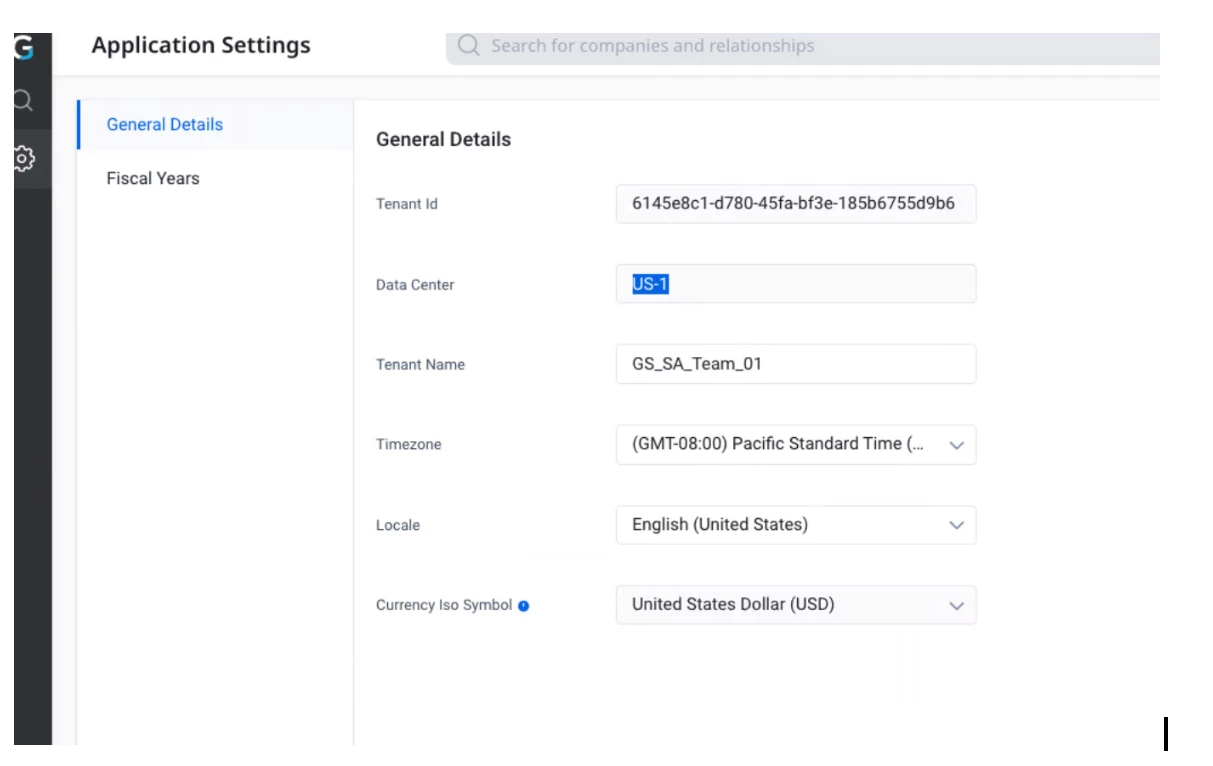
Step 1: Install the correct regional Managed App into your Salesforce instance. There are two versions of the app: One for Gainsight’s US Data Centers and one for the EU Data Center.
The Gainsight Admin can find the data center in the “Application Settings” page (see screenshot below). Download the US package for US1 and US2 centers, and EU for the EU data center.
EU Customers
- Package Name: ‘Gainsight CS Connected App - EU’
- Connected App: GAINSIGHTCSEU
- Production Link to Install: https://login.salesforce.com/packaging/installPackage.apexp?p0=04tJ9000000Tyho (V2.1)
- Sandbox Link to Install: https://test.salesforce.com/packaging/installPackage.apexp?p0=04tJ9000000Tyho
US1 & US2 Customers
- Package Name: Gainsight CS Connected App - US
- Connected App: GAINSIGHTCSUS
- Production Link to Install: https://login.salesforce.com/packaging/installPackage.apexp?p0=04tg50000000tm7 (V2.1)
- Sandbox Link to Install: https://test.salesforce.com/packaging/installPackage.apexp?p0=04tg50000000tm7
New link for the existing UI Managed Package: https://login.salesforce.com/packaging/installPackage.apexp?p0=04tIg000000D7PJ (V2.0)
Note: This is only needed when viewing Gainsight UI within Salesforce.
When you use the URL to get to the App Installer, set up per below and click Install:
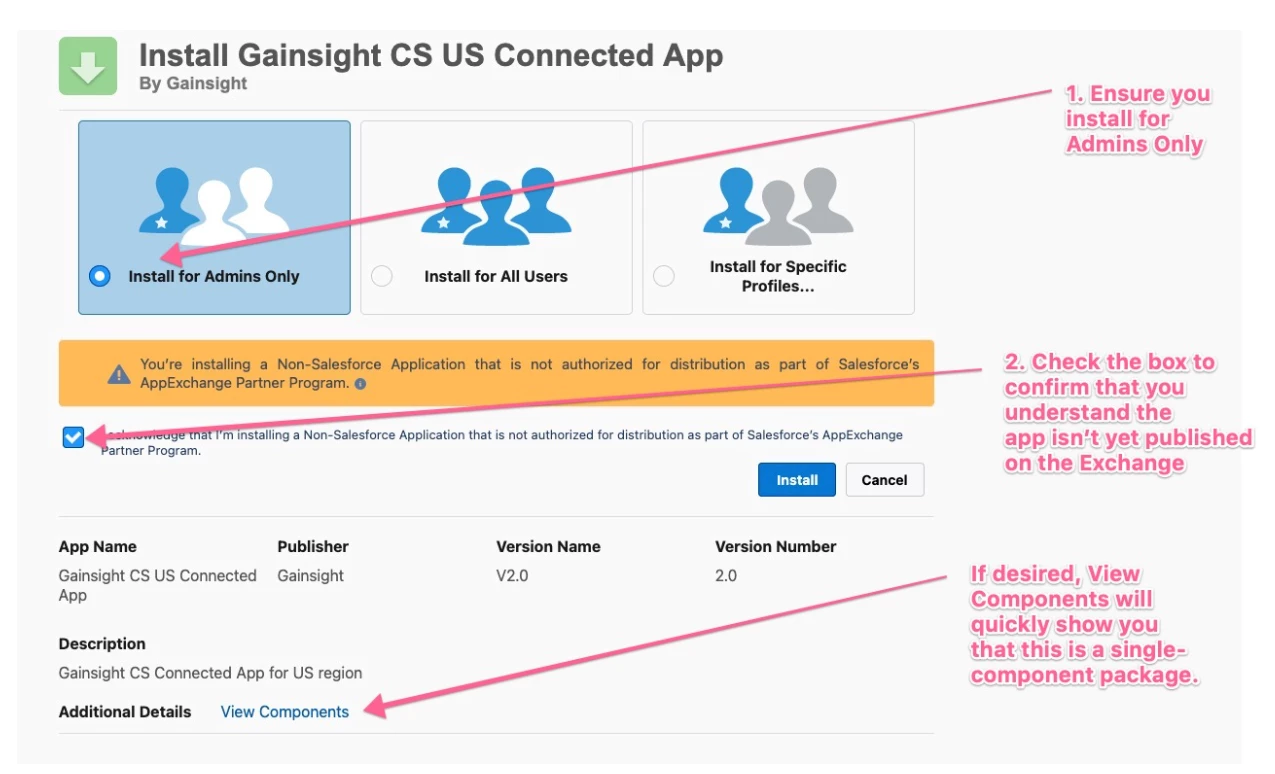
Step 2: When the app installation is complete, the Salesforce Connector in Gainsight needs to be re-authorized by the OAuth User. A successful re-authentication should mean that the reconnection has been successful.
Video walkthrough of installing the new package and reauthorizing: https://share.zight.com/8Luzoj09
NOTE: We understand that not everybody might be able to install a new managed package into their Salesforce instance quickly - therefore, there is an alternative, secure path to use for re-authorization while your Salesforce team reviews the new managed package.
Reauthorizing without installing the new managed package: Grant an additional Permission to the existing Salesforce OAuth user for your connection. Due to a recent change in Salesforce requirements for OAuth user permissions, the existing OAuth user may get an error message when trying to re-authorize. An example is shown below:
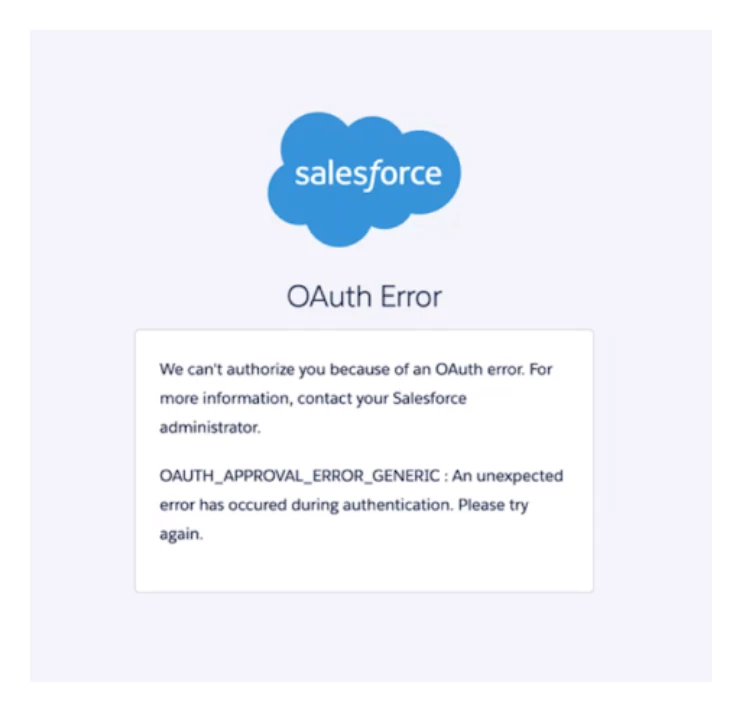
A Salesforce Admin can add the system permission "Approve Uninstalled Connected Apps" to this OAuth User’s profile or permission set. This new security step is expected and simply confirms that the Gainsight “Salesforce Connector” is an approved and secure integration. After performing this step, your Gainsight Connector can be re-authorized from Gainsight by your OAuth from the Connectors 2.0 page.
Video walkthrough of adjusting OAuth user permissions and reauthorizing: https://share.zight.com/nOuyP8k9
December 10th Update (Posted 6:40PM UTC)
Great news — Salesforce has approved the Gainsight Managed Package with UI. This means you can once again access the Gainsight UI directly inside Salesforce, just as you could before.Salesforce has also approved the Gainsight Connected Apps that power data exchange between Gainsight and Salesforce. With this approval in place, customers can begin bringing their Salesforce-connected workflows back online. To resume data flow, the Gainsight Connected App needs to be reauthorized.
We’re excited to be moving into this restoration phase and will continue to share updates and guidance as more functionality comes back online. A follow-up with more details will be coming later today.
December 9th Update (Posted 12:19AM UTC)
UI Update: Participant Sync Changes for Salesforce-Based JO Programs
Note: This update is intended to inform you about recent UI changes. It is not a call to action and no action is required at this time.
What Was Done
We completed a mitigation step for all Journey Orchestrator programs that source participant data from Salesforce. As part of this update:
- Participant Sync has been disabled for all JO programs where Salesforce is the participant source.
- A new “Participant Sync” UI toggle has been added, giving Gainsight Admins and the BCP team control over when syncing is re-enabled after review.
This ensures that programs do not unintentionally ingest outdated or cached Salesforce data once the Salesforce connection is restored.
What You’ll See
In your JO program configuration, you will notice:
- Participant Sync is now OFF for any Salesforce-based program
- A new toggle that allows you to turn sync back on
- Clear indicators explaining why sync is disabled
- No new Salesforce-sourced participants being pulled until the toggle is re-enabled
Importantly, if you add any non-Salesforce source to the program and want to execute participant sync from that new source, you may enable the toggle. The change only restricts Salesforce-based participant ingestion.
Why This Was Done
These changes were made to maintain data integrity during the Salesforce remediation period and to prepare customers for the upcoming Salesforce remediation event, when the Gainsight Managed App is expected to come back online.
Specifically, this update helps ensure:
- No stale or previously cached Salesforce participants enter active JO journeys
- Admins have full control over when and how Salesforce-connected programs resume syncing
- Programs remain predictable and consistent during reinstatement
- A clean, safe reactivation process when Salesforce restores the connection
This proactive measure aligns with recommendations from our independent cybersecurity partners and helps ensure a smooth transition once Salesforce lifts the restrictions.
Restoration Process Resources
Here are some resources that will help you familiarize yourself with the restoration process. Please hold off on making changes until Salesforce confirms it's safe to proceed:
- Restoration Courses: https://education.gainsight.com/page/security-advisory-restoration
- Office Hours: https://education.gainsight.com/calendar (Open to Admins for registration now)
December 8th Update (Posted 4:31AM UTC)
Important Update from our CEO, Chuck Ganapati: Security Investigations Complete
Hello,
To continue our commitment to sharing details about our work resolving the security advisory issued by Salesforce, I want to share an important update on our progress.
After working closely with leading cybersecurity experts at Mandiant and CrowdStrike, both of their investigations are now complete. We immediately shared the following investigation summaries from Mandiant and CrowdStrike with Salesforce:
Here is what Mandiant and CrowdStrike concluded:
1. Mandiant identified no evidence of an active threat actor in Gainsight CS logs. We partnered with them for containment and hardening efforts across our CS technology environment. Mandiant verified the remediation activities performed during the response, which included application vulnerability analysis, credential management, logging enhancements, and security configuration reviews.
2. CrowdStrike’s investigation found no evidence of threat actor activity during its investigation into the Skilljar, Staircase, Customer Communities (CC), Product Experience (PX), and Northpass (CE) applications. They also confirmed logical separation from the Customer Success (CS) environment, with no lateral movement and no Indicators of Compromise (“IOCs”) identified in any other Gainsight application.
We expect to begin the reconnection process soon. As we move towards reconnection, this is a good time for your teams to review and prioritize your most important Gainsight workflows in anticipation of data flow resuming. We’ll also share preparation guidance shortly to ensure both your team and ours are ready for a smooth transition.
Thank you for your patience and partnership throughout this process. Our teams are here to provide personalized support, and we are working diligently toward restoring full Gainsight functionality.
December 8th Update (Posted 8:27 UTC Time)
We wanted to share an important update: Both Mandiant and CrowdStrike have completed their independent investigations. We’ve already shared this investigation summary with Salesforce and are now reviewing the findings together. Once those conversations are complete, we’ll publish the investigation summary on our Trust site, so you have full visibility as well.
In parallel, we are proactively working with our partners at Zendesk, HubSpot, and Gong.io to keep them fully updated so we can get those integrations re-enabled as quickly and safely as possible.
Thank you for your patience and partnership as we work through this final step.
December 5th Update (Posted 2:43AM UTC)
Q: What’s the timeline to re-enable non-Salesforce connectors like Gong, Zendesk?
A: These connectors are expected to come back online after the Salesforce connector is restored. Gainsight is working with each vendor, and reactivation depends on their independent security reviews.
Q: What’s the confidence level that this will be resolved in “days”?
A: Gainsight believes restoration can be measured in days, but the final decision and timing are up to Salesforce and so we can’t commit to an exact timeframe.
December 3rd Update (Posted 12:43PM UTC)
IMPORTANT NOTE:Upcoming Action ACTION COMPLETED - S3 Key Rotation and Connection Deactivation on December 4th
We want to give everyone advance notice about an upcoming remediation action related to the Salesforce advisory.
On Thursday, December 4th, between 6:00 AM and 9:00 AM Pacific Time, we will deactivate S3 connections for customers whose S3 access keys have not been rotated since before January 1st, 2025. This action is being taken based on guidance from the independent cybersecurity firms supporting the investigation and is a standard part of the remediation process to ensure all environments meet current security best practices.
We understand this may cause some disruption, and we genuinely appreciate your patience. The goal is to handle this step for you if older keys have not yet been rotated, so your environment is already in a clean, secure, fully remediated state as we progress toward restoring the Gainsight app on Salesforce.
If your S3 connection is impacted, you will need to reconnect it using newly rotated keys.
A detailed PDF guide (Title: S3_How to Reset Access Key) is linked in the resources section above to help walk you through the process.
If you need help or prefer guidance, please open a support ticket—our team is ready to assist. Thank you for your partnership and understanding as we continue through this remediation phase.
Q: How should I protect myself?
A: We recommend a set of precautionary steps to help customers further protect their environments. These actions align with standard best practices during any security investigation:
- Rotate the S3 bucket access keys and other connectors like BigQuery, Zuora, Snowflake etc. used for connections with Gainsight.
- Log in to Gainsight NXT directly, rather than through Salesforce until the Salesforce Connected App functionality is fully restored.
- As part of this, reset NXT user passwords for any users who do not authenticate via SSO.
- Re-authorize any connected applications or integrations that rely on user credentials or tokens.
These steps are preventative in nature and are designed to ensure your environment remains secure while the investigation continues. Our third-party cybersecurity experts’ independent reviews uncover any new recommendations.
Please see documentation in the resources section above showcasing how you can rotate keys/re-auth various connectors.
Support for Business Continuity Needs
Based on guidance from Gainsight’s Professional Services, if you require immediate support with Business Continuity needs, please open a Gainsight Support ticket. Please include the following information in order for us to expedite and triage requests:
- Please list your critical workflows. If applicable, what Gainsight product(s)?
- Are you able and willing to push data to a Data Lake, CSV to Amazon S3, or push to Gainsight’s APIs?
- Do you have engineering/data resources to support pushing data to Gainsight via new integrations?
- Who will be our key contacts at your organization to drive this forward?
- What time zones do the key contacts (referenced above) work?
December 1st Update (Posted 1:23AM UTC)
Q: When will the next Office Hours be?
A: We're hosting two events this week designed to provide updates on this security advisory. We recommend attending the event most relevant to your role/questions:
Wednesday AMA – “System Continuity Recommendations & Next Steps”
Join us Wednesday, Dec 3 at 8AM PT for a live AMA focused on tactical guidance on how to move forward during and after the Salesforce connector pause. We’ll cover how to maintain continuity, what functionality will come back automatically, and what might require action once systems are restored. This session will focus on system restoration, not cover updates regarding the overall security advisory, and is intended for Admins and Ops teams managing the day-to-day impact.
[Link to Join (Passcode: 394056)]
Friday Customer Office Hours – Executive Briefing + Updates
We’re hosting an Office Hours session Friday, Dec 5 at 8AM PT to share executive-level updates, restoration plans, and Q&A with our leadership team. This is your chance to hear the latest from Gainsight Security, Product, and Exec teams. This session will focus on overall updates over tactical customer-specific questions.
[Link to Join (Passcode: 384134)]
Important Note for Office Hours: Due to the nature of this content, we need to authenticate users for both calls and will require attendees to login to Zoom. If you don't use Zoom for work, you'll need to create a free login in order to join the call.
Q: What are the known IOCs?
A: Please see the list of IOCs and User Agents below which includes what we’ve identified and what Salesforce has published here.
We have updated the list of Indicators of Compromise (IOCs) included in the FAQ. The list has expanded since our last update based on additional information received through the ongoing investigation.
At this time, there is no change to our assessment of the incident, and we continue to see no evidence of threat activity in Gainsight’s systems, and we will notify you in the event that changes. We are publishing the updated IOCs so that customers have the most complete information available should they wish to continue their own analysis.
From a CISO perspective, it’s important to understand that IOC sets naturally evolve during any multi-party investigation. As additional logs, telemetry, and cross-environment correlations become available, the list often expands—not because new threat activity is discovered, but because security teams consolidate all potentially relevant indicators into a single unified reference. This is standard incident-response practice and should not be interpreted as evidence of new compromise.
IOC List
User Agent Strings:
1. python-requests/2.32.3
2. Go-http-client/1.1
3. Salesforce-Multi-Org-Fetcher/1.0
4. python-requests/2.28.1
5. AppleWebKit/537.36 (KHTML, like Gecko)
6. Mozilla/5.0 (X11; Linux x86_64)
7. HeadlessChrome/138.0.7204.0
8. Safari/537.36
IPs:
| 3.239.45.43 | 45.66.35.35 | 104.3.11.1 | 198.54.135.205 | 185.220.101.165 | 135.134.96.76 | 185.220.101.185 | 46.165.243.36 |
| 185.220.100.244 | 45.67.138.124 | 146.70.174.69 | 107.189.31.33 | 203.55.81.2 | 146.70.171.216 | 185.220.101.31 | 87.118.122.30 |
| 192.42.116.219 | 65.195.105.153 | 169.150.203.245 | 107.189.6.124 | 80.94.92.92 | 185.207.107.216 | 185.220.101.59 | |
| 195.47.238.90 | 65.195.105.81 | 172.113.237.48 | 172.105.20.12 | 109.70.100.1 | 185.220.100.245 | 185.241.208.185 | |
| 195.47.238.92 | 65.195.111.21 | 198.54.135.148 | 185.132.53.150 | 109.70.100.68 | 185.220.100.255 | 192.76.153.253 | |
| 45.149.173.227 | 82.163.174.83 | 198.54.135.197 | 185.220.101.109 | 109.70.100.71 | 185.220.101.130 | 193.189.100.195 |
December 1st Update (Posted 8:21PM UTC)
Q: I’m having trouble with the GS Assist plugin not working. What should I do?
A: Please follow the instructions below regarding re-enabling the Gainsight Assist Chrome Plugin. Note: This action needs to be performed at the User level, it is not an Admin level task.
- Verify whether Gainsight Assist is already installed - Open the Chrome browser and navigate to Gmail. If you see Gainsight Assist listed under your Chrome extensions section to the right, you may log in and begin using the plugin.
- Install or reinstall Gainsight Assist - If Gainsight Assist does not appear in your extensions, open the Chrome web store, search for Gainsight Assist, and reinstall the extension (remove and add it again if necessary).
After installation, you should see a confirmation message in the top-right of the extension indicating that the plugin has been successfully installed.
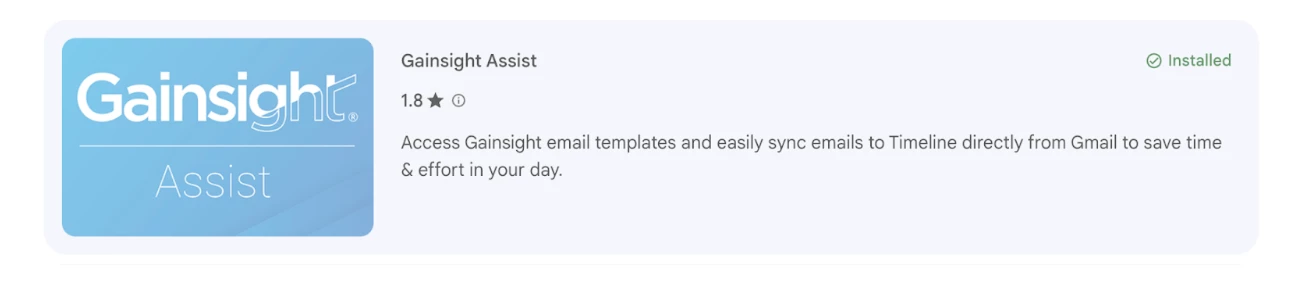
- Log in to the plugin - Once the plugin is installed, log in using your Gainsight credentials. After logging in, you will be able to log activities directly from Gmail into your Gainsight instance.
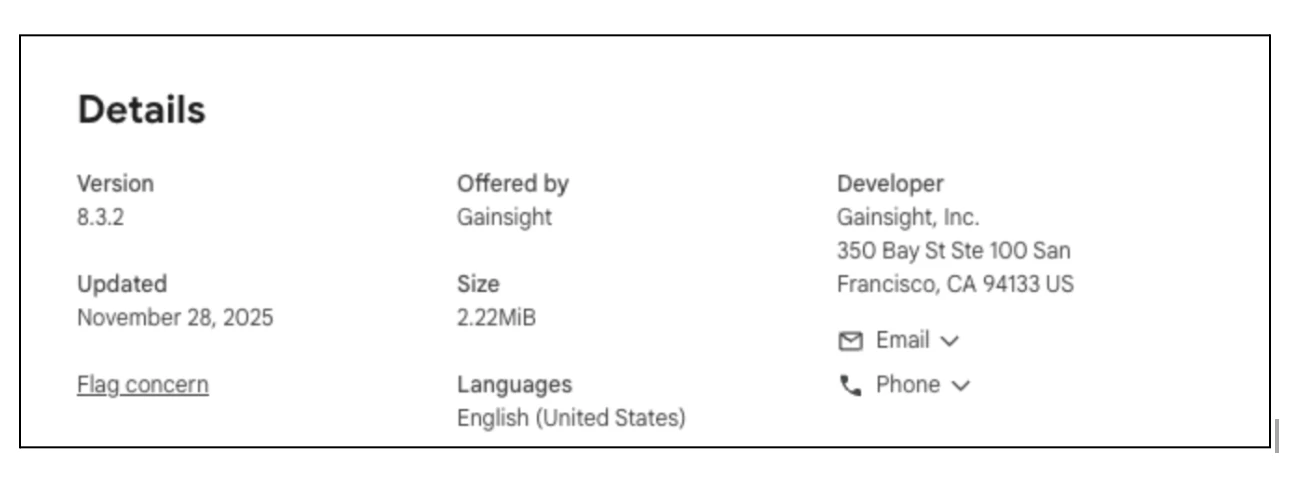
- Verify the plugin version - The latest version of Gainsight Assist is 8.3.2. You can verify the installed version by navigating to the Chrome Extensions page.
Q: I’m having trouble with the Gainsight Google Calendar integration not working. What should I do?
A: Please follow the instructions below regarding re-enabling the Gainsight Google Calendar integration. Note: This action needs to be performed at the User level, it is not an Admin level task.
- Access Settings - Log in to Gainsight, click your profile icon in the top-right corner, and select Settings.
- Open Calendar Configuration - On the Settings page, navigate to the Calendar Configuration sub-tab.
- Retry Authorization - In the Google Calendar section, click Retry Authorization.
- Authorize Your Account - Select your Google account and grant the required permissions. This will reauthorize the connection and allow your calendar events to sync into Gainsight.
November 27th Update (Posted 1:59AM UTC)
Q: My Google SSO login into Gainsight is failing. What can I do?
A: Google SSO logins (Gsuite) are currently failing. Out of an abundance of caution, Google has temporarily disabled OAuth clients with callback URLs such as gainsightcloud.com. As a result, customers using Google App–based login are currently unable to access the system.
To ensure uninterrupted access, we would like to propose an alternative approach using SAML authentication. We support SAML setup with any Identity Provider, including Azure, OneLogin and Google. Our team will be happy to guide you through this configuration.To proceed, please follow the below steps.
- IdP Configuration:
- Follow the provided documents on Google, Azure or OneLogin to configure SAML. Please see attached PDFs at the bottom of this post.
- Raise a Support ticket after creating the custom application in your Identity Provider (IdP):
- In the ticket, mention you need help setting up SAML.
- Include your availability (2-3 time slots) for Monday, December 1st, Tuesday, December 2nd, or Wednesday, December 3rd and your timezone.
- Ensure both your IT Administrator and Gainsight Administrator are available for the scheduled call during those time slots and cc them on the ticket.
- Our representative will send out a Zoom meeting invite for one of those time slots. (Note: Due to high number of requests, it’s possible that our representative may ask for additional time slots.)
- Attend the call where one of our Support agents will walk you through the process.
November 26th Update (Posted 3:36 AM UTC)
Q: Are the issues with Google SSO related to this cybersecurity incident?
A: Google has disabled OAuth clients with callback URIs like gainsightcloud.com out of an abundance of caution. Google is requesting Gainsight, revoke OAuth tokens, rotate all OAuth client secrets, and complete a CASA Tier 3 assessment to reinstate the OAuth clients. See link HERE.
Q: What is Gainsight doing for customers using the Gong integration that only syncs back 4 hours? Will missed events be restored?
A: Gainsight is currently evaluating remediation steps post-restoration, including potential sync catch-up workflows. Further guidance will be shared once the connector is re-enabled. We are working to minimize manual work required once connection is restored.
Q: Will jobs and rules that failed due to max errors be restarted automatically once the connector is restored?
A: Jobs that were halted due to repeated errors will be restarted by Gainsight once the integration is safely restored. Admins will also have the ability to manually re-trigger or reset any affected rules if needed. Gainsight will provide explicit recovery instructions and checklists to help customers validate and manually restart any assets that don’t resume automatically.
Q: Should we expect to rebuild our connectors and rules from scratch after restoration?
A: Gainsight is preparing a structured recovery process to minimize customer admin effort. Rules, reports, and connectors will be re-enabled as-is, and we will provide a step-by-step reauthorization and validation checklist to guide restoration.
Q: Will the filter criteria and configuration in rules using SFDC tasks still be intact post-restore?
A: Yes. Filter criteria and configurations will remain intact. Once the SFDC connection is restored, assets and rules referencing SFDC should resume functionality without needing manual reconfiguration.
Q: Is PX affected?
A: PX is only impacted if configured to sync with Salesforce via the connected app. PX native features that do not rely on Salesforce remain operational.
Q: Will Zendesk, Gong, and Hubspot re-enable their integrations on their own timeline?
A: Yes. These vendors paused connections independently. Gainsight is in contact with them, but they will decide when to re-enable based on their own security reviews.
Q: Can customers continue using GS-managed S3 buckets?
A: Yes. Customers may continue using GS-managed S3 buckets. As a best practice:
- Rotate access keys
- Whitelist Gainsight IPs (if supported)
- Limit access scopes on the Gainsight side
November 24th Update (Posted 4:38AM UTC)
Q: When is the next Office Hours scheduled?
A: The next Office Hours is scheduled for Wednesday, November 26th at 12PM PST/3PM EST. Here is the link to join (Passcode: 685740).
Note: We recognize this timing is challenging for some regions, however, we’ll continue to update the FAQs with key takeaways from the Office Hours session.
Q: Do I need logs from Gainsight for my investigation?
A: Based on the nature of the logs we retain, many of our clients have not found them to be material in assessing any risk to their organization, however we will do our best to provide any available logging as soon as we are able to. Because of this, these logs would not be materially useful in analyzing the suspicious activity reported by Salesforce. At this stage, we strongly recommend that you focus your investigation on the Salesforce logs that show authentication attempts and API calls originating from the Gainsight Connected App. These Salesforce-side logs are the authoritative source of information for identifying any anomalous access patterns.
Q: Should I disconnect Staircase from any of its integrations?
A: See below:
- Staircase is not impacted by the ongoing Salesforce Security Advisory Relating to Gainsight beyond the inability to read or write data to Salesforce due to Salesforce’s revoked connections (due to an abundance of caution). Gong.io’s connection with Staircase is also disconnected at the time of writing this answer.
- Salesforce removed the Staircase connection as a precautionary measure only in response to the broader Gainsight Connected App investigation.
- Staircase operates on a completely isolated and separate infrastructure from other Gainsight products, with no shared systems or data paths.
November 23rd Update
Q: What are the known IOCs?
A: Please see the list of IOCs and User Agents below which includes what we’ve identified and what Salesforce has published here.
User Agents:
- python-requests/2.32.3
- Go-http-client/1.1
- Salesforce-Multi-Org-Fetcher/1.0
- python-requests/2.28.1
IOC IP Addresses:
| 104.3.11.1 | 185.220.100.255 | 3.239.45.43 |
| 109.70.100.1 | 185.220.101.130 | 45.67.138.124 |
| 109.70.100.68 | 185.220.101.185 | 45.149.173.227 |
| 109.70.100.71 | 185.220.101.31 | 45.66.35.35 |
| 135.134.96.76 | 185.220.101.59 | 46.165.243.36 |
| 146.70.171.216 | 185.241.208.185 | 65.195.105.153 |
| 146.70.174.69 | 192.76.153.253 | 65.195.105.81 |
| 169.150.203.245 | 193.189.100.195 | 65.195.111.21 |
| 172.113.237.48 | 198.54.135.148 | 82.163.174.83 |
| 185.207.107.216 | 198.54.135.197 | 87.118.122.30 |
| 185.220.100.245 | 198.54.135.205 |
Q: What is the recommended approach for implementing IP restrictions within a managed application of this nature?
A: For the Gainsight managed connected app, we advise setting up IP restrictions at the profile level. This is because IP restrictions will be enforced regardless of any IP Relaxation settings applied to the connected app.
For updates prior to November 23rd, please refer to the post below.