
Alistair FIeld
Expert ⭐️
March 15, 2023
F.A.Q.

How to add hyperlinks to text in Private Messages

  • March 15, 2023
  • 11 replies
  • 503 views

When writing a Private Message, you may want to hyperlink your message text.

The text editor does not give you the option to add a hyperlink.
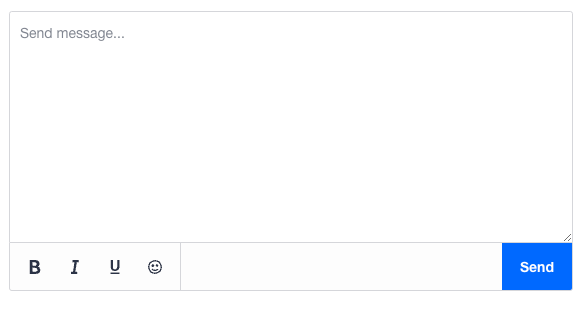
However, you can use the following url parameter.


[url=your link here]link text[/url]


Example: [url=https://community.insided.com/events]inSpired Events[/url]

    11 replies

    Alistair FIeld
    Expert ⭐️
    March 15, 2023

    Thank you @revote for the inSpiration. 👍

    The needs of the many, outweigh the needs of the few. 🖖
    Daniele Cmty
    Helper ⭐️⭐️
    March 15, 2023

    Ooo nice!

    An alternative workaround, which I’ve always used, is the following:

    • Create a hyperlink in a text box editor (e.g. in a comment box or “create topic” box)
    • Copy-paste that hyperlink into the message editor at the desired location
    • Pro-Tip: Make sure to underline it in the message box so it actually looks like a hyperlink. Otherwise it’ll be hard to spot.
    Nadia Nicolai
    Gainsight Employee ⭐️
    Gainsight Employee ⭐️
    March 21, 2023

    Awesome, thanks for sharing @Alistair FIeld 🙌🏻

    Nice @Daniele Cmty, I used the same ‘hack’ back in the days. A hyperlink looks so much better - more attractive to click.

    @Jasper, I think this might also be interesting for you and the team 🤓 

    Jasper
    Contributor ⭐️⭐️⭐️⭐️⭐️
    March 21, 2023

    Yes, we were already using that. After the text editor didn't support BBcode anymore we found we could still do it in pm's 🙂

    Nadia Nicolai
    Gainsight Employee ⭐️
    Gainsight Employee ⭐️
    March 21, 2023

    Ah yes, you’re right @Jasper  do you also remember the parameter to insert images? And does it also still work in PM’s? (if it ever did)

    Jasper
    Contributor ⭐️⭐️⭐️⭐️⭐️
    March 21, 2023

    I don't think it still works, at least it didn't when I just tested it.

    It used to be possible with [img]url[/img]. We would love images in pm's though 😉

    revote
    VIP ⭐️⭐️⭐️⭐️⭐️
    March 21, 2023

    I don't think it still works, at least it didn't when I just tested it.

    It used to be possible with [img]url[/img]. We would love images in pm's though 😉

    Yeah, generally speaking, private messages should have (almost) same features than comments.

    JessicaMendez
    Contributor ⭐️⭐️⭐️⭐️
    March 22, 2023

    When I write a new private message or respond to a private message, I do not see a text editor at all. There is no option for me to bold or underline text. Is there something I’m missing? 


    Daniele Cmty
    Helper ⭐️⭐️
    March 23, 2023

    Hi @JessicaMendez,

    What you can see in the screenshot is the backend private message module. It is mostly useful for sending messages in bulk.

    Here’s how to use it:


    You can insert markup in private messages using BBCode syntax. So far I’ve used links, bold, underline, etc. and it worked fine.

    Before sending messages in bulk with bbcode, I recommend you to try out sending a message to a test account so you see if the format worked well.


    Alistair FIeld
    Expert ⭐️
    March 23, 2023

    @JessicaMendez that is the private message function in Control.

    The above is looking at the Private Message in the front end.


    https://community.insided.com/inbox/conversation?with=2142


    The needs of the many, outweigh the needs of the few. 🖖