

bjoern_schulze
Helper ⭐️⭐️⭐️
September 22, 2026
Solved

Custom Widget "Profile completion": Questions and issues

We built a custom Widget called “Profile Completion” for the o2 Community.

The widget:

  • Loads the current user’s profile through a Gainsight connector
  • Calculates completion based on nine equally weighted criteria:
    • eight User Profile Fields
    • personal avatar
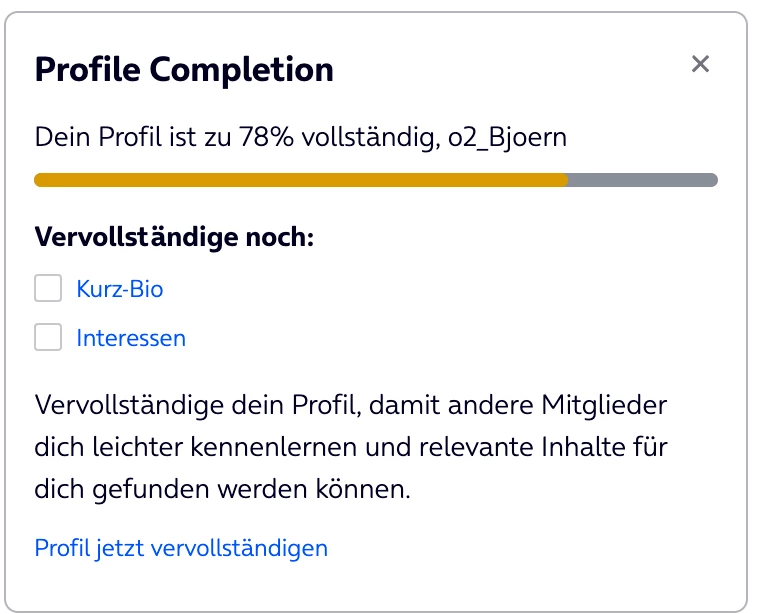
  • Displays the completion percentage, username, progress bar, missing fields, explanation text, and a link to the profile settings
  • Supports configurable Builder options for content and display
  • Uses Gainsight Personalization to target users with a Primary Role (through a segment)

It looks like this:
Questions and Issues

Pre-load personalization based on profile completion

Currently, Personalization only filters by a broad segment such as users with a Primary Role. The widget is therefore initialized for all matching users and must load the connector before it can determine whether the profile is complete.

Question:

Is there a supported way to personalize a Custom Widget based on a calculated or stored profile-completion status before the widget is loaded?

Ideally, we would like to have something like:

Primary Role = Registered User
AND profile_completion_status = incomplete

Complete profiles should not load the widget or execute its connector.

Avatar availability as a segmentation attribute

The personal avatar is available in the user API response and we can use it to calculate the completion percentage. However, avatar availability is not available as a User Profile Field filter.

Question:

Can the presence or absence of a user-uploaded avatar be exposed as a segmentable user attribute?

Ideally, the segment should be able to distinguish:

  • avatar exists
  • avatar is missing

Birthday empty-state filtering

The Birthday field does not provide an `is empty` filter. The available date filter, such as `More than 0 day ago`, does not reliably identify users who have never entered a birthday.

Question:

Is there a supported filter for an unset or default Birthday value?

Our workaround: The widget treats the platform default value `1-1-1970, 0` as incomplete.

Segment logic: OR conditions and exclusions

The Segment Builder currently allows multiple filters with `AND`, but we could not create the required condition:

Field A is empty
OR Field B is empty
OR Field C is empty

We also could not reliably create a negated version of the existing “all profile fields completed” segment.

Questions:

  • Are `OR` conditions supported for User Profile Field filters?
  • Can a segment be defined as the inverse of another segment?
  • Is there a recommended pattern for targeting users who match at least one incomplete-profile condition?

Native Style tab for Custom Widgets

The native Style tab is available for native widgets, but not for our Custom Widget.

Questions:

  • Can the native `Style` tab be enabled for Custom Registry Widgets?
  • Is there an official Registry configuration schema for enabling it?
  • If it is not supported, is there a planned roadmap for enabling it for Custom Widgets?

We deliberately do not want to recreate the native Style tab with an unsupported custom implementation.

marekkoszlak
Gainsight Employee ⭐️
September 25, 2026

Hi ​@bjoern_schulze, I really like the use case and the widget idea! Going through your questions:

Pre-load personalization / avatar
Personalization can't check a calculated value like profile completion before the widget loads, so the widget will still start up for everyone in the segment. What you can drop is the connector.

Take a look at our most recent release from yesterday: Gainsight CC: Deeper CS Sync, a New CLI, and More Preview Control. The section "Read Community User Data in the Browser with the Web SDK" covers how you can now get a lot more useful information straight from the User SDK, without needing Connectors for it. For your widget, ChWebSdk.Context.User() returns the logged-in user's avatar (empty when there isn't one) and all their profile fields (empty or null when unset) in a single call, on the member's own session. The widget can work out completion from that and render nothing when the profile is complete. I think this will make your whole setup simpler and more future-proof. The detailed documentation is here: https://developer-portal.gainsight.com/docs/sdk/web-sdk/user-context.html

Segment questions (avatar attribute, Birthday "is empty", OR / negated segments)
I will have to check about this one with the proper team on our side and either I, or the respective PM will come back to you on it.

Style tab
We hide the Style tab for custom widgets on purpose, and there's no registry setting to turn it on. The supported route is design tokens: reference them in your widget CSS and the widget follows the community theme. For anything admins should control per placement, add a configuration property in the registry, the same way you're already handling your Builder options. Design tokens use is documented here https://developer-portal.gainsight.com/docs/custom-widgets/v2/design-tokens.


I hope that helps and I’m happy to dig in further if you have any follow-up questions or prefer to meet on a call for a deep dive if that’s what could be more helpful for you.

7 replies

Matt Breneman
Contributor ⭐️⭐️⭐️
September 22, 2026

hey ​@bjoern_schulze! I can share what I have done for the “Pre-load personalization based on profile completion” question. My widget was based on Community actions rather than profile completion so keep that in mind during my response.

I used the Gamification ranks to help with this. You can make the widget visible to specific segments. So, I made it visible to Newcomer and Contributor ⭐ only. Based on my gamification rules, by the time someone gets to Contributor ⭐⭐, they will have completed the items on the widget and then it becomes hidden for them. 


This may not apply exactly to your use case since the profile completion may not relate to their ranks, but I’m hoping it at least provides an idea on what can be done for showing/hiding the widget. 

Translate
Julian
Gainsight Employee ⭐️⭐️⭐️
September 24, 2026

I also use ranks to segment based on activity / maturity. This works great to e.g. show onboarding content to new users, just like you did. Another advantage would be that you can base ranks purely on login / account age, to further specify / personalize the experience for new users (e.g. allowing to have a new recommendation for each time you log in).

In this case however, I would recommend to approach this differently:
In my own test community, I have connectors and widgets that can add or remove values from either profile fields, user roles (or both), to further manage personalized experiences.

I will respond outside of this thread to give a more detailed explanation of how I have solved this.

Translate
I follow my nose, it always knows
marekkoszlak
Gainsight Employee ⭐️
September 25, 2026

Hi ​@bjoern_schulze, I really like the use case and the widget idea! Going through your questions:

Pre-load personalization / avatar
Personalization can't check a calculated value like profile completion before the widget loads, so the widget will still start up for everyone in the segment. What you can drop is the connector.

Take a look at our most recent release from yesterday: Gainsight CC: Deeper CS Sync, a New CLI, and More Preview Control. The section "Read Community User Data in the Browser with the Web SDK" covers how you can now get a lot more useful information straight from the User SDK, without needing Connectors for it. For your widget, ChWebSdk.Context.User() returns the logged-in user's avatar (empty when there isn't one) and all their profile fields (empty or null when unset) in a single call, on the member's own session. The widget can work out completion from that and render nothing when the profile is complete. I think this will make your whole setup simpler and more future-proof. The detailed documentation is here: https://developer-portal.gainsight.com/docs/sdk/web-sdk/user-context.html

Segment questions (avatar attribute, Birthday "is empty", OR / negated segments)
I will have to check about this one with the proper team on our side and either I, or the respective PM will come back to you on it.

Style tab
We hide the Style tab for custom widgets on purpose, and there's no registry setting to turn it on. The supported route is design tokens: reference them in your widget CSS and the widget follows the community theme. For anything admins should control per placement, add a configuration property in the registry, the same way you're already handling your Builder options. Design tokens use is documented here https://developer-portal.gainsight.com/docs/custom-widgets/v2/design-tokens.


I hope that helps and I’m happy to dig in further if you have any follow-up questions or prefer to meet on a call for a deep dive if that’s what could be more helpful for you.

Translate
jvdc
Expert ⭐️
September 28, 2026

Yeah I think the best way would be to design the widget itself to not show if the fields are all completed or display a success message.

You inspired me and I've a profile preview widget which displays the profile completeness. I leave it when complete as it also displays other user data.

We're droing like Marek suggests and solely use data from ChWebSdk.Context.User() which works very well.

To also make it easier with the styling I've picked up as many design tokens as possible: border-radius from cards, company defined colors, … and I’ve added a few cusotmizing options in the widget config section:

If you click in the gauge you can see either a success message or the fields that the user can still fill in.


Translate
Sanne van Opstal-Brakel
Helper ⭐️
October 5, 2026

I love this idea and I want to start with custom widgets / learn how to use them…. As I am a non-techy I would heavily rely on AI to code…. If you used AI, any one wants to share some of their prompts to get where they are today? 

Translate
Sharing = caring
jvdc
Expert ⭐️
October 5, 2026

I am actually preparing a workshop for Pulse Europe where I'll be sharing my tips for developing widgets without any dev skills 😊 The docs will be ready post-Pulse, but my overal pitch is to first start with the HTML widgets and slowly transfer that to a widget of its own.

Have you made any HTML widgets? If you want to give it a try and play with user information, you can start by sharing these links to your AI,

https://developer-portal.gainsight.com/docs/sdk/web-sdk/overview.html

https://developer-portal.gainsight.com/docs/sdk/web-sdk/user-context.html

and then ask to make a simple widget that for instance displays the user's username, then gradually add other data like the profile picture and other specific profile details.

Translate
aluciani
Helper ⭐️
October 8, 2026

This should really be part of the base platform.

Translate