

Engagement Training: basics - ongoing discussion
The engagement training is a reoccurring webinar, which tackles one of the most frequently asked Community Manager questions, “how do I keep members coming back?” To sign up for the webinar, click here.
The training is best suited for Community Managers who would like to understand the basics regarding end user engagement on inSpired. We will discuss the following:
- Homepage customization
- Rank up notifications
- Maximizing email notifications
- Re-engaging inactive members
After the webinar, all questions and discussions will take place in this inSpired post. I encourage peers to interact, ask questions, and share their tips to increase end user engagement.
Questions:
How do you set up the notifications for the ‘Rank Messages to Engage Inactive Users’? I don’t see this under System Emails.
To set up the rank messages, you will not visit system emails. Instead, you will set them up within Rank. You will need to be on our Business or Professional Packages for Rank emails. The Professional package does not include Ranks. See below:
- Login to Control > Gamification > Ranks > Add Rank
- Name all of these ranks “New” with the same icons because they haven’t had any community activity yet, and they technically are not moving up or down in a rank.
- In the “How to get this rank” section select the users who are eligible for this rank. (customers)
- Minimum comments, topics, likes received, visits, etc. should all be set to 0
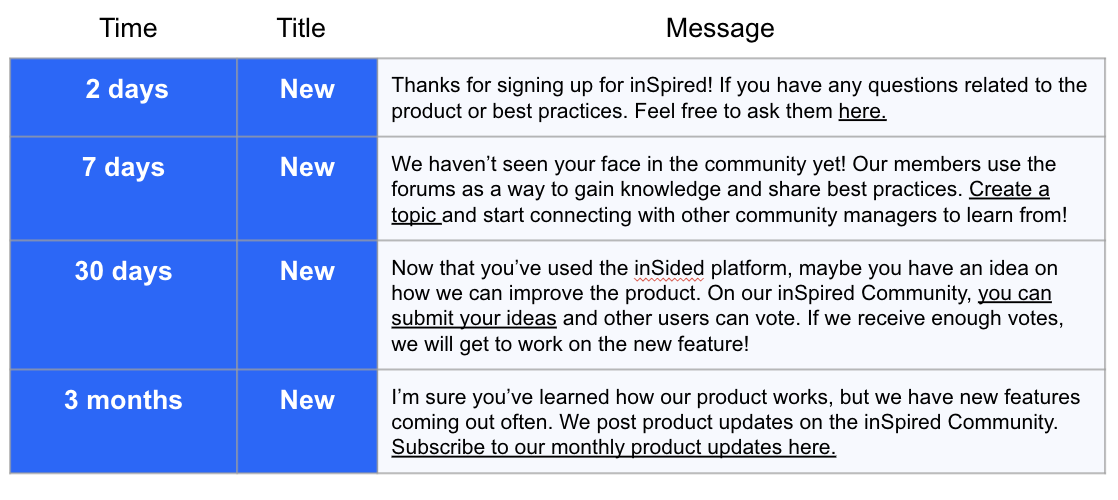
- Minimum age in seconds is important. set the seconds for 2 days, 7 days, 30 days, etc.
- “What happens when you get this rank?” Toggle on a private message that says the following:
@erin.brisson @Daniele Cmty
Would we be able to get a copy of these slides?
I’ve now attached the slides to this post.
On Sending engagement emails, have the community members opted into receiving these emails by default?
Can you please share the HTML for the one-click unsubscribe?
Here are instructions to add the one click unsubscribe button:
Any thoughts about hiding the content preview in the “New Reply” emails, in order to force the members to click on the button and open the community, which would make it more likely for them to actually engage and interact?
I feel like you could go either way; however, maybe a test would be best. Personally, I like to see the preview, but I may be more motivated to click into the link if I didn’t see the preview.
How are you targeting content to only inactive users?
I do this one of two ways:
- I use the Export Users tool and sort who has not created a topic or post yet.
- I use the SalesForce engagement Dashboard to tell me which customers have not logged into the platform this month/quarter.