Solved

How do you solve for multiple products with lack of filtering in Events?

  • November 25, 2025
  • 8 replies
  • 35 views

We just launched our community to the first of 5+ products: community.bonterratech.com 

as I am preparing the migrate content for our second product, I am examining how we can filter sections of the site that you cannot control the visibility for. 

For example, when a user from Product 1 logs in they will only see Community + Articles for Product 1 because I am able to set permissions at the Category level for Product 1 custom role. 

But, Events, Product Updates and Product Ideas do not allow for permission settings of certain content based on a custom role so I have to expose all of the content to all of the different product users. 

With 4+ event types and 5+ products on the same platform, I’m running into the issue of having a LONG list of event types because I am having to use the Product Name + Event Type to allow users to be able to sort to see what they need to see. Am I missing another way to do this? is there a way to filter/sort on Events based on a second layer of filters that I am not seeing somewhere? 

For product updates I am using Tags to help add additional sorting capabilities but I do not see a way to add tags to Events. 

Additionally, our onboarding consultant said that being able to set permissions for product updates and product ideas was coming. Has anybody heard about this yet? I would really love to be able to control who can post ideas for which product ideas board as I don’t want users from product 2 upvoting ideas for product 3. 

Best answer by atwhite

We have not fully solved for this either, but in our case we have a primary product and several secondary products. We have devoted Ideas and Product Updates to the primary product, and use role-specific forums for whatever we need for the other products. It’s not super sustainable, but for now it works for us. We are also looking forward to the pending updates. According to the Idea below, they’re targeting Q1 2026 for Ideas permissions. 

 

8 replies

atwhite
Forum|alt.badge.img+1
  • Helper ⭐️⭐️
  • Answer
  • November 25, 2025

We have not fully solved for this either, but in our case we have a primary product and several secondary products. We have devoted Ideas and Product Updates to the primary product, and use role-specific forums for whatever we need for the other products. It’s not super sustainable, but for now it works for us. We are also looking forward to the pending updates. According to the Idea below, they’re targeting Q1 2026 for Ideas permissions. 



  • Author
  • Contributor ⭐️
  • November 26, 2025

thanks ​@atwhite. Glad to see Q1 2026 for ideation permissions! 


judahs
  • Contributor ⭐️⭐️
  • December 9, 2025

@lizragland we are in this exact same situation as well. It’s very challenging for multi-product communities that Gainsight doesn’t extend any visibility controls to events.

My solution was to create a small front-end script that I added to the Third-Party Scripts area in Control. We just launched in September and implemented the event filtering this month

Basically, the script uses the inSidedData object (which is present on every page of the community) to identify the user’s roles--in our community those correspond to their product. The script then looks at the titles of all the events in the events list and classifies them depending on which product name it finds--this only works because we include the relevant product name in the title of our events. It then adds a style class to any events listed that does not match the product role of the user. 

If it doesn’t find a product name in the event title, then it does not filter it--this is important because we have many events that are product-agnostic or industry-related. It also checks the user’s role information to see if they are an internal user/employee, in which case it does not filter any events out--this is necessary because many of our internal community users support customers using multiple different products. And it also uses the inSidedData object to check what page the user is on, that way it only runs on the homepage (where we have the events widget) and the events page itself. 

It’s a band-aid solution for sure. But I really wish there was a “no code” solution for this out of the box. Happy to share the full script if you are interested.

There’s currently an open idea for this exact thing so you should definitely upvote if you haven’t yet:

Calendar and events to have user role-based restriction | Gainsight Community


atwhite
Forum|alt.badge.img+1
  • Helper ⭐️⭐️
  • December 10, 2025

@judahs That’s a really fascinating solution! We might be interested in doing something similar. We would have to apply new naming conventions to our events, but we’re in the process of rethinking our events strategy right now, so that’s good timing.

We’ve essentially done something similar with our custom navigation—performing a role check and then only displaying menu items for the spaces a user has permissions for (rather than having a bunch of links that go to error pages for them). This feels like a logical extension. I’d love to see the script if you can share. 


Alistair FIeld
Forum|alt.badge.img+4

An alternate idea for the events scenario is;

  1. create Hidden groups for each product
  2. Make your events for  specific product Group Events
  3. assign custom roles per product to each user
  4. secretly make these users members of the group for the correct product
  5. The events in the group they are added to will be visible in the events overview BUT not the events in the other product groups.

💡just an idea i thought of while reading this thread


Chris Hackett
Forum|alt.badge.img
  • Helper ⭐️⭐️⭐️
  • December 11, 2025

Hi ​@Alistair FIeld  - How are you doing #4 “secretly make these users members of the group for the correct product”? I know you can invite them but don’t know a way to add members to a group manually.


Alistair FIeld
Forum|alt.badge.img+4
  • Expert ⭐️
  • December 12, 2025

Hi ​@Alistair FIeld  - How are you doing #4 “secretly make these users members of the group for the correct product”? I know you can invite them but don’t know a way to add members to a group manually.

Morning ​@Chris Hackett 

Hmmm 🤔 Good spot. I said it was just an idea 💡😊

Back to the drawing board!


atwhite
Forum|alt.badge.img+1
  • Helper ⭐️⭐️
  • December 12, 2025

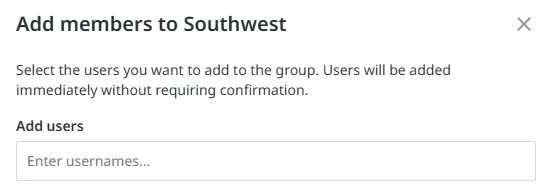
You can add members to a group via the group page in Control: 

But, they’re likely to receive an email about it, plus once they’ve been added, they’ll see the hidden group and have access to it. There’s nothing very “secret” about it. 😄

That said, though, group-specific events would definitely help in this case, and you could be very up-front about it. Depending on the level of interaction around a particular product, inviting users of that product into a closed or hidden group would allow for event segmentation AND focused conversation.