

DannyPancratz
VIP ⭐️⭐️⭐️⭐️⭐️
Jan 30, 2025 5:29 PM UTC
Solved

How to hide Notification Center for logged-out Users?

The new Notification Center is still visible when in a logged-out state. (It should not IMO and I’ve given that feedback in a support ticket related to a bug with it)
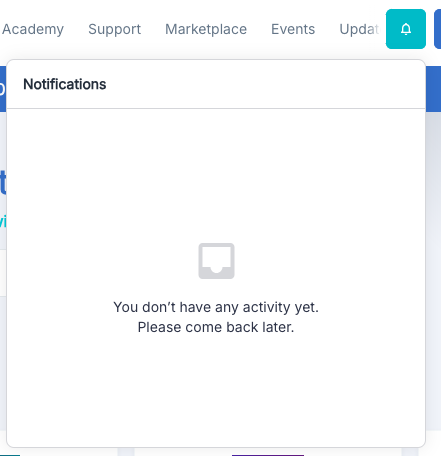
Empty Notification Center when logged-out
Also shows bug where NC covers up part of the menu in logged-out view


If anyone comes up with a Third Party Script or CSS to hide it for logged-out users only, please share. 

I’ve asked in my support ticket and will share here if they provide one. 

Yoeri
YoeriAnswer
Gainsight Employee ⭐️⭐️⭐️
Jan 30, 2025 6:24 PM UTC

That’s right Danny, the notification center should not appear for guests. We’ll look into it.

Group Product Manager, Customer Communities

3 replies

revote
VIP ⭐️⭐️⭐️⭐️⭐️
Jan 30, 2025 5:42 PM UTC

Oh no. I noticed this now when I saw this ticket.

Definitely this has to be a bug, NC cant be seen by the visitors.

Translate
DannyPancratz
VIP ⭐️⭐️⭐️⭐️⭐️
Jan 30, 2025 6:01 PM UTC

From my support ticket, this is CSS to hide the whole thing. It is not specific to logged-out users (for that you probably need a third party script to reference user data and identify guest users)


.notification-center { 
display: none;
}
Translate
FYI: I am no longer active in this community
Yoeri
YoeriAnswer
Gainsight Employee ⭐️⭐️⭐️
Jan 30, 2025 6:24 PM UTC

That’s right Danny, the notification center should not appear for guests. We’ll look into it.

Translate
Group Product Manager, Customer Communities