

Solved

How to remove the flags showing up in the language/translation button?

  • April 7, 2025
  • 8 replies
  • 77 views

jvdc
  • Helper ⭐️⭐️⭐️

Hey we would like to hide those flags that are essentially referring to countries in the language button.
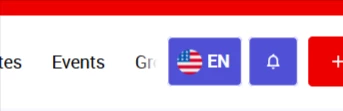
Has anyone been able to remove/hide them, in a clean way 😄?

Best answer by olimarrio

Hey ​@jvdc 👋,

Correct, this isn’t a bug 😅 - we are moving away from flag icons because:

  • Flags represent countries, not languages
  • Many languages span multiple regions
  • They introduce geopolitical and accessibility concerns at scale

For now, this change has only been made to those with Control access, so don’t remove the custom CSS you have in place yet. We’ll announce when this change is being rolled out to all community members beforehand.

8 replies

FMEEvangelist
  • Helper ⭐️⭐️
  • April 7, 2025

I think using CSS it would be something like this:

.language-selector img[alt="en"] {
display: none;
}

We did something similar to change the flag from US to Canada, so I’m 99% sure this is the part you need to turn off. 


Michał Świączkowski

@jvdc Just curious – what’s the reason behind wanting to hide the country flags in the language button? Is it more about the look & feel, or something else you’re aiming for? 😊


jvdc
  • Author
  • Helper ⭐️⭐️⭐️
  • April 8, 2025

Hey ​@Michał Świączkowski , thanks for asking. It is mainly because the country flags are then putting the focus a language on a specific country, which is irrelevant for many people of other countries. We have many users from countries in Africa where the spoken language is French, but having to select a French country flag for them can be awkward.

See what a I mean?


jvdc
  • Author
  • Helper ⭐️⭐️⭐️
  • April 30, 2025

Hey,

In order to also hide the flags in the dropdow, I  add to add a couple more lines, and then some lines to center everything.

/* Flags in language selector */
.language-selector img, .control-dropdown__item--with_image .dropdown-image {
display: none;
}
.main-navigation--language-switcher .language-selector {
width: auto;
padding: 0 10px;
}
.language-selector .selected .truncated {
margin-left: 0px;
}


Kenneth R
Forum|alt.badge.img+5
  • Expert ⭐️⭐️
  • May 1, 2025

Great that you found a solution ​@jvdc ! 


jvdc
  • Author
  • Helper ⭐️⭐️⭐️
  • February 4, 2026

Hey I see this has been done, correct?? (hopefully not a bug 😄)


olimarrio
Forum|alt.badge.img+5
  • Gainsight Employee ⭐️
  • Answer
  • February 4, 2026

Hey ​@jvdc 👋,

Correct, this isn’t a bug 😅 - we are moving away from flag icons because:

  • Flags represent countries, not languages
  • Many languages span multiple regions
  • They introduce geopolitical and accessibility concerns at scale

For now, this change has only been made to those with Control access, so don’t remove the custom CSS you have in place yet. We’ll announce when this change is being rolled out to all community members beforehand.


jvdc
  • Author
  • Helper ⭐️⭐️⭐️
  • February 4, 2026

@olimarrio ah thanks for the tip, I had already removed the CSS 😅