

nicksimard
Contributor ⭐️⭐️⭐️⭐️
February 26, 2021
Solved

Is it possible to change "product areas" in the Product Updates sidebar?

  • February 26, 2021
  • 3 replies
  • 73 views

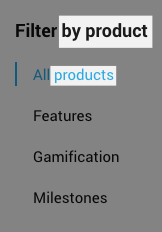
Hey team! In my staging site I see this in the Product Updates sidebar:
But on your site I see this:
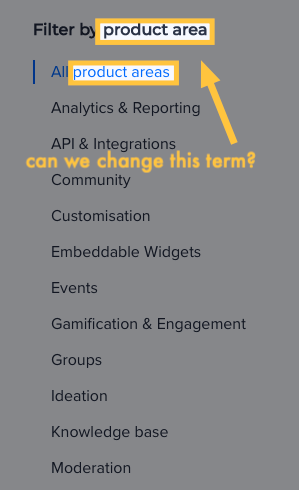
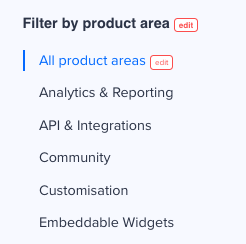
It appears you can modify what shows up there. Is it in Phrases, and if so can you tell me how I’d change this? We’re thinking of testing it out for Community-related updates first, which means it wouldn’t be product-related. Thanks!

Best answer by Shane1

@nicksimard if you click on the ‘phrases’ tool in the bottom right corner you will then be able to edit the ‘Product Area’ phrases


3 replies

nicksimard
Contributor ⭐️⭐️⭐️⭐️
March 2, 2021

Anyone got any tips here? I’d love to play with the product updates feature but specifically for Community-related updates, and using “Filter by product” and “All products” won’t make any sense there.

Thanks!

Come check out the Zapier Community (built with inSided) at https://community.zapier.com!
Shane1
Shane1Answer
Helper ⭐️⭐️⭐️
March 3, 2021

@nicksimard if you click on the ‘phrases’ tool in the bottom right corner you will then be able to edit the ‘Product Area’ phrases


nicksimard
Contributor ⭐️⭐️⭐️⭐️
March 3, 2021

Ahhhhh, yes! I always forget to click on that Phrases tool. Perfect — thanks :)

Come check out the Zapier Community (built with inSided) at https://community.zapier.com!