

[Advance notice] WYSIWYG Editor in the Community Frontend (Branded Templates)
Many of you mentioned at Innovation Lab and inSpired that it’s important for you to know in advance when a core update is coming, so you can prepare your community members for the change.
I’m delighted to announce that we’ll be releasing the WYSIWYG editornext Thursday (30 November) very soon, pending us fixing some last-minute critical bugs. It’ll be available in the front end of all communities on Branded Templates.
If you want some boilerplate to use to inform your community about exactly what’s coming, I’ve written a brief explainer (credit to@Mathis for this suggestion at Innovation Lab - we’ll try to create these for all core updates that you'll want to inform your users about):
START
--------------
New editor for writing posts
In the new editor, you can see what your post will look like whilst you’re writing it, so there’ll be no more formatting surprises.
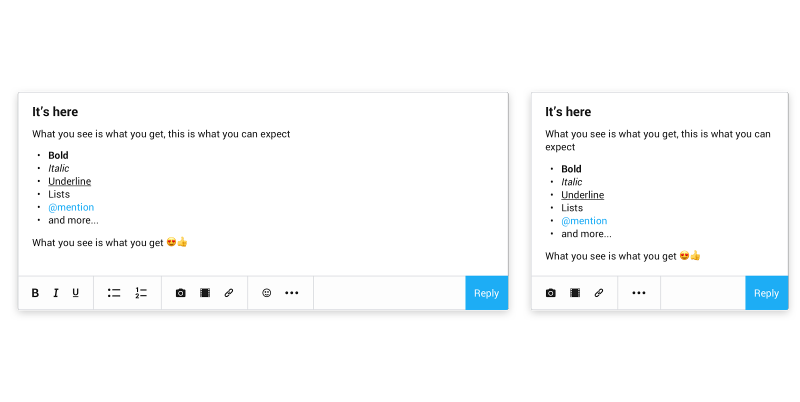
That means that as you type you’ll be able to see your images, emoji, @mentions, embedded videos, links, lists, spoilers, quotes, and text formatting. What you see is what you get 😁 !
The new editor adapts based on what you’re doing on the community - creating a topic, writing a reply, or sending a private message - so you always have useful editing options at your fingertips.
BBCode is still supported, so although certain editing options aren’t available through the new editor’s interface (like colours and strikethrough), they’ll still work if you use BBCode markup in your posts.
We hope you’ll find the new editor really enjoyable and we’re looking forward to seeing your beautifully formatted posts!
--------------
END
What are the next priorities to deliver for the WYSIWYG editor?
- Available in the Control environment (including @mentions!)
- Attach images in private messages
We'd be happy to hear your feedback or answer any questions, so shoot if you've got something on your mind.
I’m delighted to announce that we’ll be releasing the WYSIWYG editor
If you want some boilerplate to use to inform your community about exactly what’s coming, I’ve written a brief explainer (credit to
START
--------------
New editor for writing posts
In the new editor, you can see what your post will look like whilst you’re writing it, so there’ll be no more formatting surprises.
That means that as you type you’ll be able to see your images, emoji, @mentions, embedded videos, links, lists, spoilers, quotes, and text formatting. What you see is what you get 😁 !
The new editor adapts based on what you’re doing on the community - creating a topic, writing a reply, or sending a private message - so you always have useful editing options at your fingertips.
BBCode is still supported, so although certain editing options aren’t available through the new editor’s interface (like colours and strikethrough), they’ll still work if you use BBCode markup in your posts.
We hope you’ll find the new editor really enjoyable and we’re looking forward to seeing your beautifully formatted posts!
--------------
END
What are the next priorities to deliver for the WYSIWYG editor?
- Available in the Control environment (including @mentions!)
- Attach images in private messages
We'd be happy to hear your feedback or answer any questions, so shoot if you've got something on your mind.