Hey @nuts 👋🏻 Good callout that the documentation is not up-to-date, as it’s referencing the old admin interface where Cockpit configuration was under Administration → Calls to Action (CTAs)
How to add a new reporting category when creating a new CTA Type
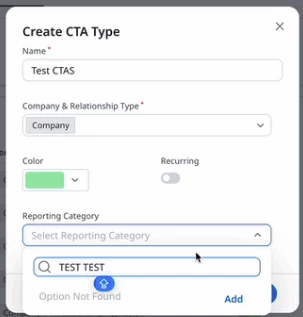
When creating a new CTA type (Administration → Cockpit + “Create CTA Type” button), you are able to type in the name of the reporting category you’d like to use. If the category does not exist, you will see “Option Not Found” appear & a button to “Add” a new type (image below)
How to modify an existing reporting category
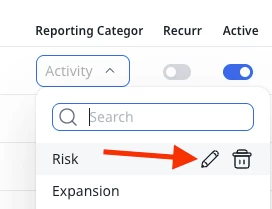
To modify an existing category, navigate to Administration → Cockpit, click on any CTA Type’s “reporting category” field to make the dropdown options appear, and hover over the option you’d like to change. A pencil icon will appear, allowing you to modify the existing option.
NOT POSSIBLE: How to create a new reporting category WITHOUT creating a new CTA Type
I am currently checking with Gainsight support on this. I do not see any option to do this in the new interface 👀 I will report back as soon as I have more information.
UPDATE: Just verified with support that you cannot currently create a new reporting category without creating a new CTA Type. I created a new idea to get reinstating this functionality on the product team’s radar. Please feel free to jump in over there if you have more context to add! 😊
Hey @nuts 👋🏻 Good callout that the documentation is not up-to-date, as it’s referencing the old admin interface where Cockpit configuration was under Administration → Calls to Action (CTAs)
How to add a new reporting category when creating a new CTA Type
When creating a new CTA type (Administration → Cockpit + “Create CTA Type” button), you are able to type in the name of the reporting category you’d like to use. If the category does not exist, you will see “Option Not Found” appear & a button to “Add” a new type (image below)
How to modify an existing reporting category
To modify an existing category, navigate to Administration → Cockpit, click on any CTA Type’s “reporting category” field to make the dropdown options appear, and hover over the option you’d like to change. A pencil icon will appear, allowing you to modify the existing option.
NOT POSSIBLE: How to create a new reporting category WITHOUT creating a new CTA Type
I am currently checking with Gainsight support on this. I do not see any option to do this in the new interface 👀 I will report back as soon as I have more information.
UPDATE: Just verified with support that you cannot currently create a new reporting category without creating a new CTA Type. I created a new idea to get reinstating this functionality on the product team’s radar. Please feel free to jump in over there if you have more context to add! 😊
Hi @jenlpro , Sorry for the delayed reply, and thank you so much for your detailed guidance. It was exactly what I needed. I was able to resolve the issue by creating a new CTA Type and adding the reporting category from there, and everything is working as expected now.
Thanks again for taking the time to clarify this (especially the note about the documentation being outdated)!
If you ever had a profile with us, there's no need to create another one. Don't worry if your email address has since changed, or you can't remember your login, just let us know at community@gainsight.com and we'll help you get started from where you left.
Else, please continue with the registration below.