
Contributor ⭐️
November 16, 2021
Question

Gainsight Assist Error

  • November 16, 2021
  • 15 replies
  • 997 views

Hello,

When I try to use Gainsight Assist in my Outlook app, it shows me an error under the “Log Email to Timeline” option that says “Something went wrong! Please try again.”
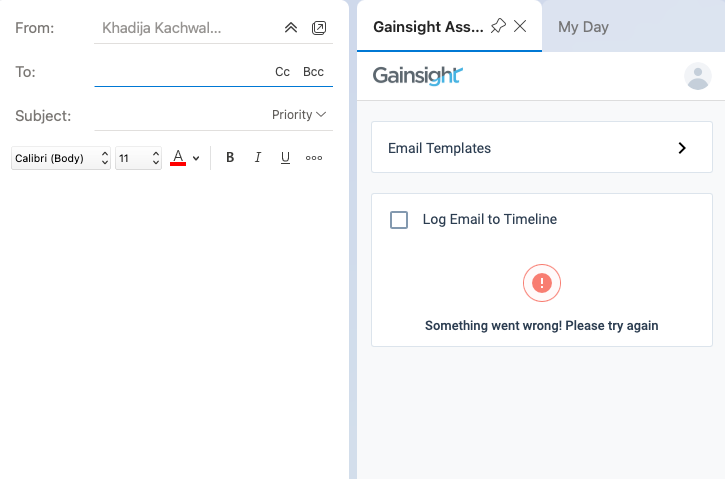
This is the New Outlook app on Mac. Any ideas?

I’ve tried to remove and reinstall the ass in as well as close and reopen the Outlook app.

15 replies

justine_billante
Contributor ⭐️
February 8, 2022

Has anybody found a solution yet?

I’ve had two users come to me with this issue over the last two weeks. (We use Outlook.) For the first user, the problem seemed to resolve on its own after a couple of days. The second user only started having issues today and so far it hasn’t stopped.

Both signed out of & logged back into the add-in, then removed and re-added the add-in, and the error was still there.

kdamera
Gainsight Employee ⭐️
February 10, 2022

Hello @khadija.k Could you please provide us with your preferred time slots so that we can schedule a call and assist you further? I have also created a ticket on your behalf for tracking purposes.


Thanks, 

Kiran D

L1 Support

Kiran Damera
Contributor ⭐️
February 17, 2022

We are experiencing the same issue but on a PC. 

Contributor ⭐️⭐️⭐️⭐️
February 24, 2022

We experience that issue when using a shared mailbox and were told to create that shared box as a user.

jlibbee
Contributor ⭐️
March 21, 2025

Update: I figured it out. We didn’t have the proper configs turned on.

My team is new to Gainsight, and we are seeing it as well on both PC and MAC. There is a pop up error that disappears quickly that mentions BCC config. But we don’t have anyone in the BCC field selected. Are others seeing this as well? Any ideas on how to correct this?