

Ester.Memoli
Helper ⭐️
January 15, 2021
Solved

How to edit the columns shown in breakdown table

  • January 15, 2021
  • 14 replies
  • 474 views

Hi everyone,

I searched in existing posts and documentation but failed to find an answer, so here I am :)

Do you know a way to edit which columns are shown in a breakdown table? To clarify: in a dashboard I’ve added a widget created in a report that simply does a COUNT of the Success Plans we have in place.

When I click on the widget it shows me automatically the customer name and the success plan name. A colleague asked me to show also the CSM name assigned to that customers, but I didn’t find a way to add an additional column.
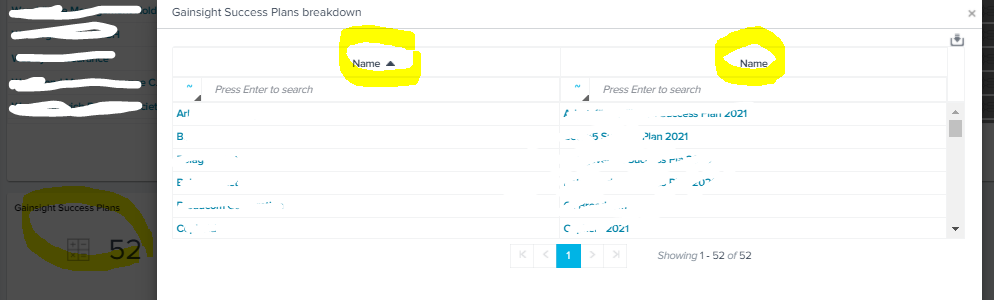
Any idea? Thanks!!

 

Best answer by heather_hansen

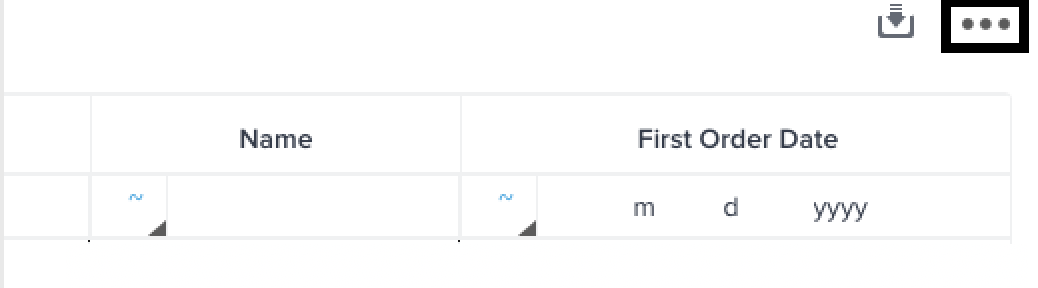
@Ester.Memoli When you are in report builder, you should be able to click on the widget, and then, in the top right of the pop up, you should see 3 dots that you can click to add additional fields into that drill down.


14 replies

bradley
Expert ⭐️
January 22, 2021

@rakesh That is handier for sure, thank you! Is it an on or off toggle for everyone, or can it be changed by permission group, similar to dashboard visibility?

rakesh
Gainsight Employee ⭐️
Lets put your data to work!
January 29, 2021

@rakesh That is handier for sure, thank you! Is it an on or off toggle for everyone, or can it be changed by permission group, similar to dashboard visibility?

On and Off toggle in settings.

bradley
Expert ⭐️
January 29, 2021

@rakesh That is handier for sure, thank you! Is it an on or off toggle for everyone, or can it be changed by permission group, similar to dashboard visibility?

On and Off toggle in settings.

@rakesh  Do I need to make a separate request to have the ability to change this based on the permission group? :)

rakesh
Gainsight Employee ⭐️
Lets put your data to work!
February 3, 2021

Yes @bradley,

But I’d wait till horizon reporting is launched before picking this up.