
Julian
Gainsight Employee ⭐️⭐️⭐️
December 29, 2017

The first Analytics Dashboard is live!

  • December 29, 2017
  • 19 replies
  • 593 views
Hi all!

As we want to leave this year with a bang, we just have released our very first Analytics Dashboard for all of you! :)

You are able to find it in the Analytics section of your control environment:
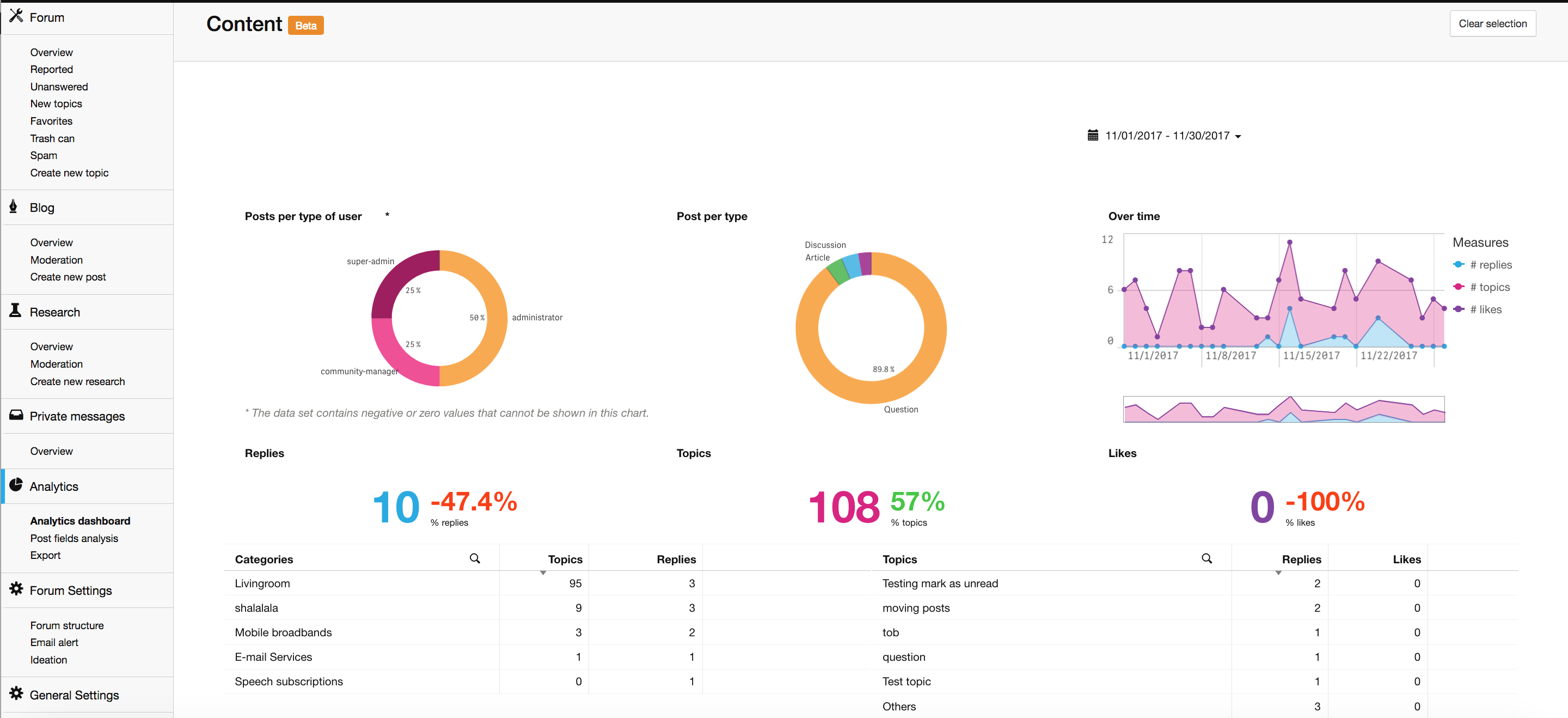

Some communities are still in the process of synchronizing the data base, so if you encounter issues accessing the dashboard, then this probably can be explained by that.

This first release is very important to us, now the ground work has been done to release more dashboards in the upcoming months. We already received quite innovative ideas for future dashboards, please keep providing us with your awesome feedback!

As we plan to move all exports to this new page at a later stage, maybe you can also share your current cases for doing exports? This way we can optimize our plans to deliver the best experience possible!

Please note: You might get a login-prompt when you click on the dashboard. You can simply abort it, you don't need to log in. ;)

If there should be any issues while using the dashboard, then simply reload the page. That will do the trick in most of the cases. Should you encounter anything that looks like a bug to you, please inform my colleagues from support!

Of course I am excited to hear your thoughts on this! If you should have questions, I will do my very best to answer them. ;)

Last but not least, I want to wish all of you a joyful ending of this year and an awesome start in 2018!

Cheers,

Julian

19 replies

Jurgen
Helper ⭐️
February 9, 2018

I lost the URL, unfortunately :/No worries, that should do the trick (it worked for me...): https://XXXX/analytics/activity#tab/day

Edit: Just saw that the data could be missing... it might be that @maikbrox disconnected it?

Edit2: Ok I have found out that there is a current issue causing this. It should be fixed soon. :)


Will the old statistics be gone forever? 😞
Julian
JulianAuthor
Gainsight Employee ⭐️⭐️⭐️
February 9, 2018
Hi Jurgen!

I have spoken with my colleague about this topic. Basically, he said that fixing this would be a rather time-consuming task to do, and the team would rather spend their energy on improving the existing dashboard. That is unfortunate, however I understand the reasoning behind it.

We also discussed your specific use case:

In the old dashboard, I could look at the replies, topics and likes trends seperately. This is useful, because the relatively high amount of replies make topics and likes trend really hard to discern. Since you're going to be refining and extending the dashboards for the coming months: is there any way to reach the old dashboard right now?


Is this the main reason that you'd like to continue using the old dashboard? Because we are looking into improving the new dashboard, so that you can filter for likes, topics and replies seperately...
I follow my nose, it always knows
Jurgen
Helper ⭐️
February 9, 2018
What a bummer, but it's fine if they're for working on adding it to the new dashboard.
It's gripe 1 on my top 3 of gripes about the new dashboard 🙂 Here's my complete top 3.

Gripe 1
Old dashboard: ability to filter likes, topics and replies
New dashboard: no ability to filter likes, topics and replies

Gripe 2
Old dashboard: a complete list of topics that you can sort by up to 6 axes (topic, forum, comments, unique users, topic start, last active)
New dashboard: a top 5 of topics that you can sort by 2 axes (replies and likes)

Gripe 3
Old dashboard: a nice responsive amount of screen real estate for the overview and summary
New dashboard: a tiny amount of screen real estate for 'Over time' and the titleless tables.
Ditte
Helper ⭐️⭐️
February 10, 2018
What a bummer, but it's fine if they're for working on adding it to the new dashboard.
It's gripe 1 on my top 3 of gripes about the new dashboard 🙂 Here's my complete top 3.

Gripe 1
Old dashboard: ability to filter likes, topics and replies
New dashboard: no ability to filter likes, topics and replies

Gripe 2
Old dashboard: a complete list of topics that you can sort by up to 6 axes (topic, forum, comments, unique users, topic start, last active)
New dashboard: a top 5 of topics that you can sort by 2 axes (replies and likes)

Gripe 3
Old dashboard: a nice responsive amount of screen real estate for the overview and summary
New dashboard: a tiny amount of screen real estate for 'Over time' and the titleless tables.

Completely agree with @Jurgen on the above points. In particular I'm missing Unique Users, and a good daily overview of topics and comments.
Currently rocking the Sonos Communities
Yoeri
Gainsight Employee ⭐️⭐️⭐️
February 12, 2018
Hey, thanks for your feedback.

One of the things we're looking into is having detailed table views. In these tables you will have more in-depth information on activity on topics and categories. I've attached a work-in-progress mockup of how it could look like and what information to display. Would like to hear your thoughts on it: which information would you like to see and why?
Group Product Manager, Customer Communities
Jurgen
Helper ⭐️
February 12, 2018
Nice mockup. It would probably be nicest if it this dashboard would work like an advanced topic filter featuring “Columns to display”. But if I had to vote:

Must haves
Topic
Forum*
Replies
Views

Should haves
Likes
Unique users

Could haves
Topic start
Last active
Type
User role
Category

*Not featured in mockup

Use cases:
  • Topic and forum are important to identify the topics and their location.
  • Replies, views, likes and unique users enable users to rank the best performing topics in a certain time period.
  • The ‘could haves’ would be more suitable as filters than as axes. They'd enable users to zoom in on the performance of a certain type of topic, category, et cetera.
Ditte
Helper ⭐️⭐️
February 15, 2018
Due to quite a bit of spam, we've received a fair amount of "reported posts" from specific users. I've noticed that the topics table calculates the topic title and not the topic ID, therefore 2 out of 5 of our "top replies" topics are ' (username) has reported a post'.
Could you please consider using the topic ID for these tables so we receive accurate numbers? Or at least make it a toggle so we can chose :)

Best,
Ditte
Currently rocking the Sonos Communities
Julian
JulianAuthor
Gainsight Employee ⭐️⭐️⭐️
February 15, 2018
Hi all,

very good feedback, thanks a bunch for sharing it with us! We will try to improve the current Dashboard so that it will reflect your suggestions.

@Ditte I see what you mean! I think we simply have to remove the subforum from the calculation, where these topics are being published... that should do the trick. 🙂 If we switch it over to topic ID, it might not work because then the list probably would display only the topic ID instead, which has no added value... I will make sure that this is being refined as soon as possible.

Edit: I assume you would also don't mind to have the "Moderator Forum" removed from the category table then?
I follow my nose, it always knows
Ditte
Helper ⭐️⭐️
February 15, 2018
Thanks, @Julian ! Correct: I won't mind any "non public" boards to be removed. (That includes superuser area).

Best,
Ditte
Currently rocking the Sonos Communities